
contour — Create contour line plots in MATLAB and RunMat.
contour creates contour line plots from scalar fields using implicit or explicit coordinates, explicit levels, and a supported subset of contour appearance properties. RunMat returns an opaque contour handle; MATLAB's contour-matrix first output and two-output [M, c] form remain graphics-representation gaps.
Syntax
h = contour(Z)
h = contour(Z, N)
h = contour(Z, V)
h = contour(Z, Name, Value, ...)
h = contour(Z, V, Name, Value, ...)
h = contour(X, Y, Z)
All supported contour forms
h = contour(Z)
h = contour(Z, N)
h = contour(Z, V)
h = contour(Z, Name, Value, ...)
h = contour(Z, V, Name, Value, ...)
h = contour(X, Y, Z)
h = contour(X, Y, Z, N)
h = contour(X, Y, Z, V)
h = contour(X, Y, Z, V, Name, Value, ...)
h = contour(X, Y, Z, N, Name, Value, ...)
h = contour(ax, ...)
Inputs
| Name | Type | Required | Default | Description |
|---|---|---|---|---|
Z | NumericArray | Yes | — | Contour height grid. |
N | NumericScalar | Yes | — | Requested contour level count. |
V | NumericArray | Yes | — | Explicit contour level values. |
props | Any | Variadic | — | Name/value contour options. |
V | Any | Yes | — | Contour level count/value vector. |
X | NumericArray | Yes | — | X coordinate vector matching Z columns or meshgrid matrix matching Z. |
Y | NumericArray | Yes | — | Y coordinate vector matching Z rows or meshgrid matrix matching Z. |
ax | Any | Yes | — | Target axes object. |
args | Any | Variadic | — | Any supported contour data, level, line-specification, and property arguments. |
Returns
| Name | Type | Description |
|---|---|---|
h | NumericScalar | Handle to contour line plot. |
Errors
| Identifier | When | Message |
|---|---|---|
RunMat:contour:InvalidArgument | Contour input arrays, level arguments, or name/value options are invalid. | contour: invalid argument |
RunMat:contour:Internal | Internal contour render preparation fails unexpectedly. | contour: internal operation failed |
How contour works
contour(Z)uses implicit axes, whilecontour(X, Y, Z)accepts strictly monotonic coordinate vectors or meshgrid-style matrices andcontour(ax, ...)selects an existing axes target.- All eight built-in integer classes are accepted for
X,Y,Z, positional level counts/vectors,LevelList,LevelStep, andLineWidth; integer shape, distinctness, meshgrid identity, ordering, count, and scalar constraints are validated from authoritative storage before floating graphics conversion. - A scalar level argument is a positive requested level count bounded by RunMat's one-million-level materialization guard; a vector is an explicit monotonically increasing level list, and
[k k]requests one level atk. - Contour state is subplot-local and composes naturally with
colormap,colorbar, and surface/composite builtins. - The public compatibility surface accepts GPU arrays but performs contour plotting on the client. RunMat preserves that behavior for resident integers through exact owning-provider gather and additionally accelerates eligible floating
Zgrids through the shared WGPU plotting context.
Options
'LevelList'accepts an explicit monotonically increasing vector of contour values; RunMat also accepts'Levels'as an alias.'LevelStep'accepts a positive finite scalar spacing, and'LineWidth'accepts a positive finite scalar width.'LineColor'accepts color strings, RGB triples, and'auto','flat', or'none'. Typed-integer RGB triples containing only exact 0/1 channels are a separately gated RunMat extension because the public RGB contract does not explicitly advertise integer classes.- The broader Contour property surface, including label-generation properties,
EdgeColor,FaceColor, alpha controls, and post-construction typedXData/YData/ZDatamutation, remains a general graphics-property coverage gap.
Examples
Create a contour line plot from a scalar field
[X, Y] = meshgrid(-2:0.25:2, -2:0.25:2);
Z = X .* exp(-X.^2 - Y.^2);
contour(X, Y, Z);
Use explicit contour levels
[X, Y] = meshgrid(-2:0.25:2, -2:0.25:2);
Z = X .* exp(-X.^2 - Y.^2);
contour(X, Y, Z, [0 0.25 0.5]);
Inspect the returned contour handle
[X, Y] = meshgrid(1:20, 1:20);
Z = X + Y;
h = contour(X, Y, Z);
get(h, 'Type')
Expected output:
ans =
    'contour'
Temperature-style level sets
[X, Y] = meshgrid(linspace(-3, 3, 120), linspace(-3, 3, 120));
Z = 2*exp(-((X-1).^2 + Y.^2)) + 1.5*exp(-((X+1.5).^2 + (Y-1).^2)) - exp(-(X.^2 + (Y+1.5).^2));

contour(X, Y, Z, 20);
colormap('turbo');
colorbar;
title('Thermal Field — Level Sets');
xlabel('x (m)');
ylabel('y (m)');
axis equal;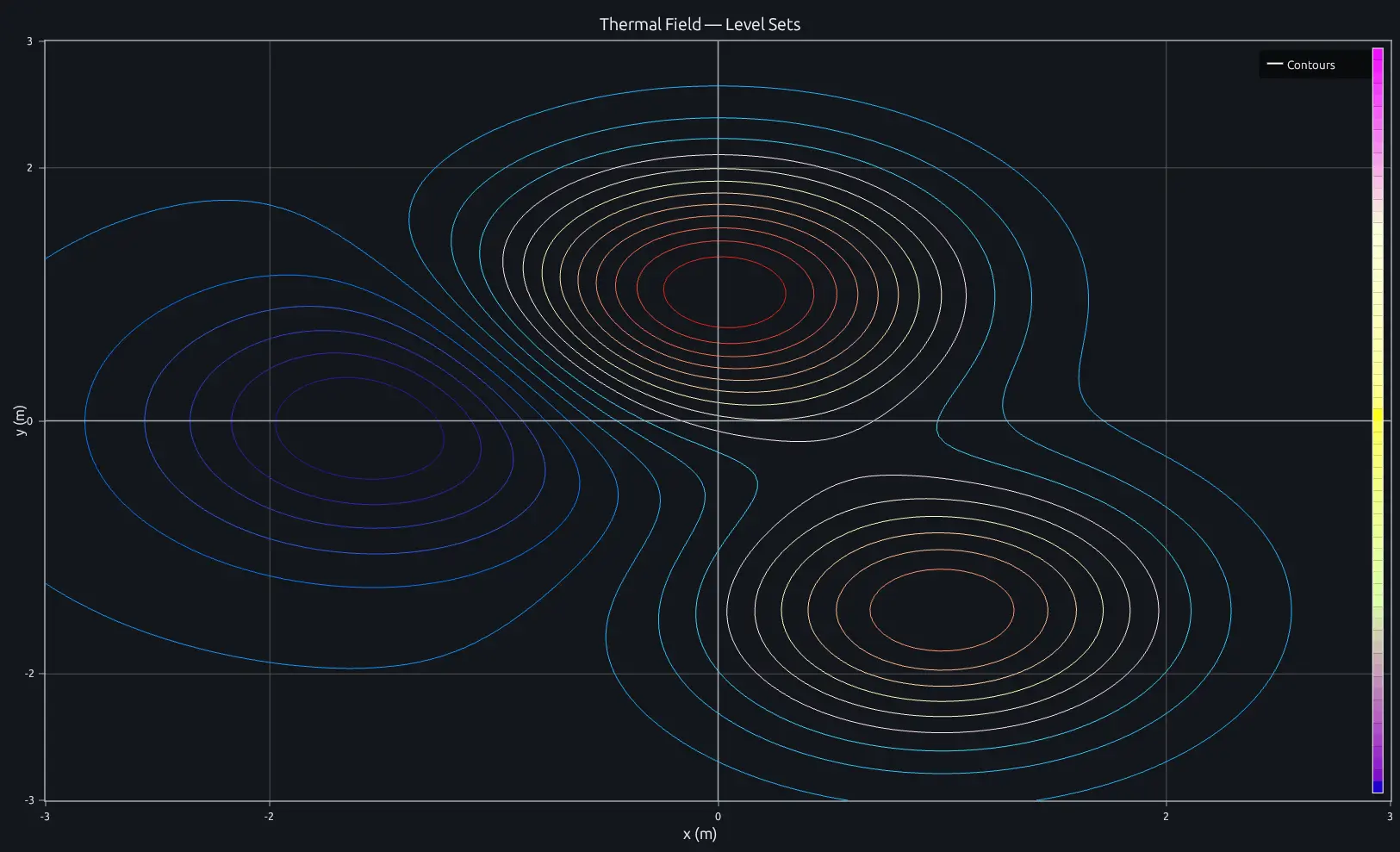
Compare this result with other chart types in the MATLAB Plot Gallery.
Using contour with coding agents
Open a RunMat example with live inputs, then ask the agent to explain how contour changes the result.
Run a small contour example, explain the result, then change one input and compare the output.
FAQ
How do I set specific contour levels?⌄
Pass a vector of values as the fourth argument. Each value becomes one contour line.
contour(X, Y, Z, [0.1 0.3 0.5 0.7 0.9]);If you pass a scalar instead, it's interpreted as the number of levels (e.g., contour(X, Y, Z, 20) draws 20 automatically spaced levels).
Can I add labels to the contour lines?⌄
MATLAB supports contour labels through clabel and contour label properties. RunMat's current contour object does not yet implement that broader label-generation surface.
What's the difference between contour and contourf?⌄
contour draws line-only iso-curves — the regions between lines are transparent. contourf fills those regions with colors from the active colormap. Use contour when you want to overlay on other plots or keep the background visible, and contourf when the filled color bands are the primary visualization.
Related Plotting functions
2D Charts
area · bar · errorbar · heatmap · hist · histogram · loglog · pie · plot · scatter · semilogx · semilogy · stairs · stem
Other
addpoints · ancestor · animatedline · axes · barh · caxis · cla · clf · clim · colorcube · colororder · copyobj · daspect · datacursormode · dataTipTextRow · fcontour · figure · fill · fill3 · findobj · fsurf · gobjects · groot · hgload · hgsave · hidden · histogram2 · hold · line · linkaxes · openfig · opengl · pan · parula · patch · plotmatrix · plotyy · polarhistogram · polarplot · polarscatter · print · quiver3 · ribbon · saveas · savefig · sphere · stackedplot · subtitle · suptitle · text · textscatter · textscatter3 · triplot · waitbar · wordcloud · xlabel · xlim · xline · xscale · xtickangle · xtickformat · xticklabels · xticks · ylabel · ylim · yline · yscale · ytickangle · ytickformat · yticklabels · yticks · zlim · zoom
More plotting resources
Open-source implementation
Unlike proprietary runtimes, every RunMat function is open-source. Read exactly how contour is executed, line by line, in Rust.
- View the source for contour in Rust on GitHub
- Learn how the RunMat runtime works
- Found a bug? Open an issue with a minimal reproduction.
About RunMat
RunMat is an open-source runtime that executes MATLAB-syntax code blazing on any GPU. It is licensed under the Apache 2.0 license.
- RunMat automatically optimizes your math for GPU execution on Apple, Nvidia, and AMD hardware. No code changes needed. Simulations that took hours now take minutes.
- Start running code in seconds. RunMat runs in the browser, on the desktop, or from the CLI. No license server, no IT ticket.