
plot — Create 2-D line plots in MATLAB and RunMat.
plot creates 2-D line charts from plot(y), plot(x, y), and multi-series call forms. Returned handle behavior and plotting-property integration follow MATLAB semantics.
Syntax
h = plot(Y)
h = plot(Y, LineSpec)
h = plot(Y, Name, Value, ...)
h = plot(X, Y)
h = plot(X, Y, LineSpec)
h = plot(X, Y, Name, Value, ...)
All supported plot forms
h = plot(Y)
h = plot(Y, LineSpec)
h = plot(Y, Name, Value, ...)
h = plot(X, Y)
h = plot(X, Y, LineSpec)
h = plot(X, Y, Name, Value, ...)
h = plot(ax, Y)
h = plot(ax, X, Y)
h = plot(ax, X, Y, LineSpec)
h = plot(ax, X, Y, Name, Value, ...)
h = plot(X1, Y1, ..., Xn, Yn)
h = plot(ax, X1, Y1, ..., Xn, Yn)
Inputs
| Name | Type | Required | Default | Description |
|---|---|---|---|---|
Y | NumericArray | Yes | — | Y data; X defaults to 1:numel(Y). |
lineSpec | StyleSpec | Yes | — | Line style/color shorthand. |
props | Any | Variadic | — | Name/value style properties. |
X | NumericArray | Yes | — | X data. |
Y | NumericArray | Yes | — | Y data. |
ax | AxesHandle | Yes | — | Target axes handle. |
series | Any | Variadic | — | Interleaved X/Y series pairs with optional per-series style tokens. |
Returns
| Name | Type | Description |
|---|---|---|
h | NumericScalar | Handle to the first line object in the rendered plot series. |
Errors
| Identifier | When | Message |
|---|---|---|
RunMat:plot:InvalidArgument | Input data, series grammar, axes targeting, or style arguments are invalid. | plot: invalid argument |
RunMat:plot:Internal | Internal line construction or rendering fails unexpectedly. | plot: internal operation failed |
How plot works
plot(y)uses1:nas the implicit x-axis, matching MATLAB shorthand behavior.plot(x, y)requires the same element count in both inputs. Row and column vectors are both accepted.- Multiple data pairs in one call create multiple line objects and return the handle for the first created series, matching common MATLAB plotting conventions.
- The returned handle works with
getandset, so line color, width, display names, and marker properties can be inspected or updated after plotting. - Plotting is subplot-local. If the active axes come from
subplot, the line is attached to that subplot rather than globally mutating every axes in the figure. - RunMat treats
plotas a rendering sink: fusion stops at the builtin, but GPU residency is preserved on the happy path when the shared plotting device is installed.
Options
- Style strings like
'-','--',':','o','x', and combined forms such as'r--o'are accepted in MATLAB-style plot calls, including per-series forms such asplot(x1,y1,'r',x2,y2,'b'). - Name/value property updates can be supplied inline or applied after plotting through
set(h, ...), wherehis the returned line handle. Inline line-spec tokens may appear before or after name/value pairs for a series. HandleVisibilityaccepts'on','off', and'callback';'off'keeps the line visible but removes it from automatic legend entries.- Display names set during or after plotting are used by
legendwhen labels are not passed explicitly.
Does RunMat run plot on the GPU?
On the GPU happy path, RunMat reuses exported plot input buffers and emits renderer-ready line geometry without a full host round-trip.
Marker-heavy or otherwise unsupported combinations can fall back to host materialization while preserving the same visible result and handle semantics.
GPU memory and residency
plot preserves GPU residency when the plotting context can consume exported GPU buffers directly. If the active plotting path cannot use the input buffers, RunMat gathers once before rendering while keeping the resulting figure semantics unchanged.
Examples
Plot paired x/y data as a basic line chart
x = linspace(0, 2*pi, 200);
y = sin(x);
h = plot(x, y);
Expected output:
% h is a numeric handle for the first line objectUse MATLAB-style y-only shorthand
samples = [1 4 2 5 3];
plot(samples);
Expected output:
% RunMat uses 1:length(samples) for the x-axisCreate multiple series and drive the legend from display names
x = linspace(0, 2*pi, 200);
h1 = plot(x, sin(x));
set(h1, 'DisplayName', 'sin(x)', 'LineWidth', 2);
hold on;
h2 = plot(x, cos(x));
set(h2, 'DisplayName', 'cos(x)');
legend;
Expected output:
% The legend uses the line DisplayName propertiesUse per-series LineSpec and line properties
x = 1:3;
y = [1 2 3];
plot(x, y, 'r', x, y + 1, 'b');
h = plot(x, y, 'LineWidth', 1.2, 'b', 'HandleVisibility', 'off');
Expected output:
% The first call creates red and blue series; h is visible but excluded from automatic legendsInspect and update a plotted line through handles
x = 0:0.1:1;
h = plot(x, x.^2);
get(h, 'Type')
set(h, 'Color', 'r', 'Marker', 'o', 'MarkerSize', 6);
Expected output:
ans =
    'line'
Damped oscillation with envelope
t = linspace(0, 4*pi, 500);
envelope = exp(-0.3*t);
signal = envelope .* sin(5*t);

h1 = plot(t, signal);
set(h1, 'DisplayName', 'Damped signal', 'LineWidth', 1.5);
hold on;
h2 = plot(t, envelope, '--');
set(h2, 'DisplayName', 'Envelope', 'LineWidth', 1.5, 'Color', [0.85 0.33 0.1]);
h3 = plot(t, -envelope, '--');
set(h3, 'DisplayName', '-Envelope', 'LineWidth', 1.5, 'Color', [0.85 0.33 0.1]);
hold off;

title('Damped Oscillation');
xlabel('Time (s)');
ylabel('Amplitude');
legend;
grid on;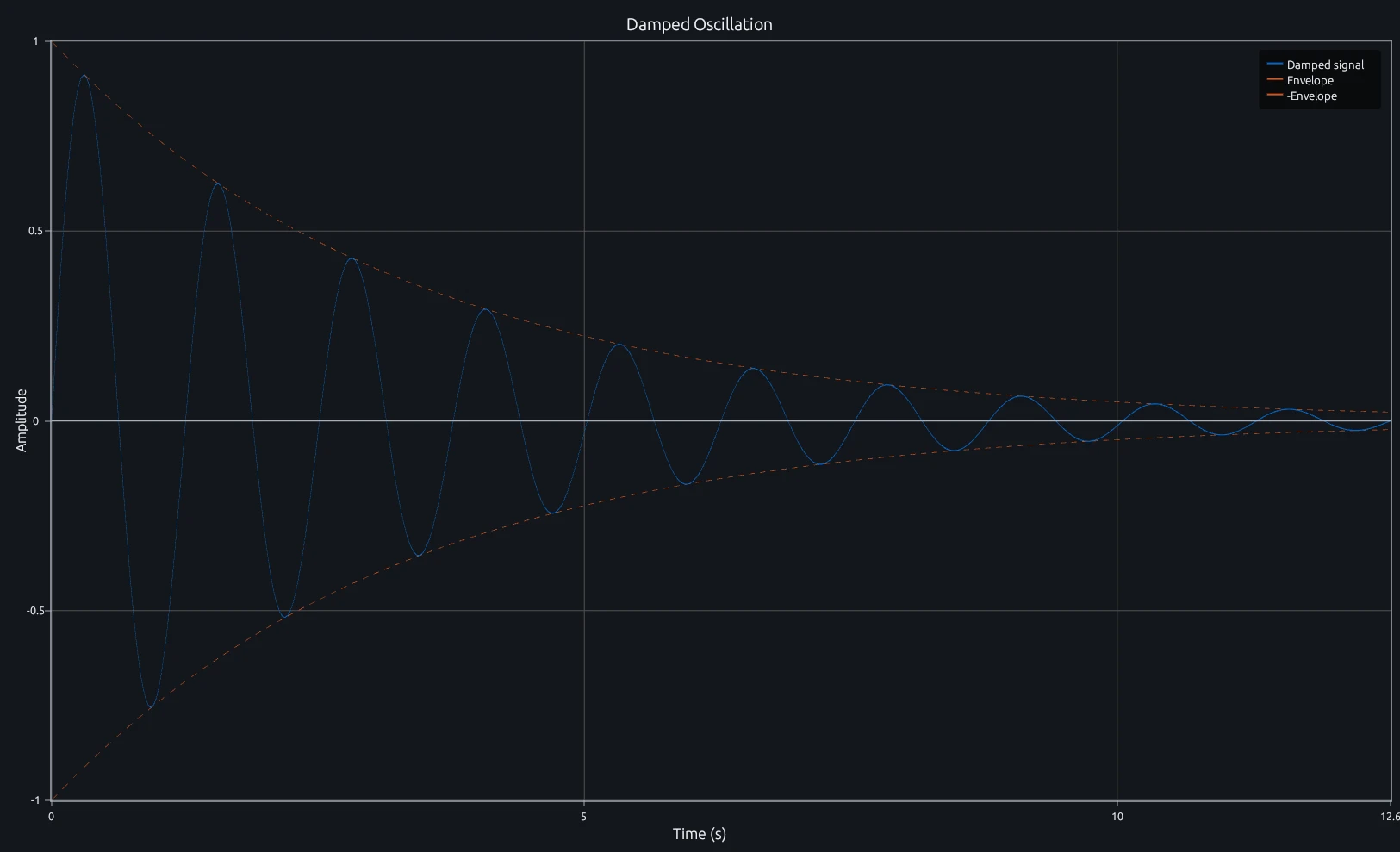
Compare this result with other chart types in the MATLAB Plot Gallery.
Using plot with coding agents
Open a RunMat example with live inputs, then ask the agent to explain how plot changes the result.
Run a small plot example, explain the result, then change one input and compare the output.
FAQ
How do I plot multiple series on the same axes?⌄
Call hold on between plot calls. Each subsequent plot adds a new line to the current axes instead of replacing the previous one.
x = linspace(0, 2*pi, 200);
plot(x, sin(x));
hold on;
plot(x, cos(x));
legend('sin', 'cos');
You can also pass multiple x/y pairs in a single plot call, e.g. plot(x, sin(x), x, cos(x)), though you lose per-series handle control that way.
What line styles and markers does plot accept?⌄
Style strings combine a color code, a line style, and a marker in any order. Line styles: '-' (solid), '--' (dashed), ':' (dotted), '-.' (dash-dot). Markers: 'o', 'x', '+', '*', 's' (square), 'd' (diamond), '^', 'v'. Colors: 'r', 'g', 'b', 'k', 'm', 'c', 'y'. For example, plot(x, y, 'r--o') draws a red dashed line with circle markers.
When should I use plot vs scatter?⌄
plot draws connected lines between points and is the right choice for continuous data or time-series. scatter draws unconnected markers and supports per-point size and color encoding through SizeData and CData. If you just want a line chart, use plot. If you need to encode a third variable via marker size or color, use scatter.
Related Plotting functions
2D Charts
area · bar · errorbar · heatmap · hist · histogram · loglog · pie · scatter · semilogx · semilogy · stairs · stem
Other
addpoints · ancestor · animatedline · axes · barh · caxis · cla · clf · clim · colorcube · colororder · copyobj · daspect · datacursormode · dataTipTextRow · fcontour · figure · fill · fill3 · findobj · fsurf · gobjects · groot · hgload · hgsave · hidden · histogram2 · hold · line · linkaxes · openfig · opengl · pan · parula · patch · plotmatrix · plotyy · polarhistogram · polarplot · polarscatter · print · quiver3 · ribbon · saveas · savefig · sphere · stackedplot · subtitle · suptitle · text · textscatter · textscatter3 · triplot · waitbar · wordcloud · xlabel · xlim · xline · xscale · xtickangle · xtickformat · xticklabels · xticks · ylabel · ylim · yline · yscale · ytickangle · ytickformat · yticklabels · yticks · zlim · zoom
More plotting resources
Open-source implementation
Unlike proprietary runtimes, every RunMat function is open-source. Read exactly how plot is executed, line by line, in Rust.
- View the source for plot in Rust on GitHub
- Learn how the RunMat runtime works
- Found a bug? Open an issue with a minimal reproduction.
About RunMat
RunMat is an open-source runtime that executes MATLAB-syntax code blazing on any GPU. It is licensed under the Apache 2.0 license.
- RunMat automatically optimizes your math for GPU execution on Apple, Nvidia, and AMD hardware. No code changes needed. Simulations that took hours now take minutes.
- Start running code in seconds. RunMat runs in the browser, on the desktop, or from the CLI. No license server, no IT ticket.