
scatter — Create 2-D scatter plots with marker size/color encodings using MATLAB-compatible scatter forms.
scatter creates 2-D marker plots from paired x/y coordinates and returns a graphics handle. It supports MATLAB-compatible argument forms for marker sizes, colors, fill mode, axes targeting, and name-value styling.
Syntax
h = scatter(X, Y)
h = scatter(X, Y, S)
h = scatter(X, Y, S, C)
h = scatter(X, Y, LineSpec)
h = scatter(X, Y, Name, Value, ...)
h = scatter(ax, X, Y)
All supported scatter forms
h = scatter(X, Y)
h = scatter(X, Y, S)
h = scatter(X, Y, S, C)
h = scatter(X, Y, LineSpec)
h = scatter(X, Y, Name, Value, ...)
h = scatter(ax, X, Y)
h = scatter(ax, X, Y, S)
h = scatter(ax, X, Y, S, C)
h = scatter(ax, X, Y, LineSpec)
h = scatter(ax, X, Y, Name, Value, ...)
Inputs
| Name | Type | Required | Default | Description |
|---|---|---|---|---|
X | NumericArray | Yes | — | X coordinates. |
Y | NumericArray | Yes | — | Y coordinates. |
S | NumericArray | Yes | — | Marker area specification. |
C | Any | Yes | — | Color specification (uniform, per-point scalar, or RGB matrix). |
lineSpec | StyleSpec | Yes | — | Marker/line style shorthand. |
props | Any | Variadic | — | Name/value marker style properties. |
ax | AxesHandle | Yes | — | Target axes handle. |
Returns
| Name | Type | Description |
|---|---|---|
h | NumericScalar | Handle to the rendered scatter plot. |
Errors
| Identifier | When | Message |
|---|---|---|
RunMat:scatter:InvalidArgument | Input data, axes targeting, or marker style arguments are invalid. | scatter: invalid argument |
RunMat:scatter:Internal | Internal scatter construction or rendering fails unexpectedly. | scatter: internal operation failed |
How scatter works
scatter(x, y)requires the same element count in both inputs.- The returned value is a scatter-handle object that can be inspected and updated through
getandset. - Marker size, marker face color, marker edge color, and display name all flow through the shared plotting handle model.
- Scatter plots integrate naturally with
subplotandlegend, so series labels and axes-local state stay scoped to the active axes. - GPU-resident point buffers can be rendered directly on the happy path; unsupported combinations fall back to host materialization while preserving the same visible result.
Does RunMat run scatter on the GPU?
The direct path keeps point buffers on the device and avoids an unnecessary host round-trip for supported scatter workflows.
Marker styling and legend/display-name behavior stay consistent across GPU and host fallback rendering.
GPU memory and residency
scatter preserves GPU residency when the plotting path can consume exported point buffers directly. If the active marker/style combination cannot use the direct path, RunMat gathers once and renders the same plot semantics on the fallback path.
Examples
Create a basic 2-D scatter plot
t = linspace(0, 2*pi, 100);
scatter(cos(t), sin(t));
Use marker sizing and color-style workflows
x = linspace(0, 1, 25);
y = x.^2;
h = scatter(x, y);
set(h, 'SizeData', 12, 'MarkerFaceColor', 'r', 'Marker', 'o');
Drive the legend from scatter object display names
x = 1:10;
h1 = scatter(x, x);
set(h1, 'DisplayName', 'linear');
hold on;
h2 = scatter(x, x.^2);
set(h2, 'DisplayName', 'quadratic');
legend;
Rendered scatter example
reference = 10:10:100;
run_a = [11.8 21.6 31.5 41.9 51.2 61.7 71.5 81.8 91.3 101.0];
run_b = [8.7 18.4 28.8 38.5 48.6 58.9 68.4 78.9 88.7 98.5];

scatter(reference, run_a, 90, [0.15 0.65 1.0], 'filled');
hold on;
scatter(reference, run_b, 90, [1.0 0.45 0.2], 'filled');
plot([10 100], [10 100], '--', 'LineWidth', 1.5);
hold off;
legend('Calibration run A', 'Calibration run B', 'Ideal response');
title('Calibration Repeatability');
xlabel('Reference value');
ylabel('Measured value');
grid on;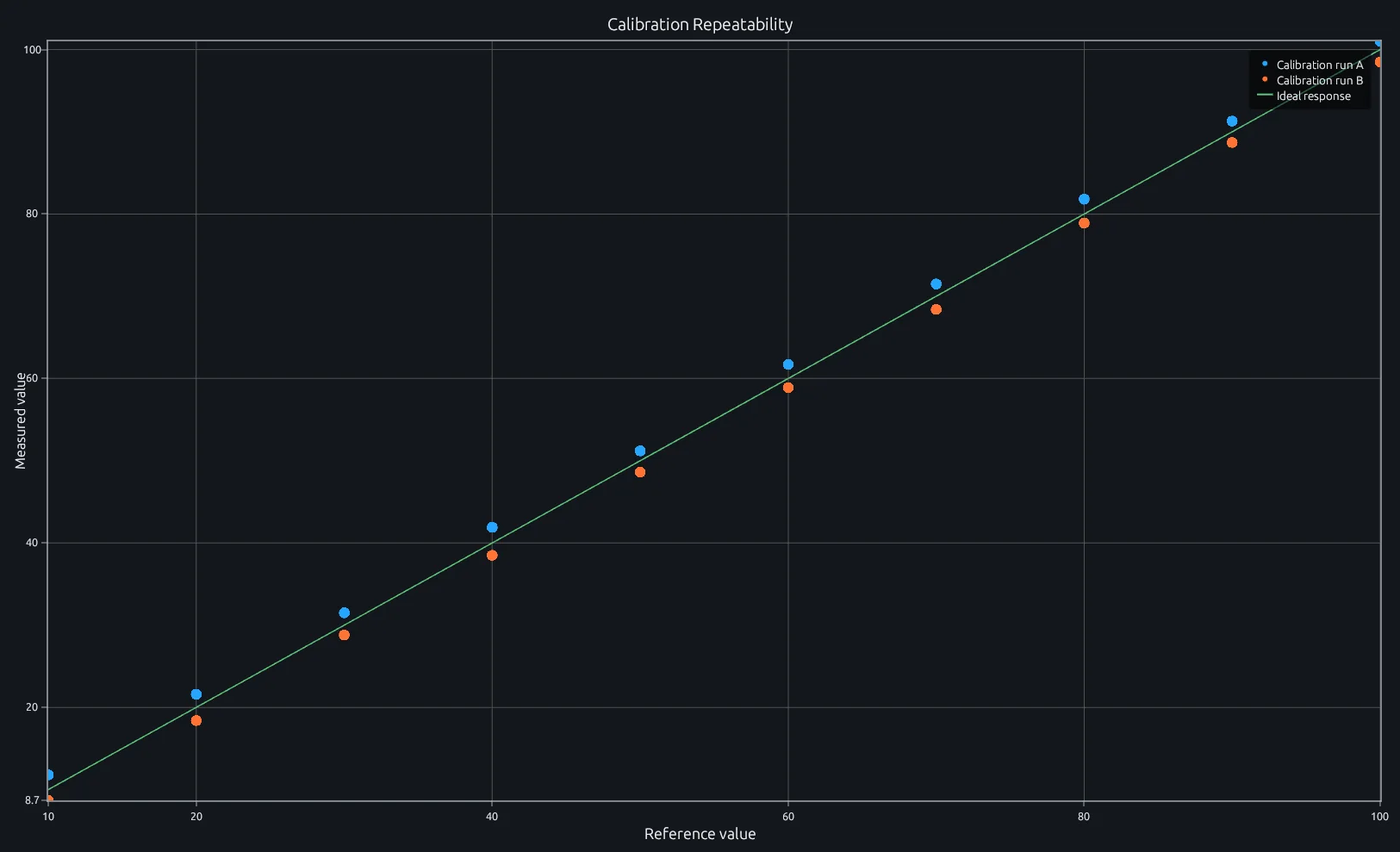
Compare this result with other chart types in the MATLAB Plot Gallery.
Using scatter with coding agents
Open a RunMat example with live inputs, then ask the agent to explain how scatter changes the result.
Run a small scatter example, explain the result, then change one input and compare the output.
FAQ
How do I color scatter points by a third variable?⌄
Set the CData property on the scatter handle to a vector the same length as x and y. The values map into the current colormap.
x = randn(1, 100);
y = randn(1, 100);
z = x.^2 + y.^2;
h = scatter(x, y);
set(h, 'CData', z);
colorbar;
Each point gets a color proportional to its z value. Call colorbar to show the mapping.
What's the difference between scatter and plot?⌄
scatter draws unconnected markers and supports per-point size (SizeData) and per-point color (CData). plot connects points with lines and applies uniform styling to the whole series. Use scatter when the individual point properties carry meaning; use plot when the connection between points is what matters.
How do I control marker size in scatter?⌄
Pass a scalar or vector to SizeData via the handle. A scalar sets uniform size; a vector sets per-point sizes.
h = scatter(x, y);
set(h, 'SizeData', 40);          % uniform size
set(h, 'SizeData', abs(y) * 50); % size proportional to |y|
The size unit is points squared, matching MATLAB conventions.
Related Plotting functions
2D Charts
area · bar · errorbar · heatmap · hist · histogram · loglog · pie · plot · semilogx · semilogy · stairs · stem
Other
addpoints · ancestor · animatedline · axes · barh · caxis · cla · clf · clim · colorcube · colororder · copyobj · daspect · datacursormode · dataTipTextRow · fcontour · figure · fill · fill3 · findobj · fsurf · gobjects · groot · hgload · hgsave · hidden · histogram2 · hold · line · linkaxes · openfig · opengl · pan · parula · patch · plotmatrix · plotyy · polarhistogram · polarplot · polarscatter · print · quiver3 · ribbon · saveas · savefig · sphere · stackedplot · subtitle · suptitle · text · textscatter · textscatter3 · triplot · waitbar · wordcloud · xlabel · xlim · xline · xscale · xtickangle · xtickformat · xticklabels · xticks · ylabel · ylim · yline · yscale · ytickangle · ytickformat · yticklabels · yticks · zlim · zoom
More plotting resources
Open-source implementation
Unlike proprietary runtimes, every RunMat function is open-source. Read exactly how scatter is executed, line by line, in Rust.
- View the source for scatter in Rust on GitHub
- Learn how the RunMat runtime works
- Found a bug? Open an issue with a minimal reproduction.
About RunMat
RunMat is an open-source runtime that executes MATLAB-syntax code blazing on any GPU. It is licensed under the Apache 2.0 license.
- RunMat automatically optimizes your math for GPU execution on Apple, Nvidia, and AMD hardware. No code changes needed. Simulations that took hours now take minutes.
- Start running code in seconds. RunMat runs in the browser, on the desktop, or from the CLI. No license server, no IT ticket.