
surf — Create 3-D surface plots from height grids or mesh coordinates with MATLAB-compatible surf syntax.
surf creates shaded 3-D surfaces from vector axes plus height data, meshgrid coordinates, or full parametric coordinate matrices. It returns a surface handle and follows MATLAB-compatible argument and property behavior.
Syntax
h = surf(Z)
h = surf(X, Y, Z)
h = surf(Z, Name, Value, ...)
h = surf(X, Y, Z, Name, Value, ...)
Inputs
| Name | Type | Required | Default | Description |
|---|---|---|---|---|
Z | NumericArray | Yes | — | Surface height grid. |
X | NumericArray | Yes | — | X axis vector or full coordinate matrix matching Z. |
Y | NumericArray | Yes | — | Y axis vector or full coordinate matrix matching Z. |
props | Any | Variadic | — | Name/value surface style options. |
Returns
| Name | Type | Description |
|---|---|---|
h | NumericScalar | Handle to the rendered surface plot. |
Errors
| Identifier | When | Message |
|---|---|---|
RunMat:surf:InvalidArgument | Surface/grid/axis inputs or style name/value arguments are invalid. | surf: invalid argument |
RunMat:surf:Internal | Internal surface construction or render preparation fails unexpectedly. | surf: internal operation failed |
How surf works
surf(Z)uses implicit axes, whilesurf(X, Y, Z)accepts vector axes, meshgrid-style coordinate matrices, or full parametric coordinate matrices, following MATLABsurfcall forms.XData,YData, andZDataretain native single, double, or integer class, exact values, and shape. Vertex generation, color preparation, and rendering are explicit floating boundaries and do not replace that authoritative scene data.- The returned value is a surface handle that can be inspected and updated through
getandset. - Surface plots naturally interact with
view,zlabel,colorbar,colormap, andshadingbecause they all operate on the same subplot-local axes state. - GPU-backed surface rendering is the preferred path when exported vector-axis buffers and the shared plotting device are available; full host coordinate matrices render through the same CPU surface path used for parametric surfaces.
surfis the shaded/fill-oriented member of the surface family, whilemeshemphasizes wireframe rendering andsurfcadds contour overlays.
Does RunMat run surf on the GPU?
The surface pipeline is shared across multiple plot families, which keeps surf aligned with image, contour-composite, and surface-style rendering behavior.
Vector-axis GPU inputs can remain on device when the renderer shares the provider context; full coordinate matrices use the host parametric-surface path after any required gather.
Surface color limits and subplot-local metadata stay consistent regardless of whether the geometry is emitted from GPU buffers or host tensors.
GPU memory and residency
surf preserves GPU residency on the vector-axis happy path through the shared surface rendering pipeline. When a direct GPU render path is not available for the active input combination, including full coordinate matrices, RunMat gathers once and builds the same surface plot semantics on the fallback path.
Examples
Create a shaded surface from a height grid
[X, Y] = meshgrid(linspace(-2, 2, 80), linspace(-2, 2, 80));
Z = sin(X.^2 + Y.^2) ./ (1 + X.^2 + Y.^2);
surf(X, Y, Z);
Pair surf with colormap, shading, and colorbar
[X, Y] = meshgrid(linspace(-3, 3, 100), linspace(-3, 3, 100));
Z = cos(X) .* sin(Y);
surf(X, Y, Z);
colormap('jet');
shading interp;
colorbar;
Adjust camera state and z-axis labeling for a surface
[X, Y] = meshgrid(linspace(-2, 2, 60), linspace(-2, 2, 60));
Z = X .* exp(-X.^2 - Y.^2);
h = surf(X, Y, Z);
zlabel('Height');
view(45, 30);
get(h, 'Type')
Expected output:
ans =
    'surface'
Damped radial ripple with interpolated shading
[X, Y] = meshgrid(linspace(-4, 4, 200), linspace(-4, 4, 200));
R = sqrt(X.^2 + Y.^2) + 0.01;
Z = sin(3*R) ./ R;

surf(X, Y, Z);
shading interp;
colormap('turbo');
colorbar;
title('Damped Radial Wavefield');
xlabel('x');
ylabel('y');
zlabel('Amplitude');
view(35, 25);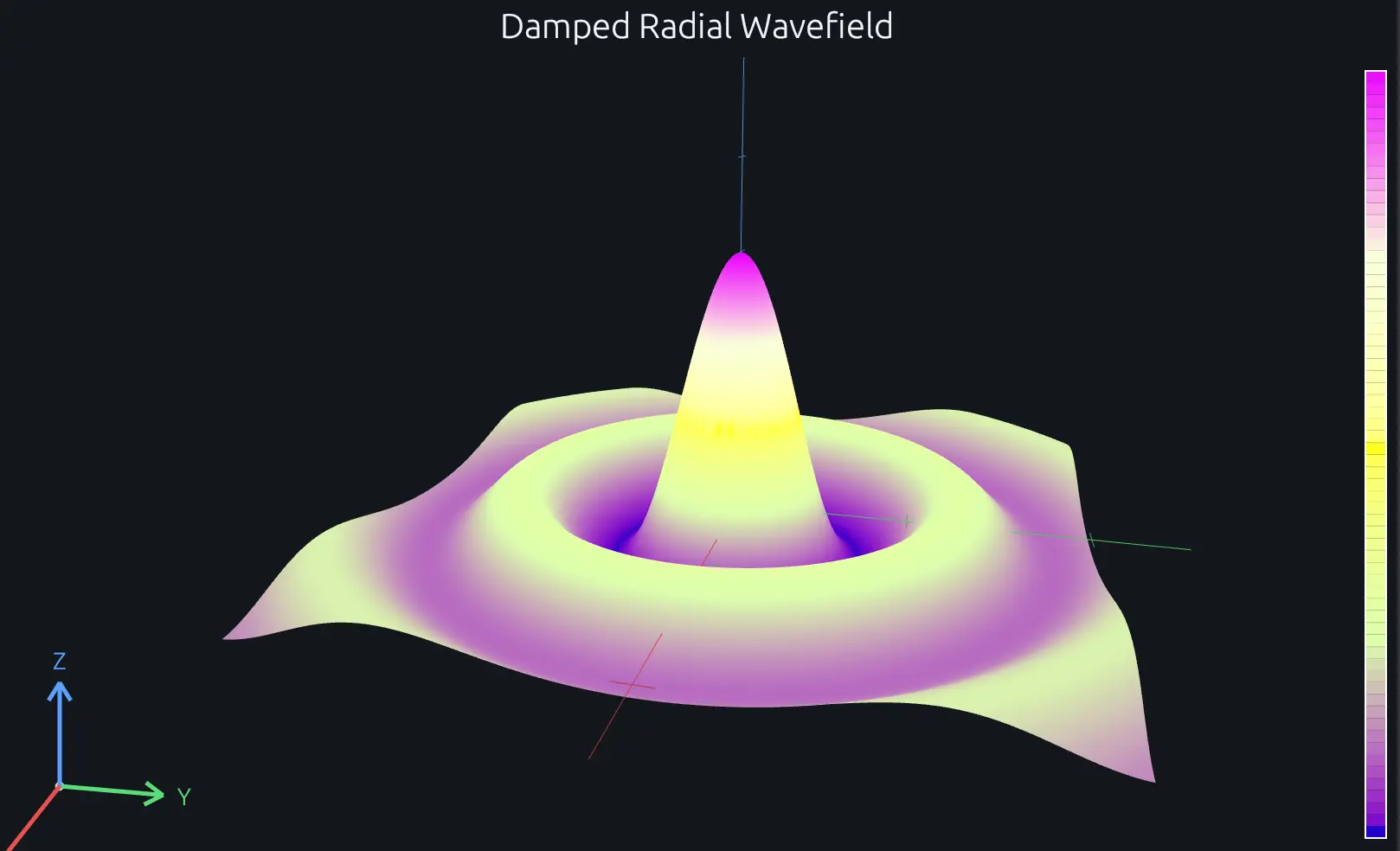
Compare this result with other chart types in the MATLAB Plot Gallery.
Using surf with coding agents
Open a RunMat example with live inputs, then ask the agent to explain how surf changes the result.
Run a small surf example, explain the result, then change one input and compare the output.
FAQ
How do I change the colormap on a surf plot?⌄
Call colormap after surf to swap the palette. The colormap applies to the current axes, so it works per-subplot.
surf(X, Y, Z);
colormap('turbo');
Any named colormap ('parula', 'jet', 'hot', etc.) or an Nx3 matrix of RGB values works here.
How do I rotate or set the 3-D viewing angle?⌄
Use view(az, el) where az is the azimuth in degrees and el is the elevation. For example, view(45, 30) gives you a 45-degree orbit at 30 degrees above the xy-plane. view(3) is a shortcut for the default 3-D perspective, and view(2) snaps to a top-down 2-D projection.
What's the difference between surf and mesh?⌄
surf renders a shaded, filled surface where face colors come from the colormap. mesh draws only the wireframe grid lines with no face fill. Use surf when you want to visualize the shape as a solid surface, and mesh when you want to see through the geometry to understand the grid structure underneath.
Related Plotting functions
2D Charts
area · bar · errorbar · heatmap · hist · histogram · loglog · pie · plot · scatter · semilogx · semilogy · stairs · stem
Other
addpoints · ancestor · animatedline · axes · barh · caxis · cla · clf · clim · colorcube · colororder · copyobj · daspect · datacursormode · dataTipTextRow · fcontour · figure · fill · fill3 · findobj · fsurf · gobjects · groot · hgload · hgsave · hidden · histogram2 · hold · line · linkaxes · openfig · opengl · pan · parula · patch · plotmatrix · plotyy · polarhistogram · polarplot · polarscatter · print · quiver3 · ribbon · saveas · savefig · sphere · stackedplot · subtitle · suptitle · text · textscatter · textscatter3 · triplot · waitbar · wordcloud · xlabel · xlim · xline · xscale · xtickangle · xtickformat · xticklabels · xticks · ylabel · ylim · yline · yscale · ytickangle · ytickformat · yticklabels · yticks · zlim · zoom
More plotting resources
Open-source implementation
Unlike proprietary runtimes, every RunMat function is open-source. Read exactly how surf is executed, line by line, in Rust.
- View the source for surf in Rust on GitHub
- Learn how the RunMat runtime works
- Found a bug? Open an issue with a minimal reproduction.
About RunMat
RunMat is an open-source runtime that executes MATLAB-syntax code blazing on any GPU. It is licensed under the Apache 2.0 license.
- RunMat automatically optimizes your math for GPU execution on Apple, Nvidia, and AMD hardware. No code changes needed. Simulations that took hours now take minutes.
- Start running code in seconds. RunMat runs in the browser, on the desktop, or from the CLI. No license server, no IT ticket.