
plot3 — Create 3-D line plots in MATLAB and RunMat.
plot3 creates line plots in 3-D space from matching x, y, and z inputs. Returned handle behavior and plotting integration follow MATLAB semantics.
Syntax
h = plot3(X, Y, Z)
h = plot3(X, Y, Z, LineSpec)
h = plot3(X, Y, Z, Name, Value, ...)
h = plot3(ax, X, Y, Z)
h = plot3(ax, X, Y, Z, LineSpec)
h = plot3(ax, X, Y, Z, Name, Value, ...)
h = plot3(X1, Y1, Z1, ..., Xn, Yn, Zn)
h = plot3(ax, X1, Y1, Z1, ..., Xn, Yn, Zn)
Inputs
| Name | Type | Required | Default | Description |
|---|---|---|---|---|
X | NumericArray | Yes | — | X data. |
Y | NumericArray | Yes | — | Y data. |
Z | NumericArray | Yes | — | Z data. |
lineSpec | StyleSpec | Yes | — | Line style/color shorthand. |
props | Any | Variadic | — | Name/value style properties. |
ax | AxesHandle | Yes | — | Target axes handle. |
series | Any | Variadic | — | Interleaved X/Y/Z series triplets with optional per-series style tokens. |
Returns
| Name | Type | Description |
|---|---|---|
h | NumericScalar | Handle to the first 3-D line object in the rendered series. |
Errors
| Identifier | When | Message |
|---|---|---|
RunMat:plot3:InvalidArgument | Input data, series grammar, axes targeting, or style arguments are invalid. | plot3: invalid argument |
RunMat:plot3:Internal | Internal 3-D line construction or rendering fails unexpectedly. | plot3: internal operation failed |
How plot3 works
plot3(x, y, z)requires matching element counts in all three inputs.- The builtin returns a 3-D line handle that can be inspected and updated through
getandset. - Multiple 3-D series in one call create multiple line objects and return the handle for the first created series.
plot3is camera-aware and naturally pairs withviewandzlabelin the subplot-local 3-D state model.- GPU-backed 3-D line rendering is used when the shared plotting device can consume exported buffers directly.
Does RunMat run plot3 on the GPU?
The dedicated 3-D line pipeline is separate from 2-D plot, which keeps camera-aware rendering and bounds handling explicit.
Subview state, labels, and line object behavior remain identical across GPU and host fallback paths.
Plot replay/export can read back preserved GPU source buffers from the line object when host coordinate vectors were not materialized at construction time.
GPU memory and residency
plot3 preserves GPU residency for multi-point GPU coordinate inputs when the 3-D line pipeline can consume exported buffers directly. Single-point GPU inputs gather once because they render through the scatter-style point fallback rather than the line-segment packer.
Examples
Create a 3-D helix
t = linspace(0, 6*pi, 300);
plot3(cos(t), sin(t), t);
Plot multiple 3-D trajectories and label them
t = linspace(0, 4*pi, 200);
h1 = plot3(cos(t), sin(t), t);
set(h1, 'DisplayName', 'helix A');
hold on;
h2 = plot3(cos(t), sin(t), -t);
set(h2, 'DisplayName', 'helix B');
legend;
Control the camera and z-axis after plotting
t = linspace(0, 4*pi, 150);
h = plot3(cos(t), sin(t), t);
zlabel('Height');
view(45, 20);
get(h, 'Type')
Expected output:
ans =
    'line'
Rendered plot3 example
t = linspace(0, 8*pi, 600);
radius = 1 + 0.12*cos(5*t);
x = radius.*cos(t);
y = radius.*sin(t);
z = linspace(0, 6, 600) + 0.12*sin(3*t);

h = plot3(x, y, z);
set(h, 'LineWidth', 2);
title('Helical Sensor Trajectory');
xlabel('x (m)');
ylabel('y (m)');
zlabel('z (m)');
view(38, 26);
grid on;
axis equal;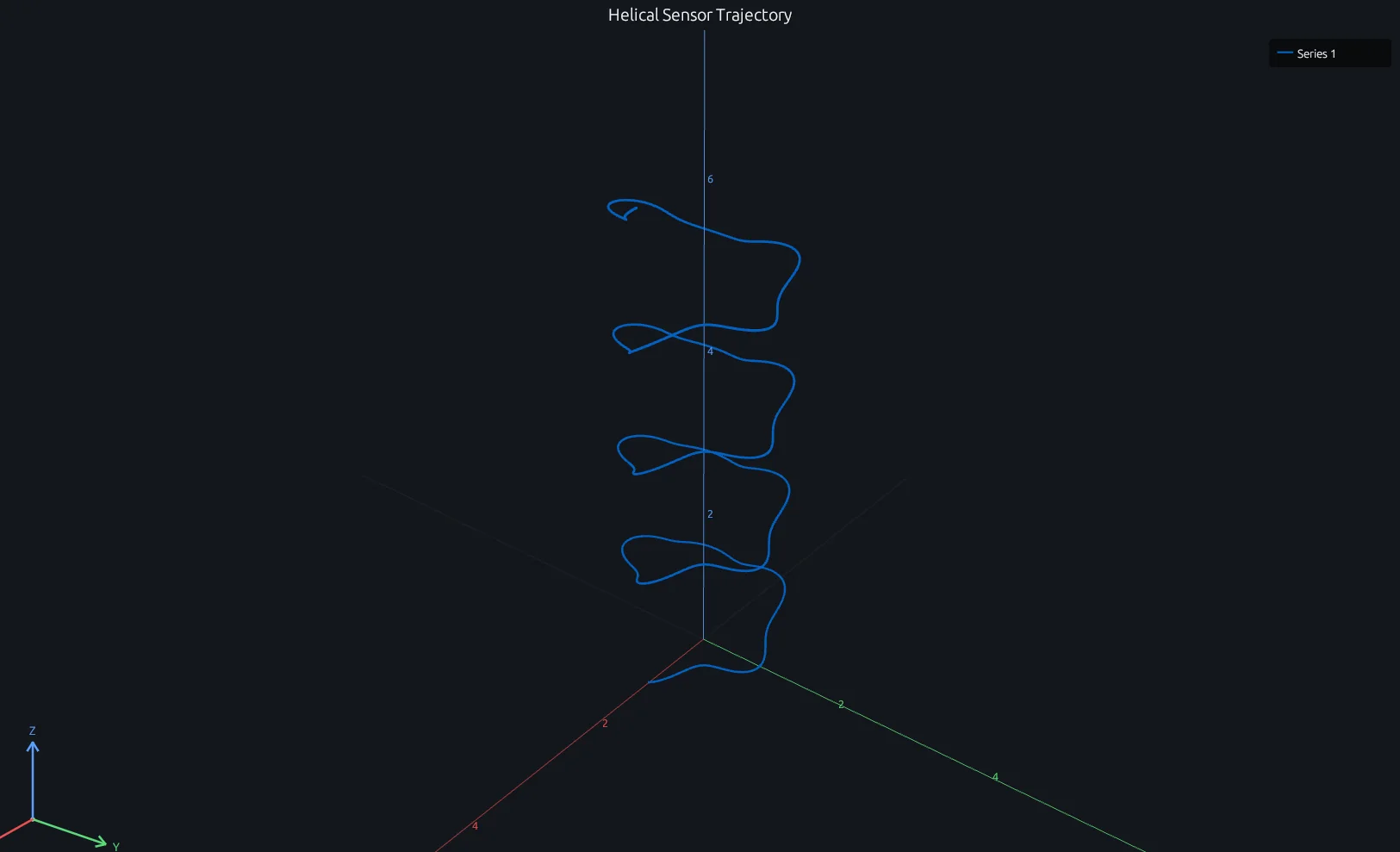
Compare this result with other chart types in the MATLAB Plot Gallery.
Using plot3 with coding agents
Open a RunMat example with live inputs, then ask the agent to explain how plot3 changes the result.
Run a small plot3 example, explain the result, then change one input and compare the output.
FAQ
How do I plot a 3-D trajectory from parametric equations?⌄
Generate a parameter vector t, compute x(t), y(t), z(t), and pass all three to plot3. The line connects points in parameter order.
t = linspace(0, 10*pi, 500);
plot3(sin(t), cos(t), t);
zlabel('z');
Can I overlay plot3 lines with scatter3 points?⌄
Yes — use hold on between calls. Both plot3 and scatter3 share the same 3-D axes and camera state, so they compose directly.
t = linspace(0, 4*pi, 200);
plot3(cos(t), sin(t), t);
hold on;
scatter3(cos(t(1:20:end)), sin(t(1:20:end)), t(1:20:end));
How do I control the camera angle on a plot3 figure?⌄
Call view(az, el) after plotting. az is the azimuth (horizontal rotation) and el is the elevation (vertical tilt), both in degrees. view(3) gives the default 3-D perspective. Camera state is subplot-local, so each subplot can have its own angle.
Related Plotting functions
2D Charts
area · bar · errorbar · heatmap · hist · histogram · loglog · pie · plot · scatter · semilogx · semilogy · stairs · stem
Other
addpoints · ancestor · animatedline · axes · barh · caxis · cla · clf · clim · colorcube · colororder · copyobj · daspect · datacursormode · dataTipTextRow · fcontour · figure · fill · fill3 · findobj · fsurf · gobjects · groot · hgload · hgsave · hidden · histogram2 · hold · line · linkaxes · openfig · opengl · pan · parula · patch · plotmatrix · plotyy · polarhistogram · polarplot · polarscatter · print · quiver3 · ribbon · saveas · savefig · sphere · stackedplot · subtitle · suptitle · text · textscatter · textscatter3 · triplot · waitbar · wordcloud · xlabel · xlim · xline · xscale · xtickangle · xtickformat · xticklabels · xticks · ylabel · ylim · yline · yscale · ytickangle · ytickformat · yticklabels · yticks · zlim · zoom
More plotting resources
Open-source implementation
Unlike proprietary runtimes, every RunMat function is open-source. Read exactly how plot3 is executed, line by line, in Rust.
- View the source for plot3 in Rust on GitHub
- Learn how the RunMat runtime works
- Found a bug? Open an issue with a minimal reproduction.
About RunMat
RunMat is an open-source runtime that executes MATLAB-syntax code blazing on any GPU. It is licensed under the Apache 2.0 license.
- RunMat automatically optimizes your math for GPU execution on Apple, Nvidia, and AMD hardware. No code changes needed. Simulations that took hours now take minutes.
- Start running code in seconds. RunMat runs in the browser, on the desktop, or from the CLI. No license server, no IT ticket.