
Write high-performance MATLAB code using AI agents.
Start from an idea, a model, or an existing MATLAB script. Work with the agent to run sweeps, compare designs, inspect results, and apply reviewable diffs as you iterate through days of engineering alternatives in one session.
Describe the scenario. Compare the outcomes.
Build a 3D simulation from a paragraph of physics
Describe the system. The agent can draft the script, run it, and help refine the figure. Sandbox sessions are full of wave propagation, electric fields, and thermal diffusion plots.
›Visualize the propagation of two interfering waves on a 1m × 1m membrane over 5 seconds.
Sweep a parameter and find the boundary
Name the parameter and the range. The agent can run the sweep and overlay the traces, so the transition point becomes visible.
›Sweep the damping coefficient from 0.01 to 1.0 in 20 steps and overlay the step responses.
Compare two designs and pick the winner
Describe both designs and choose the metric. The agent can run the comparison and show the tradeoff.
›Compare a 2nd-order Butterworth and a 4th-order Bessel filter at the same cutoff. Which has less phase distortion?
Explore design ideas and find the best performer
List the constraints and the metric that matters. The agent can test parameter sets, compare the results, and return the code behind the strongest candidate.
›Use a simple beam-stress formula to compare steel beam thicknesses for a 1 kN/m load over a 2 m span. Plot stress versus weight and return the code behind the best option.
An agent that works with your full project context.
Reads visual results
Plot and figure snapshots give the agent visual context, so it can help reason about the output, not only the code that produced it.
Inspects live variables
Pull values from the workspace when you need them. The agent can use the same previews to debug shapes, ranges, and intermediate results.
Keeps context in one place
You and the agent share the same files, variables, figures, and run history, so each suggestion is grounded in the current project.
Uses static and runtime feedback
RunMat can surface lints, shape issues, and semantic feedback before execution, then use errors, variables, figures, and runtime output after the script runs.
Builds from your script
Ask for a sweep, comparison, plot, or report. The agent proposes the next step as code you can review and edit.
Works across the project
It can read and edit project files, not just the tab in front of you. Larger changes still land as reviewable diffs.
Start from anywhere
An existing MATLAB script
Open a script you already use. Ask the agent to explain it, debug a run, add a plot, or turn a single run into a parameter sweep.
Raw data
Add a CSV or table. Ask the agent to clean it, plot it, fit a model, or compare residuals.
A script that's broken
Run it in the workspace and ask the agent to debug it. It can use the error, variables, and output to propose a fix.
An engineering problem
Describe the system, constraints, and result you need. The agent can help write the first script.
Run more experiments without losing project state.
The agent can help try more branches in a session. Every change lands as a diff you can read, accept, or revert, so the project stays legible as the exploration widens.
Reviewable diffs
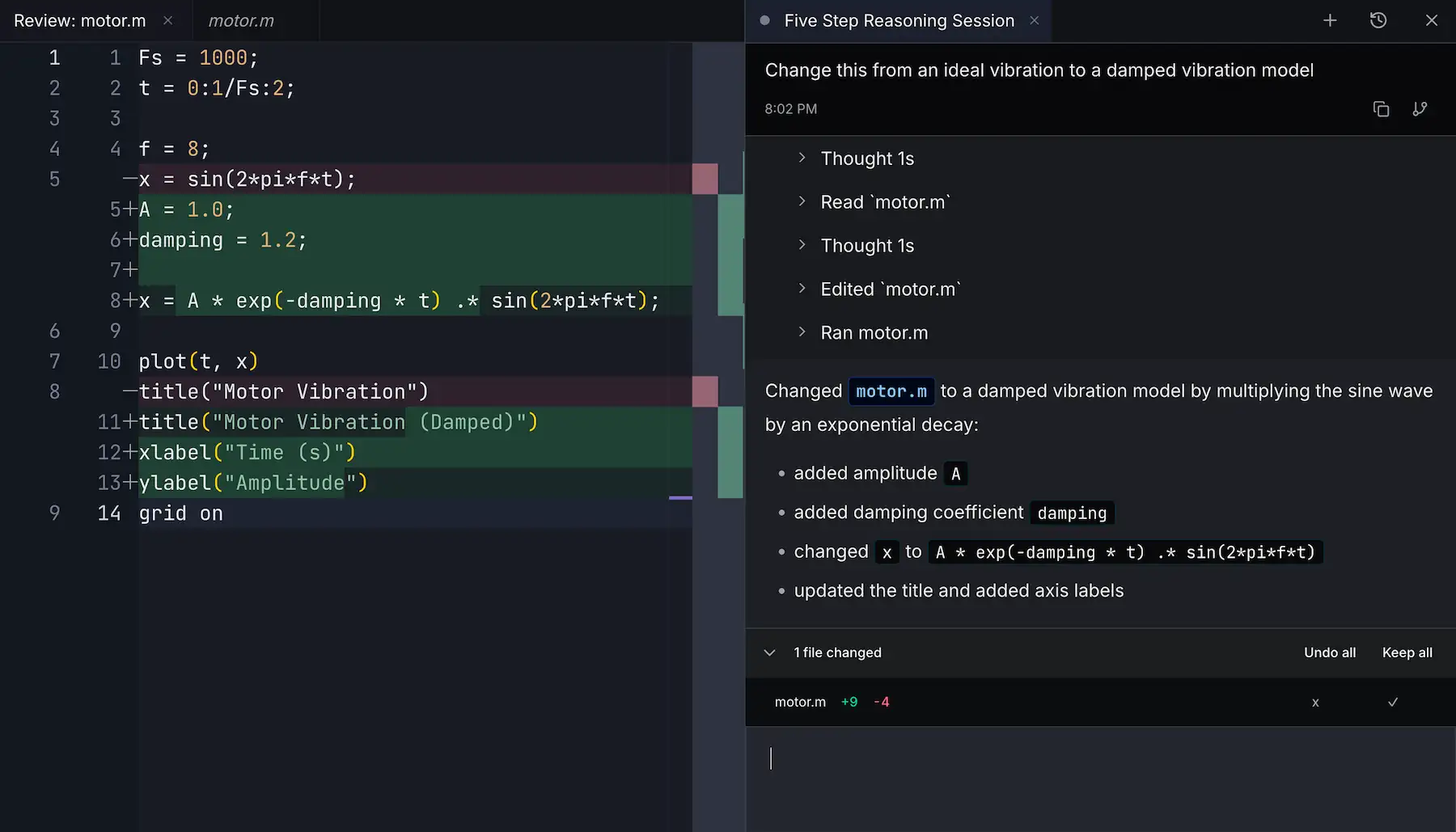
See exactly what the agent changed, line by line, before it becomes part of the project.
One-click revert
Reject a change to roll it back. Keep the promising experiments and discard the dead ends.
History is automatic
Files snapshot as the agent works. Roll back to an earlier state without setting up git.
Designed for agent-in-the-loop engineering
Ask RunMat to change a simulation and the agent works inside the runtime: it edits MATLAB-syntax code, runs it, reads plots and variables, then returns the exact diff behind the result. Keep the change, revert it, or continue iterating without losing the path that got you there.
Runnable prompts for the sandbox
These are small, current examples: open one in the sandbox and watch the agent create, run, inspect, and revise.
Sweep a parameter range
Plot temperature decay for a coffee cooling in a 20°C room. Try 5 different cup materials and overlay them.
Animate a plate vibration
Animate a clamped square-plate vibration with two strikes and show the combined wave pattern.
Fit a model to lab data
Load measurements.csv. Try a linear, exponential, and power-law fit. Plot residuals for each and tell me which fits best.
Model from physics
I'm modelling thermal resistance through a 3-layer wall. Write the code and plot the temperature gradient.
Visualize an electric field
Plot the electric field and equipotential contours around two point charges of opposite sign. Show both 2D and 3D views.
Tune a PID controller
Design a PID controller for a 1 kg mass on a spring. Plot the step response and find gains that settle in under 0.5 seconds without overshoot.
Where other tools stop short
Most AI tools can suggest code. RunMat gives the agent structured feedback from the engineering loop: static checks before execution, runtime state while it runs, figures and variables after.
MATLAB Copilot
Best at: MATLAB-aware chat, code generation, and explanations inside MATLAB.
Missing: RunMat's reviewable project diffs, open runtime, and no-license workflow.
ChatGPT, Claude, Gemini
Best at: strong reasoning and useful MATLAB-syntax code suggestions.
Missing: running the code, seeing variables and plots, and keeping edits tied to the project.
Cursor and other AI IDEs
Best at: editing files, refactoring code, and working through software projects.
Missing: treating MATLAB-syntax execution, tensors, figures, and runtime output as first-class context.
Spreadsheet + ChatGPT stitching
Best at: quick models with familiar tools you already have open.
Missing: a continuous loop between data, code, plots, runtime output, and reviewable history.
An open runtime without MATLAB license friction.
The runtime is open source. The browser sandbox is free to try; the desktop app keeps everything on your machine. Either way, the .m files you already have just run.
No MATLAB license required
The runtime is an Apache 2.0 licensed reimplementation. It runs MATLAB-syntax code without a paid MathWorks license — for coursework, prototypes, and engineering workflows.
Browser or desktop
Open the sandbox URL for a zero-install session. Or download the desktop app to keep your project and the runtime on your machine.
Agent credits included
RunMat includes generous cloud storage and Agent credits. Earn more credits by inviting new members to RunMat, or purchase additional credits whenever you need them. See pricing.
Frequently asked questions
Common questions about RunMat's agent, model choice, and what it can and can't do.
What is RunMat's agent?⌄
How is RunMat's agent different from MATLAB Copilot?⌄
When should I use RunMat's built-in agent?⌄
Can the agent run MATLAB-syntax code?⌄
Can the agent extend what my MATLAB-syntax scripts can do?⌄
What models can the agent use?⌄
Is the agent free to use?⌄
Does the agent work offline?⌄
Is there a desktop version, or only browser?⌄
What can the agent see when it is running my code?⌄
How is RunMat different from GitHub Copilot for MATLAB?⌄
Use RunMat for free
RunMat is free to use in your browser, on Desktop, or with the CLI.