
errorbar — Create plots with symmetric or asymmetric error bars using MATLAB-compatible errorbar forms.
errorbar visualizes uncertainty using vertical error bars with symmetric or asymmetric magnitudes. It returns graphics handles and follows MATLAB-compatible argument and property forms.
Syntax
h = errorbar(Y, E)
h = errorbar(X, Y, E)
h = errorbar(X, Y, YNeg, YPos)
h = errorbar(X, Y, YNeg, YPos, XNeg, XPos)
h = errorbar(ax, ...)
Inputs
| Name | Type | Required | Default | Description |
|---|---|---|---|---|
Y | NumericArray | Yes | — | Data values. |
E | NumericArray | Yes | — | Symmetric Y error magnitudes. |
X | NumericArray | Yes | — | X coordinates. |
Y | NumericArray | Yes | — | Y coordinates. |
YNeg | NumericArray | Yes | — | Negative Y error magnitudes. |
YPos | NumericArray | Yes | — | Positive Y error magnitudes. |
XNeg | NumericArray | Yes | — | Negative X error magnitudes. |
XPos | NumericArray | Yes | — | Positive X error magnitudes. |
ax | NumericScalar | Yes | — | Target axes handle. |
data | Any | Variadic | — | Errorbar positional data arguments. |
props | Any | Variadic | — | Style and name/value properties. |
Returns
| Name | Type | Description |
|---|---|---|
h | NumericScalar | Handle to the created error bar series. |
Errors
| Identifier | When | Message |
|---|---|---|
RunMat:errorbar:InvalidArgument | Input vectors, error vectors, style arguments, or axes-target forms are malformed. | errorbar: invalid argument |
RunMat:errorbar:Internal | Internal render preparation or GPU vertex generation fails. | errorbar: internal operation failed |
How errorbar works
- Vertical, horizontal, and both-direction error-bar forms are supported through the runtime and replay/render stack.
- Vector inputs create one error-bar handle. Matrix inputs create one registered error-bar series per plotted line; returning the complete handle vector remains limited by the current scalar graphics-handle builtin ABI.
- All eight integer classes and logical coordinate/error arrays are accepted and cross one deliberate floating client-graphics boundary.
- Cap size, line styling, marker appearance, display names, and related properties use the shared plotting object/property system.
- Error bars remain subplot-local and integrate naturally with legends and axes state.
- GPU-backed geometry is used only for compatible real floating vectors; integer, logical, matrix, and unsupported combinations gather to client plotting while preserving the same visible result.
- Datetime, duration, categorical, distributed-array, and complete ErrorBar data-property compatibility remain development gaps.
Does RunMat run errorbar on the GPU?
Dedicated GPU geometry generation covers supported real floating-vector workflows; MATLAB documents errorbar gpuArray execution as client-side.
Markers continue to use the shared marker path so line/marker styling stays consistent with the rest of the plotting stack.
GPU memory and residency
Real floating vectors can remain resident through RunMat's direct geometry path. Integer and logical buffers gather authoritatively before the client graphics conversion and are never reinterpreted as floating buffers.
Examples
Plot symmetric vertical error bars
x = 1:5;
y = [2 3 2.5 4 3.5];
err = [0.2 0.3 0.1 0.4 0.2];
errorbar(x, y, err, err);
Plot asymmetric both-direction error bars
x = 1:4;
y = [3 4 2 5];
xn = [0.1 0.2 0.1 0.3];
xp = [0.2 0.3 0.2 0.4];
yn = [0.3 0.2 0.4 0.2];
yp = [0.4 0.3 0.5 0.3];
errorbar(x, y, yn, yp, xn, xp);
Style an error-bar object and label it for the legend
x = 1:5;
y = [1 2 1.5 3 2.5];
h = errorbar(x, y, 0.2*ones(size(x)), 0.2*ones(size(x)));
set(h, 'LineWidth', 2, 'DisplayName', 'measurement');
legend;
Measurements with confidence intervals
x = 1:8;
y = [2.1 3.4 4.2 5.8 5.5 6.1 7.3 8.0];
neg = [0.3 0.4 0.2 0.5 0.6 0.3 0.4 0.3];
pos = [0.4 0.3 0.3 0.6 0.5 0.4 0.5 0.4];

errorbar(x, y, neg, pos, 'o-', 'LineWidth', 1.5);
title('Tensile Strength vs. Sample');
xlabel('Sample #');
ylabel('Strength (MPa)');
grid on;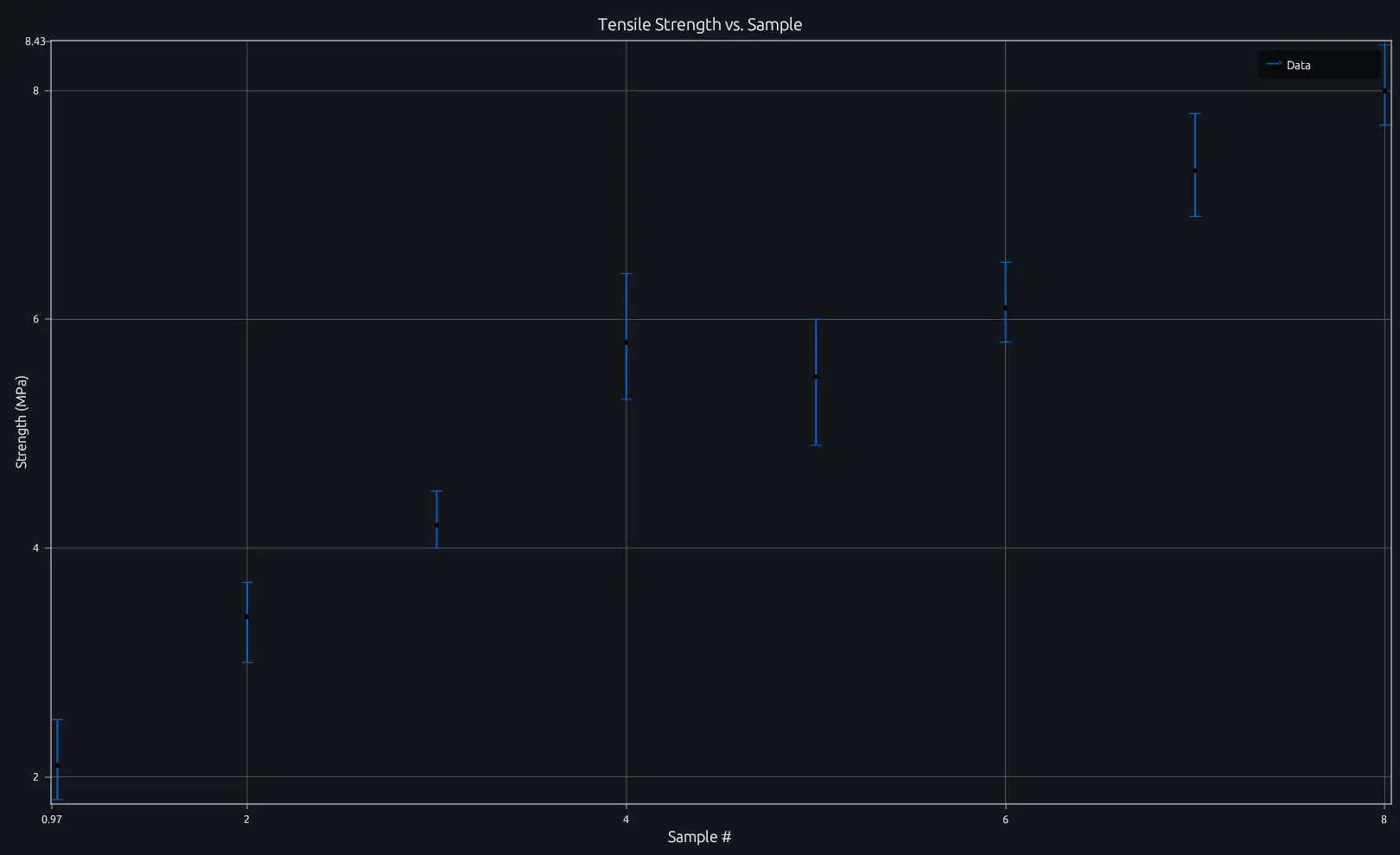
Compare this result with other chart types in the MATLAB Plot Gallery.
Using errorbar with coding agents
Open a RunMat example with live inputs, then ask the agent to explain how errorbar changes the result.
Run a small errorbar example, explain the result, then change one input and compare the output.
FAQ
How do I plot asymmetric error bars?⌄
Pass separate lower and upper error vectors. For vertical-only asymmetric bars, use errorbar(x, y, neg, pos) where neg is the downward extent and pos is the upward extent.
x = 1:5;
y = [2 3 2.5 4 3.5];
neg = [0.1 0.2 0.15 0.3 0.1];
pos = [0.3 0.4 0.2 0.5 0.25];
errorbar(x, y, neg, pos);
Can I add horizontal error bars?⌄
Yes. Append "horizontal" to a symmetric or asymmetric form for horizontal-only bars, or use "both" for equal horizontal and vertical lengths. The six-data form errorbar(x, y, yneg, ypos, xneg, xpos) controls all four directions independently.
x = 1:4; y = [3 4 2 5];
errorbar(x, y, 0.2*ones(size(x)), "horizontal");
Can I combine error bars with a line or scatter plot?⌄
Yes—errorbar already draws a line through the data points by default. To overlay error bars on a separate plot, call hold on first. The error bar handle supports the same set properties as line handles, so you can match colors and widths.
plot(x, y, 'b-', 'LineWidth', 2);
hold on;
errorbar(x, y, err, err, 'LineStyle', 'none', 'Color', 'b');
Related Plotting functions
2D Charts
area · bar · heatmap · hist · histogram · loglog · pie · plot · scatter · semilogx · semilogy · stairs · stem
Other
addpoints · ancestor · animatedline · axes · barh · caxis · cla · clf · clim · colorcube · colororder · copyobj · daspect · datacursormode · dataTipTextRow · fcontour · figure · fill · fill3 · findobj · fsurf · gobjects · groot · hgload · hgsave · hidden · histogram2 · hold · line · linkaxes · openfig · opengl · pan · parula · patch · plotmatrix · plotyy · polarhistogram · polarplot · polarscatter · print · quiver3 · ribbon · saveas · savefig · sphere · stackedplot · subtitle · suptitle · text · textscatter · textscatter3 · triplot · waitbar · wordcloud · xlabel · xlim · xline · xscale · xtickangle · xtickformat · xticklabels · xticks · ylabel · ylim · yline · yscale · ytickangle · ytickformat · yticklabels · yticks · zlim · zoom
More plotting resources
Open-source implementation
Unlike proprietary runtimes, every RunMat function is open-source. Read exactly how errorbar is executed, line by line, in Rust.
- View the source for errorbar in Rust on GitHub
- Learn how the RunMat runtime works
- Found a bug? Open an issue with a minimal reproduction.
About RunMat
RunMat is an open-source runtime that executes MATLAB-syntax code blazing on any GPU. It is licensed under the Apache 2.0 license.
- RunMat automatically optimizes your math for GPU execution on Apple, Nvidia, and AMD hardware. No code changes needed. Simulations that took hours now take minutes.
- Start running code in seconds. RunMat runs in the browser, on the desktop, or from the CLI. No license server, no IT ticket.