
stem — Create stem plots for discrete sequences with MATLAB-compatible stem syntax and styling controls.
stem draws discrete samples as vertical lines from a baseline and returns a graphics handle. Pass Y alone for one-based x coordinates or paired X,Y data for explicit positions. X and Y may use single, double, or any of the eight integer classes. RunMat retains the native source class for property queries and figure persistence while deriving floating geometry for display.
Syntax
h = stem(Y)
h = stem(Y, LineSpec)
h = stem(Y, Name, Value, ...)
h = stem(X, Y)
h = stem(X, Y, LineSpec)
h = stem(X, Y, Name, Value, ...)
All supported stem forms
h = stem(Y)
h = stem(Y, LineSpec)
h = stem(Y, Name, Value, ...)
h = stem(X, Y)
h = stem(X, Y, LineSpec)
h = stem(X, Y, Name, Value, ...)
h = stem(ax, Y)
h = stem(ax, Y, LineSpec)
h = stem(ax, Y, Name, Value, ...)
h = stem(ax, X, Y)
h = stem(ax, X, Y, LineSpec)
h = stem(ax, X, Y, Name, Value, ...)
Inputs
| Name | Type | Required | Default | Description |
|---|---|---|---|---|
Y | NumericArray | Yes | — | Y samples. X defaults to 1:numel(Y). |
lineSpec | StyleSpec | Yes | — | Line style shorthand such as '--r'. |
props | Any | Variadic | — | Name/value style properties. |
X | NumericArray | Yes | — | X samples. |
Y | NumericArray | Yes | — | Y samples. |
ax | AxesHandle | Yes | — | Target axes handle. |
Returns
| Name | Type | Description |
|---|---|---|
h | NumericScalar | Handle to the rendered stem plot. |
Errors
| Identifier | When | Message |
|---|---|---|
RunMat:stem:InvalidArgument | Input data, axes targeting, or style arguments are invalid. | stem: invalid argument |
RunMat:stem:Internal | Internal plot construction or rendering fails unexpectedly. | stem: internal operation failed |
How stem works
stem(y)uses implicit x-values1:n, whilestem(x, y)uses explicit paired coordinates.- The returned value is a stem plot handle that works with
getandset. - Baseline visibility, markers, fill behavior, display names, and line styling all flow through the shared plotting property model.
XDataandYDataretain the input numeric class, shape, and exact values, including wideint64anduint64data that cannot be represented exactly as double.- Figure-scene serialization preserves typed source data. Older scenes without typed source fields continue to load as ordinary double-backed plots.
- The plot remains subplot-local and composes naturally with legends and axes-local state.
- GPU-backed geometry is used when plotting-compatible buffers are available, with marker rendering sharing the point/marker pipeline.
Does RunMat run stem on the GPU?
Stem line geometry can be emitted directly from GPU buffers on the happy path.
Markers use the shared rendering path, which keeps style semantics aligned with the rest of the plotting stack.
GPU memory and residency
stem preserves GPU residency when the direct stem packer path is available. Marker rendering stays on the shared marker path.
Examples
Create a stem plot from y-values only
stem([1 4 2 5 3]);Use explicit x-values and filled markers
x = 0:5;
h = stem(x, [0 1 0 2 0 3]);
set(h, 'Filled', true, 'DisplayName', 'samples');
legend;
Inspect a stem handle after plotting
h = stem(1:5, [2 1 3 2 4]);
get(h, 'Type')
Expected output:
ans =
    'stem'
Discrete sampled signal
n = 0:31;
x = sin(2*pi*n/16) .* (0.9 .^ n);

stem(n, x);
title('Sampled Decaying Sinusoid');
xlabel('Sample index n');
ylabel('x[n]');
grid on;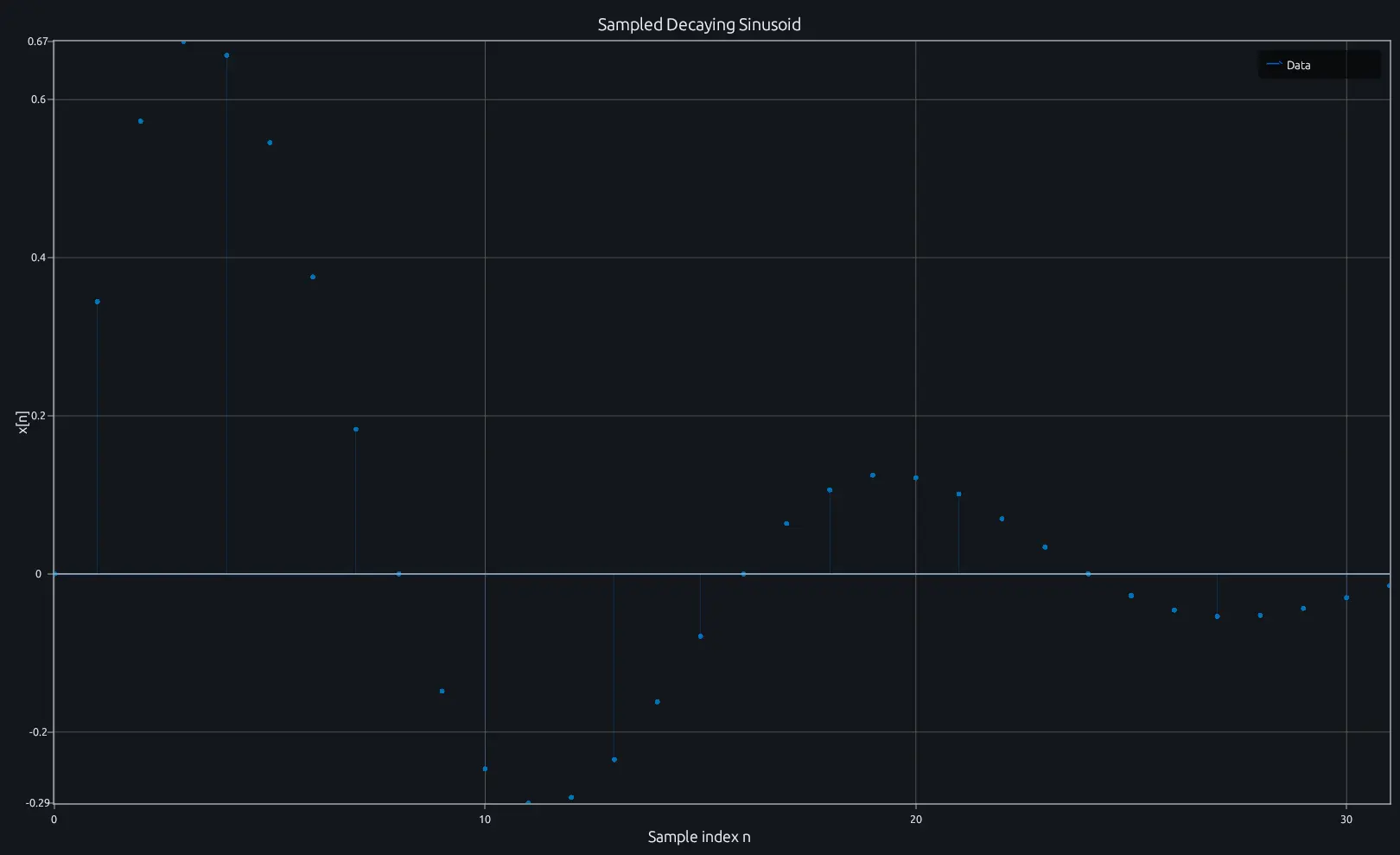
Compare this result with other chart types in the MATLAB Plot Gallery.
Using stem with coding agents
Open a RunMat example with live inputs, then ask the agent to explain how stem changes the result.
Run a small stem example, explain the result, then change one input and compare the output.
FAQ
When should I use stem instead of plot?⌄
stem is designed for discrete sequences where each sample is an independent value at a specific index—think impulse responses, sampled signals, or coefficient arrays. plot connects points with a continuous line, which implies interpolation between samples. If your data is inherently discrete and the gaps between samples matter, stem communicates that visually.
How do I customize the markers on a stem plot?⌄
Use the handle returned by stem with set to change marker shape, size, fill, and color.
h = stem(1:8, [3 1 4 1 5 9 2 6]);
set(h, 'Marker', 's', 'MarkerSize', 8, 'Filled', true, 'MarkerFaceColor', 'r');
Marker properties go through the same shared property model as plot and scatter, so the same property names work.
Can I change the baseline of a stem plot?⌄
Yes. Set the 'BaseValue' property on the stem handle to shift the baseline from the default of 0.
h = stem(1:5, [2 4 1 3 5]);
set(h, 'BaseValue', 2);
Stems will then extend from y=2 to each data point rather than from y=0.
Related Plotting functions
2D Charts
area · bar · errorbar · heatmap · hist · histogram · loglog · pie · plot · scatter · semilogx · semilogy · stairs
Other
addpoints · ancestor · animatedline · axes · barh · caxis · cla · clf · clim · colorcube · colororder · copyobj · daspect · datacursormode · dataTipTextRow · fcontour · figure · fill · fill3 · findobj · fsurf · gobjects · groot · hgload · hgsave · hidden · histogram2 · hold · line · linkaxes · openfig · opengl · pan · parula · patch · plotmatrix · plotyy · polarhistogram · polarplot · polarscatter · print · quiver3 · ribbon · saveas · savefig · sphere · stackedplot · subtitle · suptitle · text · textscatter · textscatter3 · triplot · waitbar · wordcloud · xlabel · xlim · xline · xscale · xtickangle · xtickformat · xticklabels · xticks · ylabel · ylim · yline · yscale · ytickangle · ytickformat · yticklabels · yticks · zlim · zoom
More plotting resources
Open-source implementation
Unlike proprietary runtimes, every RunMat function is open-source. Read exactly how stem is executed, line by line, in Rust.
- View the source for stem in Rust on GitHub
- Learn how the RunMat runtime works
- Found a bug? Open an issue with a minimal reproduction.
About RunMat
RunMat is an open-source runtime that executes MATLAB-syntax code blazing on any GPU. It is licensed under the Apache 2.0 license.
- RunMat automatically optimizes your math for GPU execution on Apple, Nvidia, and AMD hardware. No code changes needed. Simulations that took hours now take minutes.
- Start running code in seconds. RunMat runs in the browser, on the desktop, or from the CLI. No license server, no IT ticket.