
stairs — Create staircase line plots for sampled or piecewise-constant data with MATLAB-compatible stairs syntax.
stairs creates a piecewise-constant line from Y alone or paired X,Y coordinates and returns a graphics handle. X and Y may use single, double, or any of the eight integer classes. RunMat keeps the native source class and exact values for XData, YData, and saved figure scenes; the plotting renderer receives a derived floating representation, so rendering does not replace or round the authoritative source data.
Syntax
h = stairs(Y)
h = stairs(X, Y)
h = stairs(X, Y, LineSpec)
h = stairs(X, Y, Name, Value, ...)
h = stairs(ax, Y)
h = stairs(ax, X, Y)
h = stairs(ax, X, Y, LineSpec)
h = stairs(ax, X, Y, Name, Value, ...)
Inputs
| Name | Type | Required | Default | Description |
|---|---|---|---|---|
Y | NumericArray | Yes | — | Y samples. X defaults to 1:numel(Y). |
X | NumericArray | Yes | — | X samples. |
Y | NumericArray | Yes | — | Y samples. |
lineSpec | StyleSpec | Yes | — | Line style shorthand such as '--r'. |
props | Any | Variadic | — | Name/value style properties. |
ax | AxesHandle | Yes | — | Target axes handle. |
Returns
| Name | Type | Description |
|---|---|---|
h | NumericScalar | Handle to the rendered stairs plot. |
Errors
| Identifier | When | Message |
|---|---|---|
RunMat:stairs:InvalidArgument | Input data, axes targeting, or style arguments are invalid. | stairs: invalid argument |
RunMat:stairs:Internal | Internal plot construction or rendering fails unexpectedly. | stairs: internal operation failed |
How stairs works
stairs(y)uses implicit x-values1:n, whilestairs(x, y)uses explicit paired coordinates.- The returned value is a plot handle that works with
getandset. - Marker styling and display names can be updated through the same handle/property system used by line plots.
XDataandYDataretain the input numeric class, shape, and exact host values, includingint64anduint64values aboveflintmax.- Figure-scene serialization preserves typed source data. Loading an older scene without typed source fields reconstructs ordinary double source data for backward compatibility.
- Step-plot rendering is subplot-local and respects current axes state just like
plotandscatter. - GPU-backed geometry is preferred when exported buffers and the shared plotting device are available.
Examples
Plot a sampled staircase signal
t = 0:5;
stairs(t, cumsum([1 -1 2 -2 1 0]));
Use MATLAB-style y-only shorthand
stairs([3 1 4 1 5 9]);Style a stairs object and label it for the legend
h = stairs(0:4, [1 2 2 3 5]);
set(h, 'Color', 'm', 'LineWidth', 2, 'DisplayName', 'sampled signal');
legend;
Piecewise-constant step response
t = 0:0.5:10;
y = 1 - exp(-0.5*t);

h = stairs(t, y);
set(h, 'LineWidth', 2);
title('First-Order Step Response');
xlabel('Time (s)');
ylabel('Output');
grid on;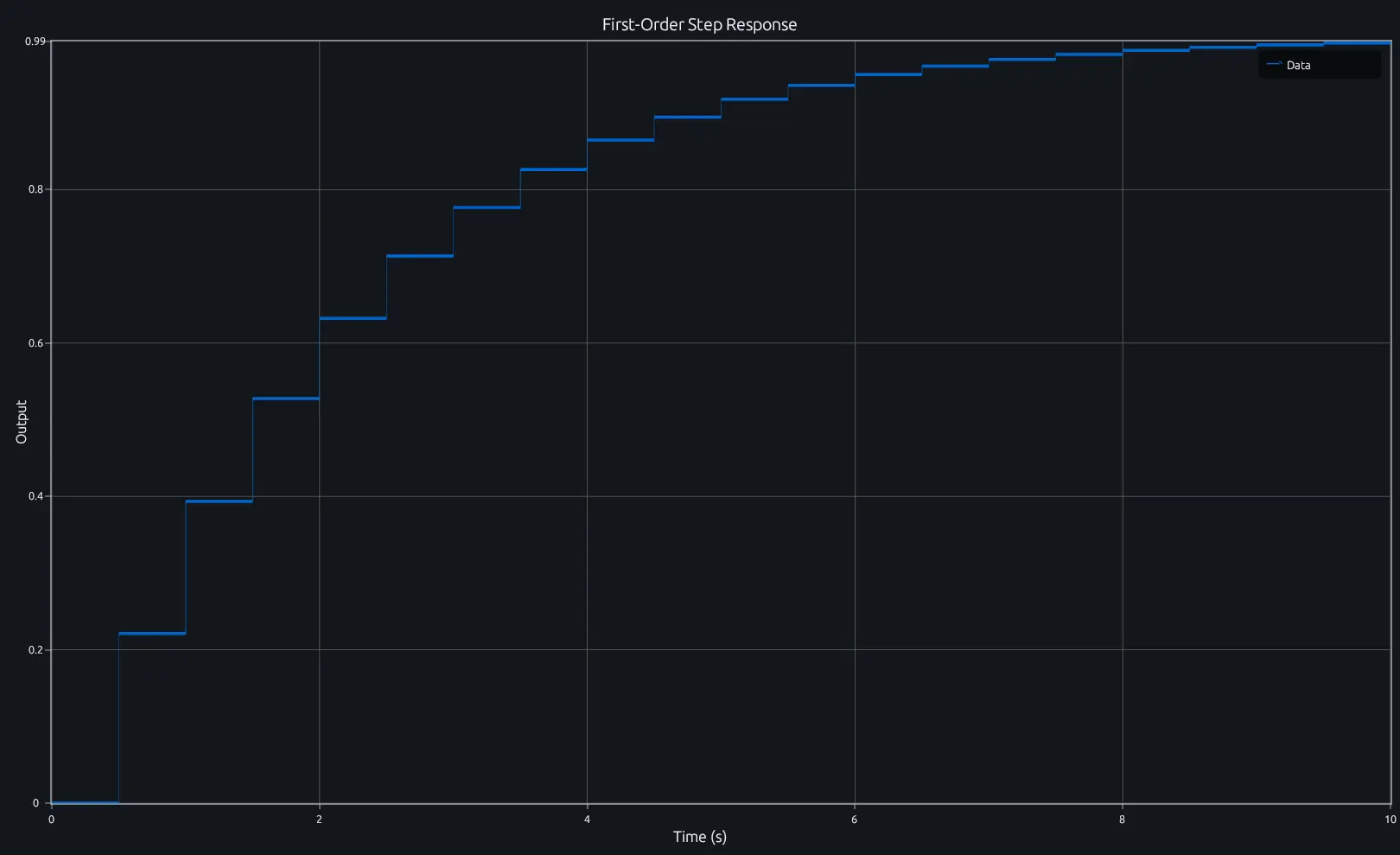
Compare this result with other chart types in the MATLAB Plot Gallery.
Using stairs with coding agents
Open a RunMat example with live inputs, then ask the agent to explain how stairs changes the result.
Run a small stairs example, explain the result, then change one input and compare the output.
FAQ
When should I use stairs instead of plot?⌄
stairs draws piecewise-constant steps between points, while plot linearly interpolates. Use stairs when your data is held constant between samples—DAC output, quantized signals, sample-and-hold systems, or any situation where the value doesn't change smoothly between observations.
How do I visualize a digital signal with stairs?⌄
Pass your time vector and signal values directly. The staircase rendering naturally represents digital/discrete-time signals where values snap between levels.
t = 0:0.01:1;
signal = double(square(2*pi*5*t) > 0);
stairs(t, signal);
ylim([-0.2 1.2]);
This avoids the misleading diagonal transitions that plot would draw between high and low states.
Can I add markers to a stairs plot?⌄
Yes. Set the 'Marker' property on the returned handle, just like you would with plot.
h = stairs(0:4, [1 3 2 4 1]);
set(h, 'Marker', 'o', 'MarkerSize', 6);
Markers appear at each data point (the step corners), not along the flat segments.
Related Plotting functions
2D Charts
area · bar · errorbar · heatmap · hist · histogram · loglog · pie · plot · scatter · semilogx · semilogy · stem
Other
addpoints · ancestor · animatedline · axes · barh · caxis · cla · clf · clim · colorcube · colororder · copyobj · daspect · datacursormode · dataTipTextRow · fcontour · figure · fill · fill3 · findobj · fsurf · gobjects · groot · hgload · hgsave · hidden · histogram2 · hold · line · linkaxes · openfig · opengl · pan · parula · patch · plotmatrix · plotyy · polarhistogram · polarplot · polarscatter · print · quiver3 · ribbon · saveas · savefig · sphere · stackedplot · subtitle · suptitle · text · textscatter · textscatter3 · triplot · waitbar · wordcloud · xlabel · xlim · xline · xscale · xtickangle · xtickformat · xticklabels · xticks · ylabel · ylim · yline · yscale · ytickangle · ytickformat · yticklabels · yticks · zlim · zoom
More plotting resources
Open-source implementation
Unlike proprietary runtimes, every RunMat function is open-source. Read exactly how stairs is executed, line by line, in Rust.
- View the source for stairs in Rust on GitHub
- Learn how the RunMat runtime works
- Found a bug? Open an issue with a minimal reproduction.
About RunMat
RunMat is an open-source runtime that executes MATLAB-syntax code blazing on any GPU. It is licensed under the Apache 2.0 license.
- RunMat automatically optimizes your math for GPU execution on Apple, Nvidia, and AMD hardware. No code changes needed. Simulations that took hours now take minutes.
- Start running code in seconds. RunMat runs in the browser, on the desktop, or from the CLI. No license server, no IT ticket.