
semilogx — Plot data with a logarithmic x-axis using MATLAB-compatible semilogx call patterns.
semilogx creates line plots like plot and configures the active axes to logarithmic scaling on X. It follows MATLAB-compatible argument forms, axes targeting, and handle behavior.
Syntax
h = semilogx(Y)
h = semilogx(X, Y)
h = semilogx(args...)
Inputs
| Name | Type | Required | Default | Description |
|---|---|---|---|---|
Y | NumericArray | Yes | — | Y data vector/matrix. |
X | NumericArray | Yes | — | X data vector/matrix. |
args | Any | Variadic | — | Plot-style inputs: optional axes handle, style tokens, and Name/Value pairs. |
Returns
| Name | Type | Description |
|---|---|---|
h | NumericScalar | Line handle. |
Errors
| Identifier | When | Message |
|---|---|---|
RunMat:semilogx:PlotFailed | Underlying plot rendering/parsing fails while building the semilog plot. | semilogx: plot operation failed |
RunMat:semilogx:LogAxisFailed | Applying logarithmic X-axis mode fails. | semilogx: failed to apply logarithmic axis mode |
How semilogx works
- The builtin returns the same kind of numeric line handle as
plot. - Only the x-axis is switched to log scale; the y-axis remains linear.
- Axes log-mode state is subplot-local, so
semilogxon one subplot does not force every axes in the figure into log mode. - Positive x-values are the meaningful domain for a logarithmic axis, even though the plotted line object still preserves the original data handle semantics.
Examples
Plot a frequency response with a logarithmic x-axis
f = logspace(0, 4, 200);
mag = 1 ./ sqrt(1 + (f / 200).^2);
semilogx(f, mag);
Compare two responses on the same semilog x-axis
f = logspace(0, 4, 200);
h1 = semilogx(f, 1 ./ sqrt(1 + (f / 200).^2));
set(h1, 'DisplayName', 'low-pass');
hold on;
h2 = semilogx(f, (f / 200) ./ sqrt(1 + (f / 200).^2));
set(h2, 'DisplayName', 'high-pass');
legend;
Verify the x-axis scale through handle/property workflows
f = logspace(1, 3, 50);
semilogx(f, log10(f));
ax = gca;
get(ax, 'XScale')
Expected output:
ans =
    'log'
Rendered semilogx example
frequency = logspace(0, 5, 400);
cutoff = 750;
gain_db = 20*log10(1 ./ sqrt(1 + (frequency/cutoff).^4));

h = semilogx(frequency, gain_db);
set(h, 'LineWidth', 2);
title('Low-Pass Frequency Response');
xlabel('Frequency (Hz)');
ylabel('Gain (dB)');
grid on;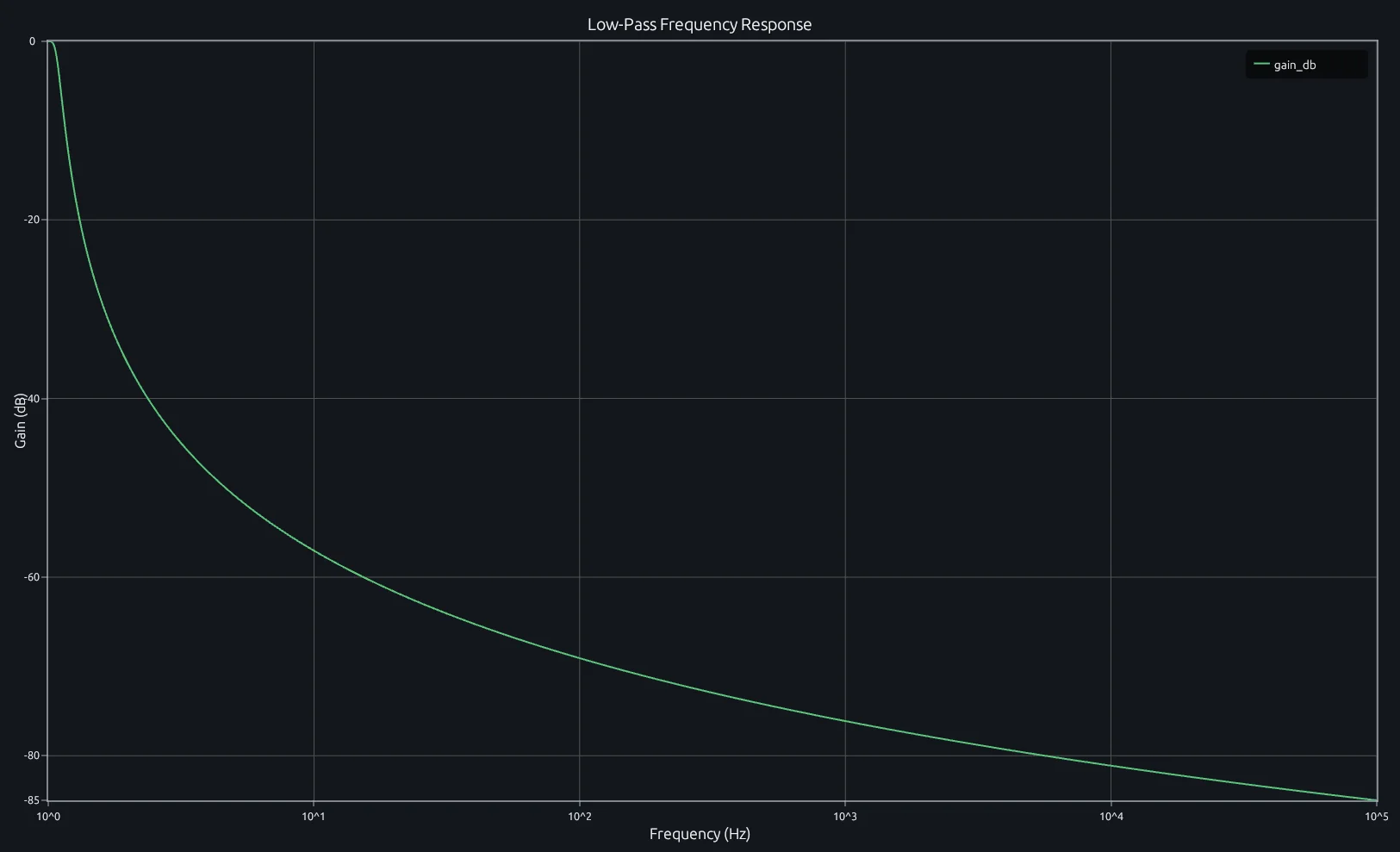
Compare this result with other chart types in the MATLAB Plot Gallery.
Using semilogx with coding agents
Open a RunMat example with live inputs, then ask the agent to explain how semilogx changes the result.
Run a small semilogx example, explain the result, then change one input and compare the output.
FAQ
When should I use semilogx instead of plot?⌄
Use semilogx when your x-data spans several orders of magnitude and you care about relative differences across that range. Frequency response curves (Bode magnitude plots) are the classic example — frequencies from 1 Hz to 100 kHz are unreadable on a linear axis but spread evenly on a log scale.
How is semilogx different from calling plot and then switching the x-axis to log?⌄
Functionally identical. semilogx(x, y) is shorthand for plot(x, y) followed by set(gca, 'XScale', 'log'). The convenience form just does both in one call and makes intent clearer when reading code.
What happens if my x-data contains zero or negative values?⌄
Logarithmic axes only render positive values. Zero and negative x-values are silently excluded from the rendered line — the data handle still holds them, but they won't appear on the plot. Filter your data to the positive domain if you need a continuous curve.
Related Plotting functions
2D Charts
area · bar · errorbar · heatmap · hist · histogram · loglog · pie · plot · scatter · semilogy · stairs · stem
Other
addpoints · ancestor · animatedline · axes · barh · caxis · cla · clf · clim · colorcube · colororder · copyobj · daspect · datacursormode · dataTipTextRow · fcontour · figure · fill · fill3 · findobj · fsurf · gobjects · groot · hgload · hgsave · hidden · histogram2 · hold · line · linkaxes · openfig · opengl · pan · parula · patch · plotmatrix · plotyy · polarhistogram · polarplot · polarscatter · print · quiver3 · ribbon · saveas · savefig · sphere · stackedplot · subtitle · suptitle · text · textscatter · textscatter3 · triplot · waitbar · wordcloud · xlabel · xlim · xline · xscale · xtickangle · xtickformat · xticklabels · xticks · ylabel · ylim · yline · yscale · ytickangle · ytickformat · yticklabels · yticks · zlim · zoom
More plotting resources
Open-source implementation
Unlike proprietary runtimes, every RunMat function is open-source. Read exactly how semilogx is executed, line by line, in Rust.
- View the source for semilogx in Rust on GitHub
- Learn how the RunMat runtime works
- Found a bug? Open an issue with a minimal reproduction.
About RunMat
RunMat is an open-source runtime that executes MATLAB-syntax code blazing on any GPU. It is licensed under the Apache 2.0 license.
- RunMat automatically optimizes your math for GPU execution on Apple, Nvidia, and AMD hardware. No code changes needed. Simulations that took hours now take minutes.
- Start running code in seconds. RunMat runs in the browser, on the desktop, or from the CLI. No license server, no IT ticket.