
contourf — Create filled contour plots in MATLAB and RunMat.
contourf creates filled contour plots by coloring regions between contour levels. RunMat returns an opaque contour-fill handle; MATLAB's contour-matrix first output and two-output [M, c] form remain graphics-representation gaps.
Syntax
h = contourf(Z)
h = contourf(Z, V)
h = contourf(Z, Name, Value, ...)
h = contourf(Z, V, Name, Value, ...)
h = contourf(X, Y, Z)
h = contourf(X, Y, Z, V)
h = contourf(X, Y, Z, V, Name, Value, ...)
h = contourf(ax, ...)
Inputs
| Name | Type | Required | Default | Description |
|---|---|---|---|---|
Z | NumericArray | Yes | — | Contour height grid. |
V | Any | Yes | — | Contour level count/value vector. |
props | Any | Variadic | — | Name/value contour options. |
X | NumericArray | Yes | — | X coordinate vector matching Z columns or coordinate matrix matching Z. |
Y | NumericArray | Yes | — | Y coordinate vector matching Z rows or coordinate matrix matching Z. |
ax | Any | Yes | — | Target axes object. |
args | Any | Variadic | — | Any supported filled-contour data, level, line-specification, and property arguments. |
Returns
| Name | Type | Description |
|---|---|---|
h | NumericScalar | Handle to filled contour plot. |
Errors
| Identifier | When | Message |
|---|---|---|
RunMat:contourf:InvalidArgument | Contour input arrays, level arguments, or name/value options are invalid. | contourf: invalid argument |
RunMat:contourf:Internal | Internal filled-contour render preparation fails unexpectedly. | contourf: internal operation failed |
How contourf works
contourf(Z)uses implicit axes,contourf(X, Y, Z)accepts strictly monotonic coordinate vectors or coordinate matrices that vary along opposite dimensions, andcontourf(ax, ...)selects an existing axes target.- All eight built-in integer classes are documented for
X,Y,Z, positional level counts/vectors,LevelList, andLevelStep; RunMat also accepts them for positiveLineWidthvalues. Shape, distinctness, coordinate-matrix identity, ordering, count, and scalar constraints are checked from authoritative storage before floating graphics conversion. - The returned value is a contour-fill handle in the plotting object system.
- A scalar level is a positive bounded requested level count, a vector is an explicit monotonically increasing level list, and
[k k]requests one level atk. contourfworks naturally withcolorbarandcolormapbecause filled regions are fundamentally color-mapped scalar ranges.- The public compatibility surface accepts GPU arrays but executes on the client. Resident integer inputs therefore gather through their owning provider, while RunMat additionally accelerates eligible floating
Zgrids through its shared WGPU plotting context. - Typed-integer
LineColorRGB triplets containing only exact 0/1 channels use the separately gatedcontour-integer-line-colorRunMat extension. - The broader Contour property surface, contour labels, post-construction typed data mutation, and MATLAB contour-matrix/object output forms remain general graphics gaps.
Examples
Create a filled contour plot
[X, Y] = meshgrid(-2:0.25:2, -2:0.25:2);
Z = X .* exp(-X.^2 - Y.^2);
contourf(X, Y, Z);
colorbar;
Use explicit levels with a colormap
[X, Y] = meshgrid(-3:0.2:3, -3:0.2:3);
Z = cos(X) .* sin(Y);
contourf(X, Y, Z, [-0.75 -0.25 0 0.25 0.75]);
colormap('turbo');
Inspect the returned contour-fill handle
[X, Y] = meshgrid(1:20, 1:20);
Z = X - Y;
h = contourf(X, Y, Z);
get(h, 'Type')
Expected output:
ans =
    'contour'
Filled scalar field with explicit levels
[X, Y] = meshgrid(linspace(-3, 3, 150), linspace(-3, 3, 150));
Z = sin(X) .* cos(Y) + 0.5*sin(2*X + Y);

contourf(X, Y, Z, 25);
colormap('turbo');
colorbar;
title('Interference Pattern — Filled Contours');
xlabel('x');
ylabel('y');
axis equal;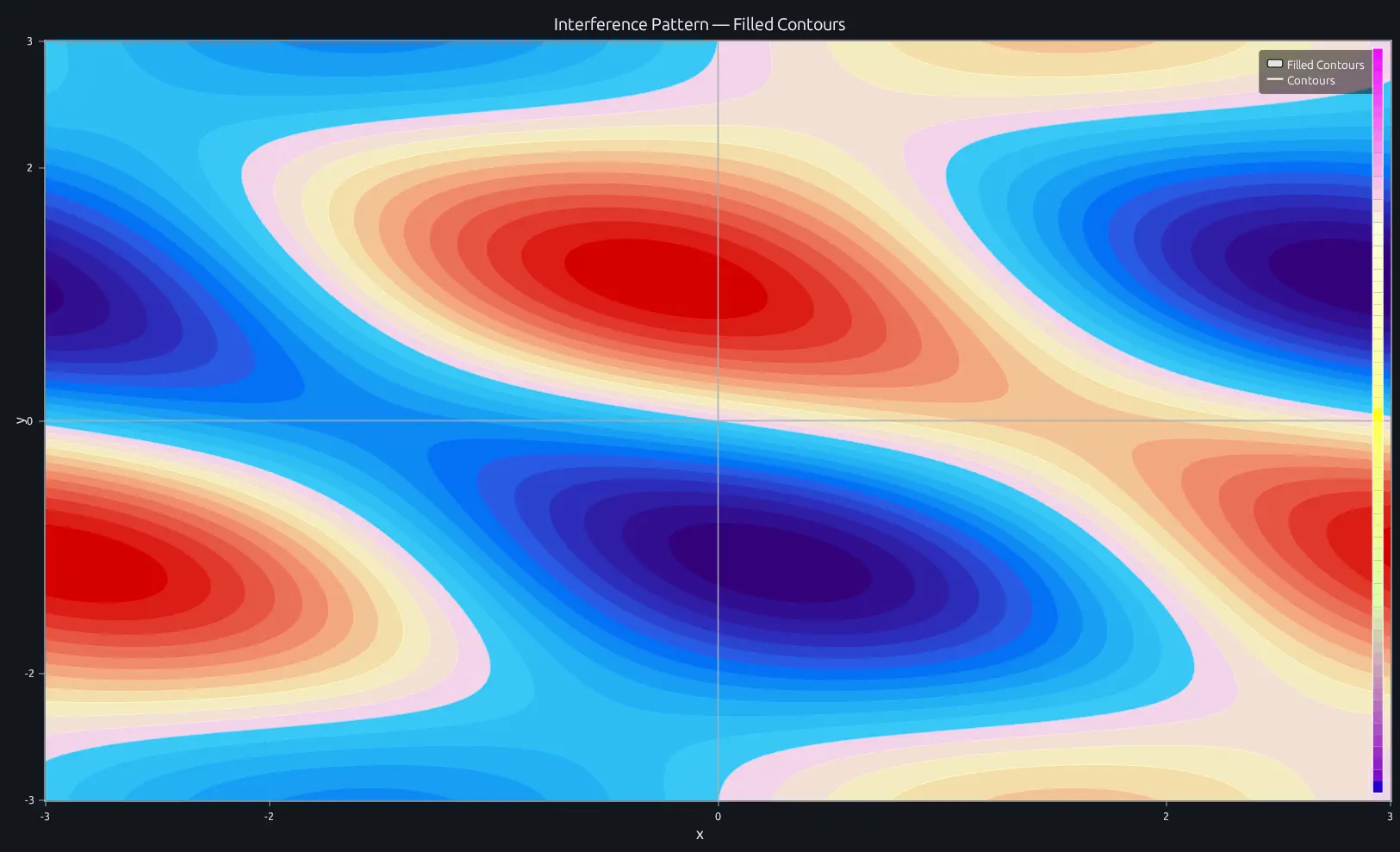
Compare this result with other chart types in the MATLAB Plot Gallery.
Using contourf with coding agents
Open a RunMat example with live inputs, then ask the agent to explain how contourf changes the result.
Run a small contourf example, explain the result, then change one input and compare the output.
FAQ
What's the difference between contourf and contour?⌄
contourf fills the regions between contour levels with solid colors from the colormap. contour draws only the boundary lines. If you're building a heatmap-style visualization where color bands carry meaning, contourf is the right choice. If you just need iso-lines overlaid on something else, use contour.
How does the colormap interact with contourf?⌄
Each filled region maps to a range in the active colormap based on its contour level. Calling colormap('hot') after contourf recolors all regions immediately. Pair it with colorbar to show the value-to-color mapping.
contourf(X, Y, Z, 15);
colormap('hot');
colorbar;
How do I control the number of filled levels?⌄
Pass an integer as the fourth argument to set the level count: contourf(X, Y, Z, 20) creates 20 levels. For exact control, pass a vector of level values instead: contourf(X, Y, Z, [-1 -0.5 0 0.5 1]). More levels give smoother color transitions but add rendering cost on large grids.
Related Plotting functions
2D Charts
area · bar · errorbar · heatmap · hist · histogram · loglog · pie · plot · scatter · semilogx · semilogy · stairs · stem
Other
addpoints · ancestor · animatedline · axes · barh · caxis · cla · clf · clim · colorcube · colororder · copyobj · daspect · datacursormode · dataTipTextRow · fcontour · figure · fill · fill3 · findobj · fsurf · gobjects · groot · hgload · hgsave · hidden · histogram2 · hold · line · linkaxes · openfig · opengl · pan · parula · patch · plotmatrix · plotyy · polarhistogram · polarplot · polarscatter · print · quiver3 · ribbon · saveas · savefig · sphere · stackedplot · subtitle · suptitle · text · textscatter · textscatter3 · triplot · waitbar · wordcloud · xlabel · xlim · xline · xscale · xtickangle · xtickformat · xticklabels · xticks · ylabel · ylim · yline · yscale · ytickangle · ytickformat · yticklabels · yticks · zlim · zoom
More plotting resources
Open-source implementation
Unlike proprietary runtimes, every RunMat function is open-source. Read exactly how contourf is executed, line by line, in Rust.
- View the source for contourf in Rust on GitHub
- Learn how the RunMat runtime works
- Found a bug? Open an issue with a minimal reproduction.
About RunMat
RunMat is an open-source runtime that executes MATLAB-syntax code blazing on any GPU. It is licensed under the Apache 2.0 license.
- RunMat automatically optimizes your math for GPU execution on Apple, Nvidia, and AMD hardware. No code changes needed. Simulations that took hours now take minutes.
- Start running code in seconds. RunMat runs in the browser, on the desktop, or from the CLI. No license server, no IT ticket.