
pie — Create pie charts in MATLAB and RunMat.
pie creates part-to-whole charts from numeric slice values. Handle behavior, explode controls, and labeling follow MATLAB semantics.
Syntax
h = pie(X)
h = pie(X, explode)
h = pie(X, labels)
h = pie(X, explode, labels)
h = pie(ax, ...)
Inputs
| Name | Type | Required | Default | Description |
|---|---|---|---|---|
X | NumericArray | Yes | — | Slice values. |
explode | NumericArray | Yes | — | Slice explode mask (nonzero elements explode). |
labels | Any | Yes | — | Label list or label format string. |
ax | NumericScalar | Yes | — | Target axes handle. |
data | Any | Variadic | — | Pie data arguments. |
Returns
| Name | Type | Description |
|---|---|---|
h | NumericScalar | Handle to the pie chart. |
Errors
| Identifier | When | Message |
|---|---|---|
RunMat:pie:InvalidArgument | Pie values, explode vectors, or labels are malformed or incompatible. | pie: invalid argument |
RunMat:pie:Internal | Internal render preparation fails. | pie: internal operation failed |
How pie works
- Typed-integer slice values are a RunMat-mode extension and cross an exactness-checked floating renderer boundary; typed explode controls are interpreted structurally.
- Slice values determine the relative angular extent of each wedge.
- Explode-style workflows and slice labels are part of the pie rendering path.
- The returned value is a pie-handle object participating in the same broader plotting handle model used across the plotting stack.
- Pie labels and overlay semantics survive replay/export because they are part of the shared event/scene path.
- Pie charts are especially useful as the part-to-whole complement to bar and histogram-style quantitative plots.
Examples
Create a basic pie chart
pie([2 3 5]);Create an exploded pie chart
values = [4 2 3 1];
explode = [1 0 1 0];
pie(values, explode);
Use labels for slice names
values = [5 3 2];
labels = {'compute', 'io', 'render'};
pie(values, labels);
Budget allocation
values = [35 25 20 12 8];
labels = {'Engineering', 'Marketing', 'Operations', 'R&D', 'Admin'};
explode = [1 0 0 0 0];

pie(values, explode);
title('Annual Budget Allocation');
legend(labels);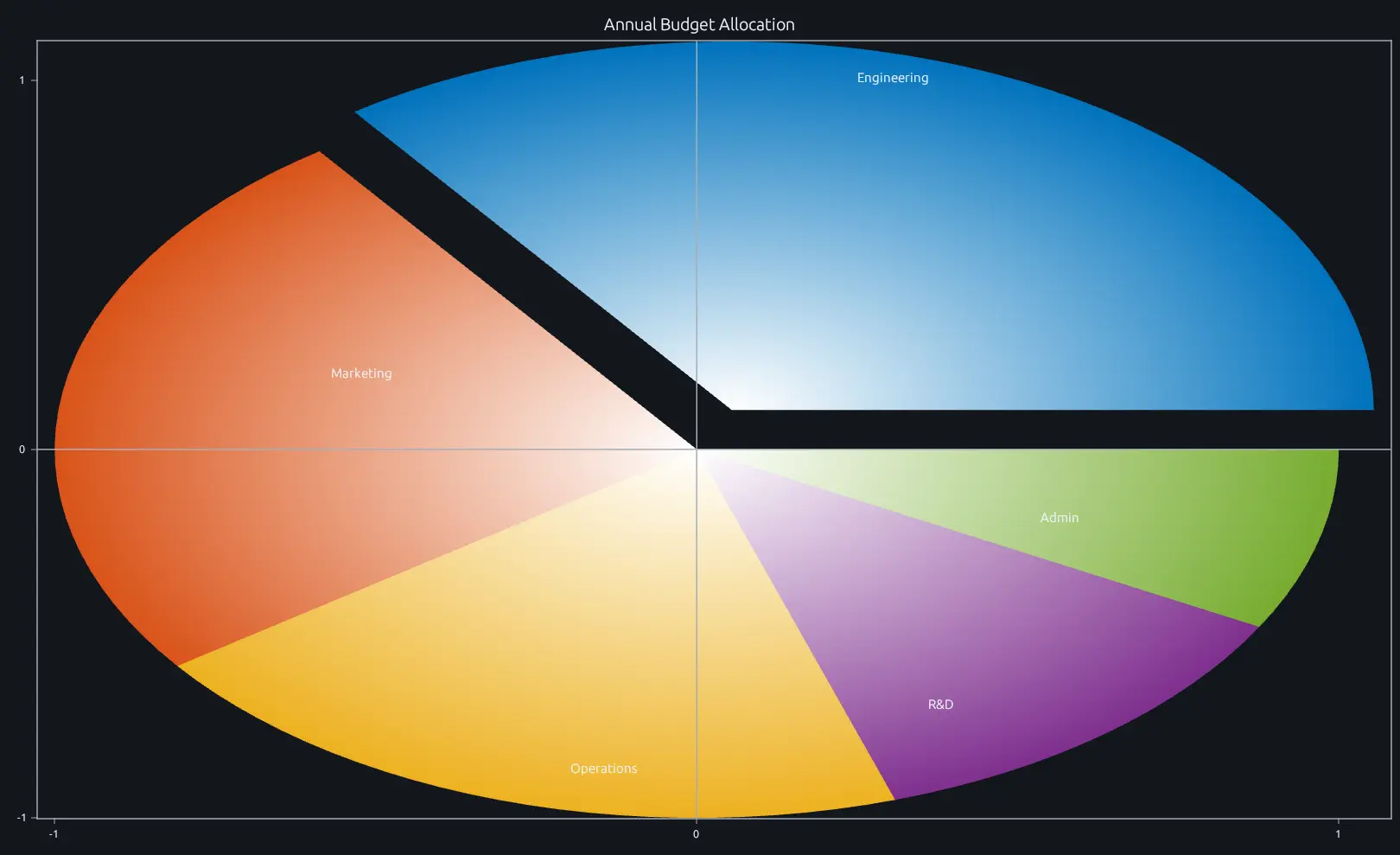
Compare this result with other chart types in the MATLAB Plot Gallery.
Using pie with coding agents
Open a RunMat example with live inputs, then ask the agent to explain how pie changes the result.
Run a small pie example, explain the result, then change one input and compare the output.
FAQ
How do I explode specific slices out of the pie?⌄
Pass an explode vector the same length as your values. A 1 pulls that slice outward; a 0 keeps it flush.
pie([4 2 3 1], [0 1 0 0]);This explodes only the second slice. You can explode multiple slices by setting more entries to 1.
How do I add percentage labels to slices?⌄
By default, pie displays percentage labels on each slice. To use custom labels instead, pass a cell array of strings as the second argument.
pie([5 3 2], {'compute 50%', 'io 30%', 'render 20%'});If you want no labels at all, pass empty strings for each slice.
When should I use a pie chart vs a bar chart?⌄
Pie charts work well when you have a small number of slices (2–5) and the point is to show each slice's share of a whole. Once you go beyond ~6 slices or need to compare absolute values across categories, bar is almost always clearer—humans are better at comparing lengths than angles. If two slices are close in size and the difference matters, use bar.
Related Plotting functions
2D Charts
area · bar · errorbar · heatmap · hist · histogram · loglog · plot · scatter · semilogx · semilogy · stairs · stem
Other
addpoints · ancestor · animatedline · axes · barh · caxis · cla · clf · clim · colorcube · colororder · copyobj · daspect · datacursormode · dataTipTextRow · fcontour · figure · fill · fill3 · findobj · fsurf · gobjects · groot · hgload · hgsave · hidden · histogram2 · hold · line · linkaxes · openfig · opengl · pan · parula · patch · plotmatrix · plotyy · polarhistogram · polarplot · polarscatter · print · quiver3 · ribbon · saveas · savefig · sphere · stackedplot · subtitle · suptitle · text · textscatter · textscatter3 · triplot · waitbar · wordcloud · xlabel · xlim · xline · xscale · xtickangle · xtickformat · xticklabels · xticks · ylabel · ylim · yline · yscale · ytickangle · ytickformat · yticklabels · yticks · zlim · zoom
More plotting resources
Open-source implementation
Unlike proprietary runtimes, every RunMat function is open-source. Read exactly how pie is executed, line by line, in Rust.
- View the source for pie in Rust on GitHub
- Learn how the RunMat runtime works
- Found a bug? Open an issue with a minimal reproduction.
About RunMat
RunMat is an open-source runtime that executes MATLAB-syntax code blazing on any GPU. It is licensed under the Apache 2.0 license.
- RunMat automatically optimizes your math for GPU execution on Apple, Nvidia, and AMD hardware. No code changes needed. Simulations that took hours now take minutes.
- Start running code in seconds. RunMat runs in the browser, on the desktop, or from the CLI. No license server, no IT ticket.