
patch — Create filled polygon patch graphics from coordinate data or Faces/Vertices definitions.
patch creates filled polygon graphics objects from coordinate arrays, faces/vertices inputs, or name-value property forms, with MATLAB-compatible plotting-handle behavior.
Syntax
h = patch(X, Y, C)
h = patch(X, Y, Z)
h = patch(X, Y, Z, C)
h = patch(S)
h = patch('Faces', F, 'Vertices', V, ...)
h = patch(ax, ...)
Inputs
| Name | Type | Required | Default | Description |
|---|---|---|---|---|
X | NumericArray | Yes | — | Patch X coordinates. |
Y | NumericArray | Yes | — | Patch Y coordinates. |
C | Any | Yes | — | Face color specification. |
Z | NumericArray | Yes | — | Patch Z coordinates. |
S | Any | Yes | — | Struct containing patch properties. |
facevert | Any | Variadic | — | Faces/Vertices property/value pairs. |
props | Any | Variadic | — | Additional patch property/value pairs. |
ax | NumericScalar | Yes | — | Target axes handle. |
data | Any | Variadic | — | Patch positional/property arguments. |
Returns
| Name | Type | Description |
|---|---|---|
h | NumericScalar | Handle to the created patch object. |
Errors
| Identifier | When | Message |
|---|---|---|
RunMat:patch:InvalidArgument | Patch coordinates, faces/vertices, or property/value arguments are malformed. | patch: invalid argument |
RunMat:patch:Internal | Internal patch triangulation/render setup fails unexpectedly. | patch: internal operation failed |
How patch works
- Vector coordinate inputs create one polygon.
- Matrix coordinate inputs create one polygon per column.
- Patch edges close automatically, matching MATLAB's open-polygon behavior.
Facesvalues are interpreted as MATLAB-style one-based vertex indices.- 2-D vertices are accepted as N-by-2; 3-D vertices are accepted as N-by-3.
XData,YData,ZData,CData,Faces, andVerticespreserve nativesingle,double, or integer class, shape, and exact host values even though renderer geometry is floating.- A typed-integer numeric alias for a leading axes handle is a gated RunMat extension; ordinary axes objects remain the compatibility form.
- The returned value is a patch graphics handle that works with
get,set,ishandle, andisgraphics. - Per-vertex or per-face
CDatacolormap interpolation is not yet implemented; non-scalar color data is accepted only as compatibility input and currently falls back to the default face color unlessFaceColorsupplies a concrete RGB/color-name value.
Options
FaceColoraccepts color names, RGB triples,flat, ornone.EdgeColoraccepts color names, RGB triples, ornone.FaceAlphaandEdgeAlphaaccept numeric values from 0 to 1.LineWidth,DisplayName, andVisibleuse the shared plotting property model.FaceColor,EdgeColor, alpha, line width, display name, visibility,Faces,Vertices,XData,YData, andZDataare the first supported patch property set. Lighting, normals, texture coordinates, and callback properties are deferred.
Does RunMat run patch on the GPU?
Patch rendering is a plotting sink and fusion barrier.
Host and gathered-GPU inputs produce the same graphics object and handle behavior.
A future direct GPU path should preserve the same Faces/Vertices semantics and only replace the triangulation/packing step.
GPU memory and residency
patch gathers GPU-resident coordinate inputs in the first implementation because MATLAB-compatible patch parsing requires shape validation, one-based Faces handling, NaN padding, and polygon triangulation. The rendered geometry still flows through the shared GPU plotting renderer.
Examples
Create a triangle patch
x = [0 1 0];
y = [0 0 1];
patch(x, y, 'red');
Create two rectangle patches from matrix columns
X = [0 2; 1 3; 1 3; 0 2];
Y = [0 0; 0 0; 1 1; 1 1];
patch(X, Y, 'cyan', 'EdgeColor', 'black');
Create a patch from Faces and Vertices
V = [0 0; 1 0; 1 1; 0 1];
F = [1 2 3 4];
h = patch('Faces', F, 'Vertices', V, 'FaceColor', [0.2 0.6 0.9]);
get(h, 'Type')
Expected output:
ans =
    'patch'
Create a 3-D patch
V = [0 0 0; 1 0 0; 0.5 1 0.5];
F = [1 2 3];
patch('Faces', F, 'Vertices', V, 'FaceAlpha', 0.6);
view(3);
Rendered patch example
vertices = [-1 -1 0; 1 -1 0; 1 1 0; -1 1 0; 0 0 1.8];
faces = [1 2 5; 2 3 5; 3 4 5; 4 1 5];

patch('Faces', faces, 'Vertices', vertices, 'FaceColor', [0.25 0.65 0.95], 'EdgeColor', [0.9 0.95 1.0], 'FaceAlpha', 0.72);
title('Triangulated Sensor Housing');
xlabel('x');
ylabel('y');
zlabel('z');
view(38, 24);
axis equal;
grid on;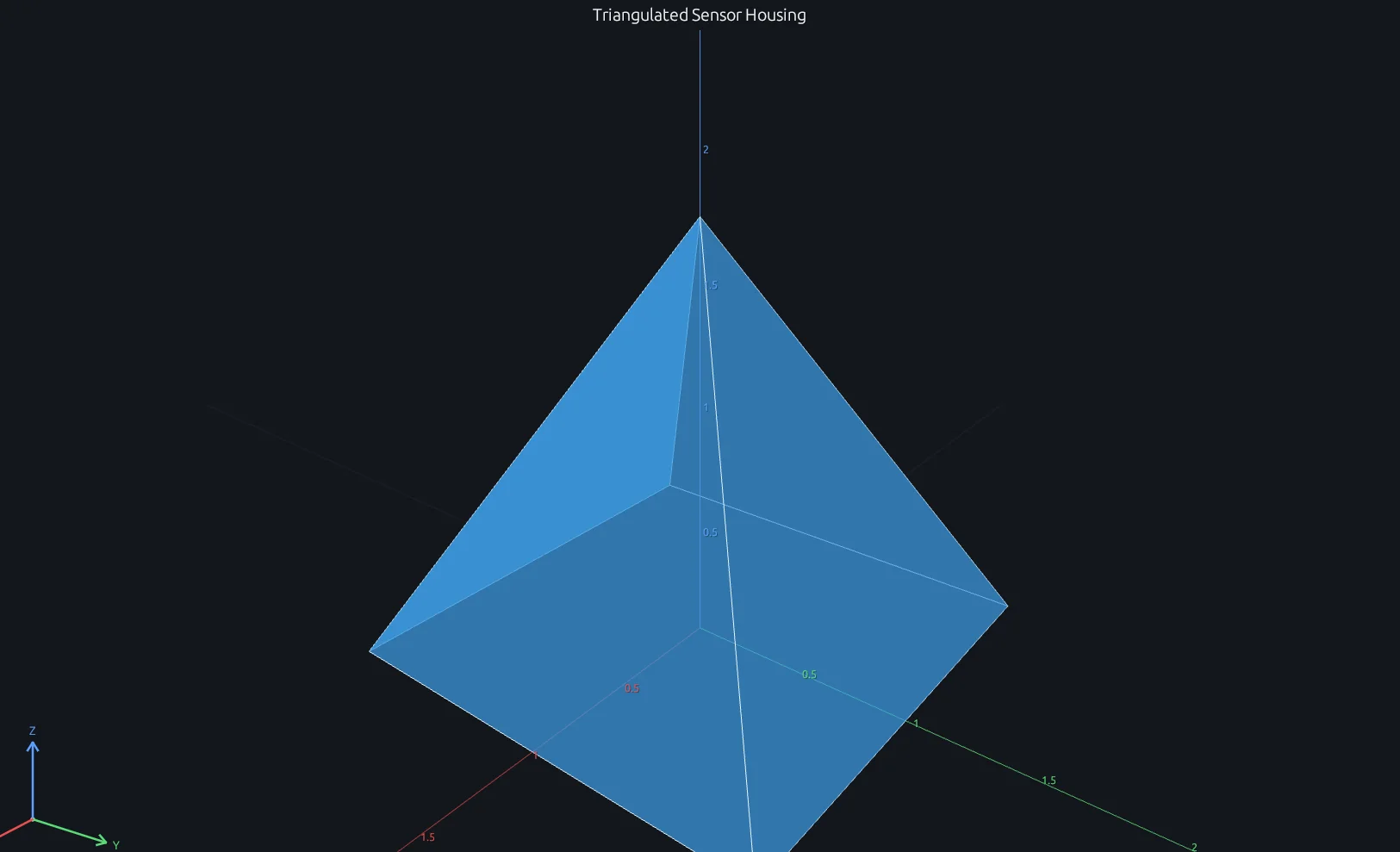
Compare this result with other chart types in the MATLAB Plot Gallery.
Using patch with coding agents
Open a RunMat example with live inputs, then ask the agent to explain how patch changes the result.
Run a small patch example, explain the result, then change one input and compare the output.
FAQ
Does patch close polygons automatically?⌄
Yes. You can provide open polygon coordinate lists; RunMat closes the edge loop when rendering the patch.
Are Faces indices zero-based or one-based?⌄
They are one-based to match MATLAB. Faces = [1 2 3] references the first, second, and third rows of Vertices.
Does patch have a direct GPU-resident geometry path?⌄
Not yet. RunMat gathers GPU-resident patch inputs for validation and triangulation, then submits the resulting geometry to the shared GPU renderer. A direct GPU triangulation/packing path can be added later for very large patch meshes.
Related Plotting functions
2D Charts
area · bar · errorbar · heatmap · hist · histogram · loglog · pie · plot · scatter · semilogx · semilogy · stairs · stem
Other
addpoints · ancestor · animatedline · axes · barh · caxis · cla · clf · clim · colorcube · colororder · copyobj · daspect · datacursormode · dataTipTextRow · fcontour · figure · fill · fill3 · findobj · fsurf · gobjects · groot · hgload · hgsave · hidden · histogram2 · hold · line · linkaxes · openfig · opengl · pan · parula · plotmatrix · plotyy · polarhistogram · polarplot · polarscatter · print · quiver3 · ribbon · saveas · savefig · sphere · stackedplot · subtitle · suptitle · text · textscatter · textscatter3 · triplot · waitbar · wordcloud · xlabel · xlim · xline · xscale · xtickangle · xtickformat · xticklabels · xticks · ylabel · ylim · yline · yscale · ytickangle · ytickformat · yticklabels · yticks · zlim · zoom
More plotting resources
Open-source implementation
Unlike proprietary runtimes, every RunMat function is open-source. Read exactly how patch is executed, line by line, in Rust.
- View the source for patch in Rust on GitHub
- Learn how the RunMat runtime works
- Found a bug? Open an issue with a minimal reproduction.
About RunMat
RunMat is an open-source runtime that executes MATLAB-syntax code blazing on any GPU. It is licensed under the Apache 2.0 license.
- RunMat automatically optimizes your math for GPU execution on Apple, Nvidia, and AMD hardware. No code changes needed. Simulations that took hours now take minutes.
- Start running code in seconds. RunMat runs in the browser, on the desktop, or from the CLI. No license server, no IT ticket.