
yline — Draw horizontal reference lines on current or specified axes with MATLAB-compatible styling forms.
yline adds one or more horizontal reference lines with optional labels, line specs, and name-value styling, following MATLAB-compatible plotting behavior.
Syntax
h = yline(y)
h = yline(y, styleOrLabel)
h = yline(y, LineSpec, label)
h = yline(y, Name, Value, ...)
Inputs
| Name | Type | Required | Default | Description |
|---|---|---|---|---|
y | NumericArray | Yes | — | Y-coordinate scalar or numeric vector of horizontal line positions. |
style_or_label | Any | No | — | LineSpec token (for example '--r') or label text. |
linespec | StyleSpec | Yes | — | Line style token (for example '--r'). |
label | StringScalar | Yes | — | Reference line label text. |
props | Any | Variadic | — | Style arguments and Name/Value pairs (Color, LineWidth, LineStyle, LabelOrientation, Visible). |
Returns
| Name | Type | Description |
|---|---|---|
h | NumericArray | Reference line handle scalar or row vector when multiple coordinates are provided. |
Errors
| Identifier | When | Message |
|---|---|---|
RunMat:yline:InvalidArgument | Coordinate input, style arguments, or Name/Value pairs are invalid. | yline: invalid argument |
RunMat:yline:Internal | Internal plotting state update fails. | yline: internal operation failed |
How yline works
yline(y)adds a horizontal reference line at each coordinate iny. Coordinates may use any native integer class and cross to the graphics coordinate domain after validation.- Reference lines append to the current axes without replacing existing plot content.
- Line spans follow the active axes limits, including later
xlimandylimchanges. - The returned handle supports
getandsetforValue,Color,LineWidth,LineStyle,Label,LabelOrientation,DisplayName, andVisible. - Integer RGB components must be zero or one, integer line widths must be positive, and numeric
Visiblevalues must be exactly zero or one.
Examples
Add a zero baseline
plot(-5:5, (-5:5).^2 - 10);
yline(0, 'k', 'LineWidth', 1);
Expected output:
% Adds a black horizontal reference line at y = 0Label a baseline
plot(1:10, rand(1, 10));
yline(0.5, ':', 'Baseline', 'LabelOrientation', 'horizontal');
Expected output:
% Adds a dotted labeled horizontal reference lineRendered yline example
time = 0:0.2:10;
current = 7.2 + 0.35*time + 0.9*sin(1.3*time);
limit = 11;

plot(time, current, 'LineWidth', 2);
yline(limit, '--r', 'Operating limit', 'LineWidth', 1.5);
title('Motor Current During Ramp');
xlabel('Time (s)');
ylabel('Current (A)');
grid on;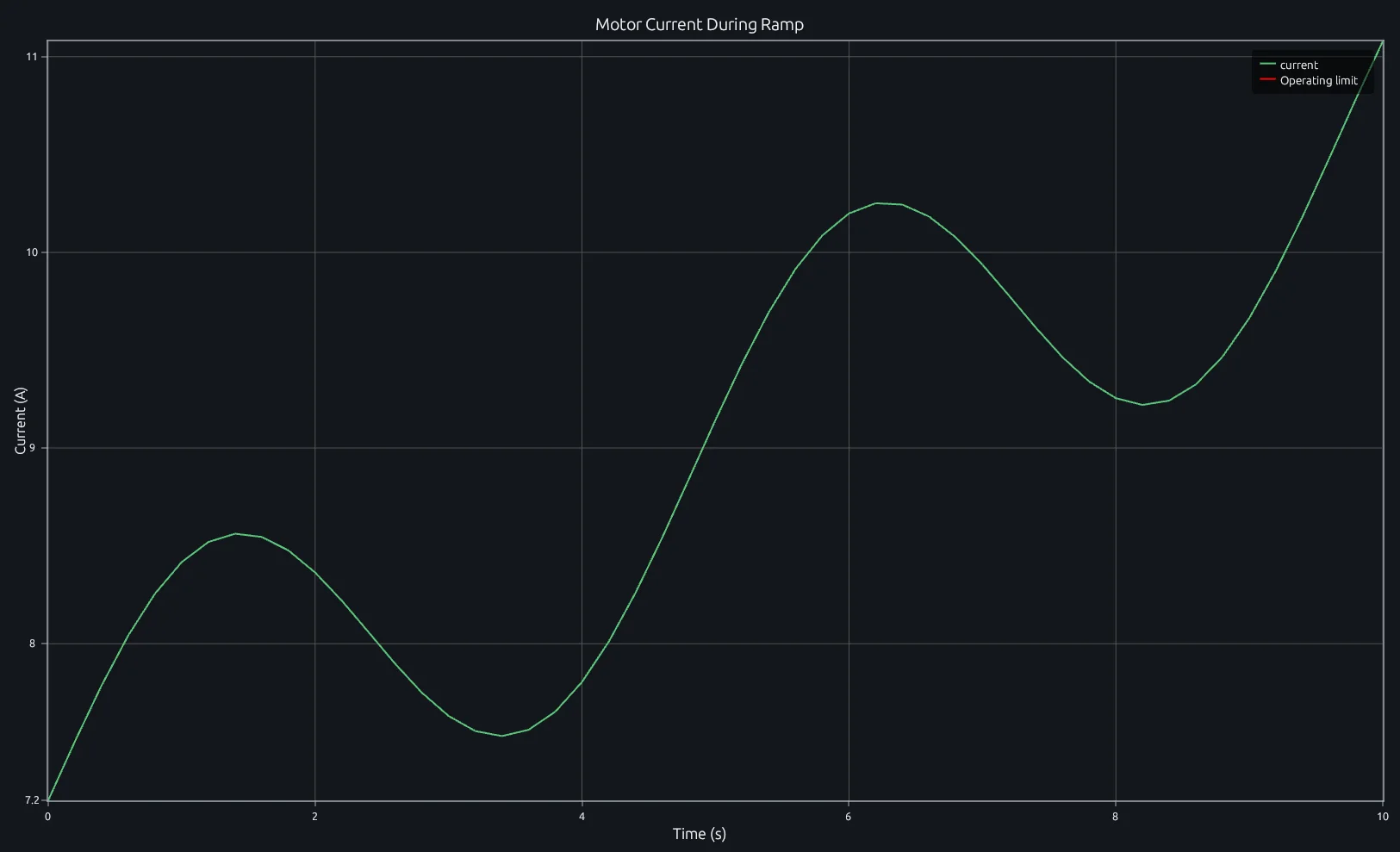
Compare this result with other chart types in the MATLAB Plot Gallery.
Using yline with coding agents
Open a RunMat example with live inputs, then ask the agent to explain how yline changes the result.
Run a small yline example, explain the result, then change one input and compare the output.
Related Plotting functions
2D Charts
area · bar · errorbar · heatmap · hist · histogram · loglog · pie · plot · scatter · semilogx · semilogy · stairs · stem
Other
addpoints · ancestor · animatedline · axes · barh · caxis · cla · clf · clim · colorcube · colororder · copyobj · daspect · datacursormode · dataTipTextRow · fcontour · figure · fill · fill3 · findobj · fsurf · gobjects · groot · hgload · hgsave · hidden · histogram2 · hold · line · linkaxes · openfig · opengl · pan · parula · patch · plotmatrix · plotyy · polarhistogram · polarplot · polarscatter · print · quiver3 · ribbon · saveas · savefig · sphere · stackedplot · subtitle · suptitle · text · textscatter · textscatter3 · triplot · waitbar · wordcloud · xlabel · xlim · xline · xscale · xtickangle · xtickformat · xticklabels · xticks · ylabel · ylim · yscale · ytickangle · ytickformat · yticklabels · yticks · zlim · zoom
About RunMat
RunMat is an open-source runtime that executes MATLAB-syntax code blazing on any GPU. It is licensed under the Apache 2.0 license.
- RunMat automatically optimizes your math for GPU execution on Apple, Nvidia, and AMD hardware. No code changes needed. Simulations that took hours now take minutes.
- Start running code in seconds. RunMat runs in the browser, on the desktop, or from the CLI. No license server, no IT ticket.