
fill3 — Create 3-D filled polygon patches in MATLAB and RunMat.
fill3 creates filled polygon patch objects from X, Y, and Z coordinate data in 3-D axes. It reuses the shared patch pipeline, so handle behavior and patch name-value properties follow MATLAB semantics.
Syntax
h = fill3(X, Y, Z, C)
h = fill3(X1, Y1, Z1, C1, ..., Xn, Yn, Zn, Cn)
h = fill3(X1, Y1, Z1, C1, ..., Name, Value, ...)
h = fill3(ax, X, Y, Z, C)
h = fill3(ax, X1, Y1, Z1, C1, ..., Xn, Yn, Zn, Cn)
h = fill3(ax, X1, Y1, Z1, C1, ..., Name, Value, ...)
Inputs
| Name | Type | Required | Default | Description |
|---|---|---|---|---|
X | NumericArray | Yes | — | Polygon X coordinates. |
Y | NumericArray | Yes | — | Polygon Y coordinates. |
Z | NumericArray | Yes | — | Polygon Z coordinates. |
C | Any | Yes | — | Color specification. |
groups | Any | Variadic | — | One or more `(X, Y, Z, C)` polygon groups. |
props | Any | Variadic | — | Trailing patch name/value property pairs. |
ax | AxesHandle | Yes | — | Target axes handle. |
Returns
| Name | Type | Description |
|---|---|---|
h | Any | Handle or row-vector of handles for created patch objects. |
Errors
| Identifier | When | Message |
|---|---|---|
RunMat:fill3:InvalidArgument | Input groups, axes targeting, or trailing property pairs are invalid. | fill3: invalid argument |
RunMat:fill3:Internal | Internal patch construction or rendering fails unexpectedly. | fill3: internal operation failed |
How fill3 works
fill3(X, Y, Z, C)creates one or more 3-D filled polygons from matching coordinate arrays.- Equal-length row or column vector coordinate inputs create one polygon regardless of orientation.
- When any coordinate is a matrix, coordinate vectors matching its row count are shared across its columns; square matrices are deterministically grouped by columns.
- Matrix coordinate inputs create one independently addressable Patch object per column and return one handle per column.
- Multiple
X,Y,Z,Cgroups in one call create multiple patch objects and return a row vector of patch handles. - A single polygon group returns a scalar patch handle.
fill3initializes the target axes with the standard 3-D view, so even polygons in the z=0 plane render as 3-D patch content.- Trailing patch property name-value pairs are applied to every polygon group in the call.
- The returned patch handles work with
get,set,ishandle, andisgraphics. - Color strings and RGB triples are supported through the shared patch color parser.
- Numeric C is retained as authoritative CData for indexed color mapping; color strings and RGB triples use the shared Patch color parser.
- Integer XData, YData, ZData, and CData preserve their original class, exact values, and shape independently of renderer geometry.
Options
FaceColoraccepts color names, RGB triples,flat, ornonethroughpatch.EdgeColoraccepts color names, RGB triples, ornone.FaceAlphaandEdgeAlphaaccept numeric values from 0 to 1.LineWidth,DisplayName, andVisibleuse the shared plotting property model.- Explicit axes handles are accepted as the leading argument, matching other RunMat plotting builtins.
Does RunMat run fill3 on the GPU?
fill3 shares patch rendering behavior, so host and gathered-GPU coordinate inputs produce the same patch objects and graphics handles.
Rendered geometry flows through the shared GPU plotting renderer after the patch objects are built.
A future direct GPU path should preserve the same X,Y,Z,C grouping and patch property semantics while replacing only the coordinate gathering and geometry packing stage.
GPU memory and residency
fill3 is a plotting sink and fusion barrier. GPU-resident coordinate inputs are gathered before patch construction because MATLAB-compatible parsing requires shape validation and polygon assembly.
Examples
Create a red square in the z=0 plane
x = [0 1 1 0];
y = [0 0 1 1];
z = [0 0 0 0];
h = fill3(x, y, z, 'r');
get(h, 'Type')
Expected output:
ans =
    'patch'
Create two filled polygons in one call
x1 = [0 1 0];
y1 = [0 0 1];
z1 = [0 0 0];
x2 = [2 3 3 2];
y2 = [0 0 1 1];
z2 = [1 1 1 1];
h = fill3(x1, y1, z1, 'g', x2, y2, z2, [0 0 1]);
Apply patch properties to a fill3 polygon
x = [0 1 0];
y = [0 0 1];
z = [0.25 0.5 0.75];
h = fill3(x, y, z, [0.25 0.5 0.75], 'EdgeColor', 'none', 'FaceAlpha', 0.5);
Create one patch per matrix column
X = [0 2; 1 3; 1 3; 0 2];
Y = [0 0; 0 0; 1 1; 1 1];
Z = [0 1; 0 1; 0 1; 0 1];
fill3(X, Y, Z, 'cyan');
view(3);
Rendered fill3 example
x1 = [0 1.3 0.2];
y1 = [0 0.2 1.1];
z1 = [0.2 0.5 1.2];
x2 = [1.5 2.8 2.6 1.4];
y2 = [0.1 0.1 1.1 1.2];
z2 = [1.0 1.0 1.7 1.7];
x3 = [0.4 1.2 0.8];
y3 = [1.5 1.7 2.6];
z3 = [0.4 1.3 0.8];

fill3(x1, y1, z1, [0.2 0.7 0.95], x2, y2, z2, [0.95 0.45 0.2], x3, y3, z3, [0.4 0.85 0.45]);
title('3-D Polygon Assembly');
xlabel('x');
ylabel('y');
zlabel('z');
view(38, 25);
grid on;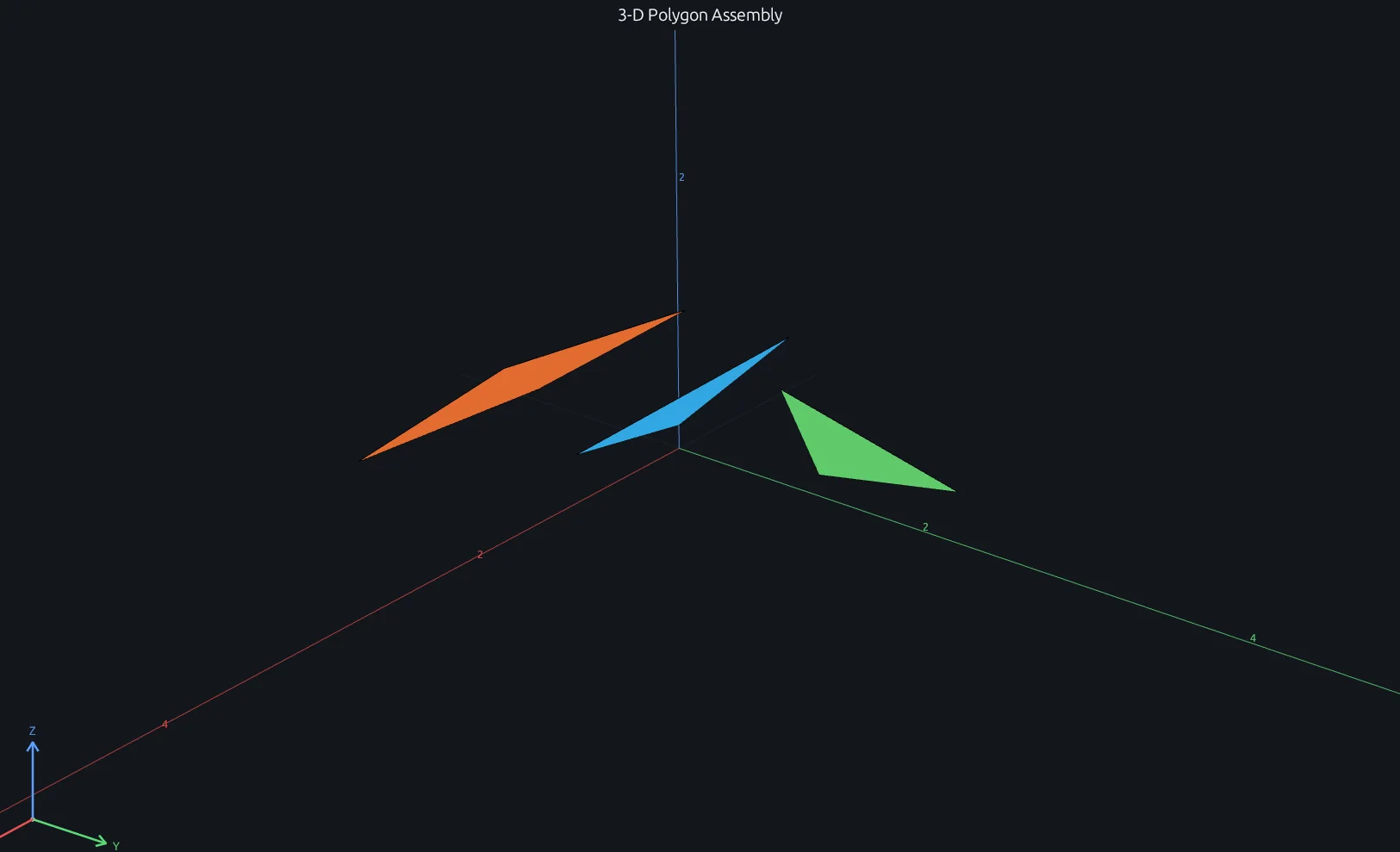
Compare this result with other chart types in the MATLAB Plot Gallery.
Using fill3 with coding agents
Open a RunMat example with live inputs, then ask the agent to explain how fill3 changes the result.
Run a small fill3 example, explain the result, then change one input and compare the output.
FAQ
What does fill3 return?⌄
fill3 returns patch graphics handles. A single polygon group returns one scalar handle; multiple groups return a row vector of handles.
How is fill3 related to patch?⌄
fill3 lowers its positional X,Y,Z,C inputs into the same patch object machinery. This keeps geometry validation, color parsing, property handling, rendering, and handle behavior consistent with patch.
Can I pass patch properties to fill3?⌄
Yes. Trailing name-value pairs such as 'EdgeColor', 'none', 'FaceAlpha', 0.5, and 'LineWidth', 2 are forwarded to the patch objects created by fill3.
Does fill3 support GPU-resident inputs?⌄
GPU-resident coordinate inputs are gathered through the shared patch path for validation and polygon construction, then the resulting geometry is rendered through RunMat's GPU plotting renderer.
Does fill3 support indexed CData?⌄
Yes. Numeric scalar, vector, and matrix C inputs are retained as Patch CData. Renderer colormap fidelity continues to share the Patch renderer implementation.
Related Plotting functions
2D Charts
area · bar · errorbar · heatmap · hist · histogram · loglog · pie · plot · scatter · semilogx · semilogy · stairs · stem
Other
addpoints · ancestor · animatedline · axes · barh · caxis · cla · clf · clim · colorcube · colororder · copyobj · daspect · datacursormode · dataTipTextRow · fcontour · figure · fill · findobj · fsurf · gobjects · groot · hgload · hgsave · hidden · histogram2 · hold · line · linkaxes · openfig · opengl · pan · parula · patch · plotmatrix · plotyy · polarhistogram · polarplot · polarscatter · print · quiver3 · ribbon · saveas · savefig · sphere · stackedplot · subtitle · suptitle · text · textscatter · textscatter3 · triplot · waitbar · wordcloud · xlabel · xlim · xline · xscale · xtickangle · xtickformat · xticklabels · xticks · ylabel · ylim · yline · yscale · ytickangle · ytickformat · yticklabels · yticks · zlim · zoom
More plotting resources
Open-source implementation
Unlike proprietary runtimes, every RunMat function is open-source. Read exactly how fill3 is executed, line by line, in Rust.
- View the source for fill3 in Rust on GitHub
- Learn how the RunMat runtime works
- Found a bug? Open an issue with a minimal reproduction.
About RunMat
RunMat is an open-source runtime that executes MATLAB-syntax code blazing on any GPU. It is licensed under the Apache 2.0 license.
- RunMat automatically optimizes your math for GPU execution on Apple, Nvidia, and AMD hardware. No code changes needed. Simulations that took hours now take minutes.
- Start running code in seconds. RunMat runs in the browser, on the desktop, or from the CLI. No license server, no IT ticket.