
bar — Create bar charts in MATLAB and RunMat.
bar creates vertical bar charts from scalar, vector, or matrix Y data, optionally at explicit X positions. It returns one bar handle per plotted series and supports grouped and stacked forms through the shared plotting handle-property system.
Syntax
h = bar(Y)
h = bar(Y, width)
h = bar(Y, width, color)
h = bar(Y, style)
h = bar(Y, Name, Value, ...)
h = bar(X, Y)
All supported bar forms
h = bar(Y)
h = bar(Y, width)
h = bar(Y, width, color)
h = bar(Y, style)
h = bar(Y, Name, Value, ...)
h = bar(X, Y)
h = bar(X, Y, width)
h = bar(X, Y, width, color)
h = bar(X, Y, style)
h = bar(X, Y, Name, Value, ...)
Inputs
| Name | Type | Required | Default | Description |
|---|---|---|---|---|
Y | NumericArray | Yes | — | Bar heights as a vector or matrix. |
width | NumericScalar | Yes | 0.8 | Fraction of available category space occupied by each bar. |
color | StyleSpec | Yes | — | Color shorthand or color name for all bars. |
style | StyleSpec | Yes | — | Layout/style token such as 'stacked' or color shorthand. |
props | Any | Variadic | — | Name/value style arguments. |
X | NumericArray | Yes | — | Category positions for bars. |
Returns
| Name | Type | Description |
|---|---|---|
h | NumericArray | Bar graphics handle or handle row vector, with one handle per plotted series. |
Errors
| Identifier | When | Message |
|---|---|---|
RunMat:bar:InvalidArgument | Bar input arrays, style tokens, or name/value arguments are invalid. | bar: invalid argument |
RunMat:bar:Internal | Renderer/GPU conversion fails while building bar geometry. | bar: internal operation failed |
How bar works
- Vector inputs create a single bar series with implicit category positions.
- Matrix inputs support grouped and stacked bar-style rendering workflows.
- Matrix Y returns a row vector containing one opaque bar handle per series; scalar and vector Y return one handle.
- X and Y accept all eight integer classes. Exact integer X labels and uniqueness are preserved before conversion into client graphics coordinates.
- The positional bar width defaults to 0.8 and, like the
LineWidthproperty, accepts real numeric scalars including every integer class. - Display names, bar width, and face color participate in the shared plotting object/property model.
- RunMat prefers GPU-backed rendering when supported input/layout combinations are present, while preserving the same bar semantics on fallback paths.
Does RunMat run bar on the GPU?
Floating single and double Y data can use the shared WGPU vertex-packing path.
All eight resident integer classes use exact client gather before the explicit floating graphics boundary.
GPU memory and residency
bar preserves floating GPU residency where the bar geometry pipeline can consume exported buffers directly. Integer GPU data gathers once through its owning provider so native integer buffers are never reinterpreted by the floating vertex shader.
Examples
Create a basic bar chart from a vector
values = [3 5 2 9];
bar(values);
Create grouped bars from a matrix
Y = [3 5 2; 4 6 1; 5 4 3];
bar(Y);
Style a bar object and label it for the legend
h = bar([2 4 1 5]);
set(h, 'FaceColor', 'g', 'DisplayName', 'counts');
legend;
Grouped category comparison
categories = {'Q1', 'Q2', 'Q3', 'Q4'};
revenue = [42 51 63 58; 38 45 52 61; 29 34 48 55];

bar(revenue');
title('Quarterly Revenue by Region');
xlabel('Quarter');
ylabel('Revenue ($M)');
legend('North', 'South', 'West');
grid on;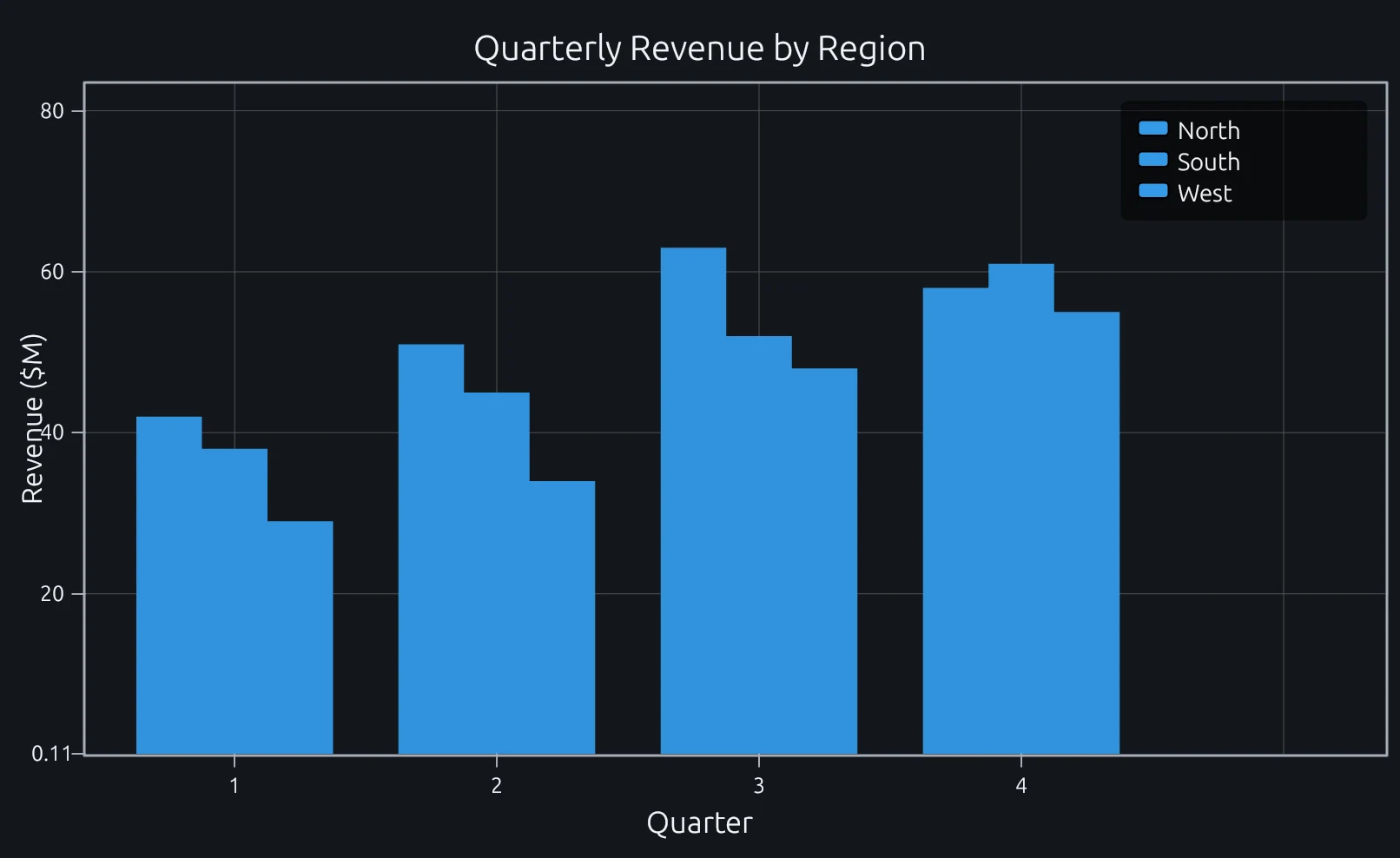
Compare this result with other chart types in the MATLAB Plot Gallery.
Using bar with coding agents
Open a RunMat example with live inputs, then ask the agent to explain how bar changes the result.
Run a small bar example, explain the result, then change one input and compare the output.
FAQ
How do I create grouped vs stacked bar charts?⌄
Pass a matrix to bar. By default, each row becomes a group with side-by-side bars (one per column). To stack them instead, pass 'stacked' as the second argument.
Y = [3 5 2; 4 6 1; 5 4 3];
bar(Y);            % grouped (default)
bar(Y, 'stacked'); % stacked
Can I make horizontal bar charts?⌄
Use barh instead of bar. It takes the same inputs but draws bars horizontally. The y-axis becomes the category axis and the x-axis shows values.
barh([3 5 2 9]);How do I set custom category labels on the x-axis?⌄
After calling bar, use set(gca, 'XTickLabel', ...) to replace the default numeric labels with strings.
bar([4 7 2]);
set(gca, 'XTickLabel', {'Q1', 'Q2', 'Q3'});
The label count should match the number of bar groups.
Related Plotting functions
2D Charts
area · errorbar · heatmap · hist · histogram · loglog · pie · plot · scatter · semilogx · semilogy · stairs · stem
Other
addpoints · ancestor · animatedline · axes · barh · caxis · cla · clf · clim · colorcube · colororder · copyobj · daspect · datacursormode · dataTipTextRow · fcontour · figure · fill · fill3 · findobj · fsurf · gobjects · groot · hgload · hgsave · hidden · histogram2 · hold · line · linkaxes · openfig · opengl · pan · parula · patch · plotmatrix · plotyy · polarhistogram · polarplot · polarscatter · print · quiver3 · ribbon · saveas · savefig · sphere · stackedplot · subtitle · suptitle · text · textscatter · textscatter3 · triplot · waitbar · wordcloud · xlabel · xlim · xline · xscale · xtickangle · xtickformat · xticklabels · xticks · ylabel · ylim · yline · yscale · ytickangle · ytickformat · yticklabels · yticks · zlim · zoom
More plotting resources
Open-source implementation
Unlike proprietary runtimes, every RunMat function is open-source. Read exactly how bar is executed, line by line, in Rust.
- View the source for bar in Rust on GitHub
- Learn how the RunMat runtime works
- Found a bug? Open an issue with a minimal reproduction.
About RunMat
RunMat is an open-source runtime that executes MATLAB-syntax code blazing on any GPU. It is licensed under the Apache 2.0 license.
- RunMat automatically optimizes your math for GPU execution on Apple, Nvidia, and AMD hardware. No code changes needed. Simulations that took hours now take minutes.
- Start running code in seconds. RunMat runs in the browser, on the desktop, or from the CLI. No license server, no IT ticket.