
polarplot — Create 2-D line plots in polar coordinates.
polarplot converts angular/radial data to cartesian line coordinates and marks the active axes as polar so the renderer draws concentric radial rings and angular spokes.
Syntax
h = polarplot(theta, rho)
h = polarplot(theta, rho, LineSpec)
h = polarplot(theta1, rho1, ..., thetaN, rhoN)
h = polarplot(rho)
h = polarplot(Z)
Inputs
| Name | Type | Required | Default | Description |
|---|---|---|---|---|
theta | NumericArray | Yes | — | Angular coordinates in radians. |
rho | NumericArray | Yes | — | Radial coordinates. |
args | Any | Variadic | — | Polar plot inputs with optional axes handle, LineSpec, and Name/Value pairs. |
rhoOrZ | NumericArray | Yes | — | Radial data with implicit theta, or complex data interpreted as angle/abs. |
Returns
| Name | Type | Description |
|---|---|---|
h | NumericScalar | Handle to the first polar line object. |
Errors
| Identifier | When | Message |
|---|---|---|
RunMat:polarplot:InvalidArgument | Input data, series grammar, axes targeting, or style arguments are invalid. | polarplot: invalid argument |
RunMat:polarplot:Internal | Internal polar line construction or rendering fails unexpectedly. | polarplot: internal operation failed |
How polarplot works
- Real integer coordinates are accepted before the explicit floating geometry boundary; complex integer
Zdata is a separately gated RunMat-mode extension that must be exactly representable before rendering. polarplot(theta, rho)interprets theta values as radians and requires theta and rho to have the same number of elements.polarplot(rho)creates implicit theta values over[0, 2*pi]with the same number of samples as rho.polarplot(Z)interprets complex input astheta = angle(Z)andrho = abs(Z).- Matrix rho or Z inputs create one polar line per column. A vector theta can be paired with a rho matrix when its length matches each column.
- Multiple theta/rho pairs in one call create multiple line objects and return the handle for the first created series.
- LineSpec strings and common line name/value pairs such as
LineWidth,Color,Marker, andDisplayNameshare the same parser used byplot. A final all-name/value group applies to every line created by that call. - Empty data creates an empty line object, matching MATLAB graphics-object behavior.
- The target axes are switched to polar mode with equal x/y scaling and symmetric cartesian limits based on the largest radius.
Options
- Use MATLAB-style line specs such as
'r--','bo-', and':'after a polar series. - Use
hold onbefore additionalpolarplotcalls to overlay more polar lines on the same axes. - Use
set(h, ...)on the returned line handle to update line properties after plotting.
Examples
Plot a polar curve from theta and rho
theta = linspace(0, 2*pi, 200);
rho = abs(sin(2*theta).*cos(2*theta));
h = polarplot(theta, rho);
Expected output:
% h is a numeric handle for the first polar lineUse complex data
z = exp(1i*linspace(0, 2*pi, 100));
polarplot(z, 'r--');
Expected output:
% theta comes from angle(z), rho comes from abs(z)Overlay multiple polar series
theta = linspace(0, 2*pi, 200);
polarplot(theta, abs(sin(theta)), 'b-');
hold on;
polarplot(theta, abs(cos(theta)), 'r--', 'LineWidth', 2);
Expected output:
% both lines share the same polar axesRendered polarplot example
theta = linspace(0, 2*pi, 500);
primary = abs(cos(theta)).^3 + 0.12;
secondary = 0.55*abs(sin(2*theta)).^2 + 0.08;

polarplot(theta, primary, 'b-');
hold on;
polarplot(theta, secondary, 'r--', 'LineWidth', 2);
hold off;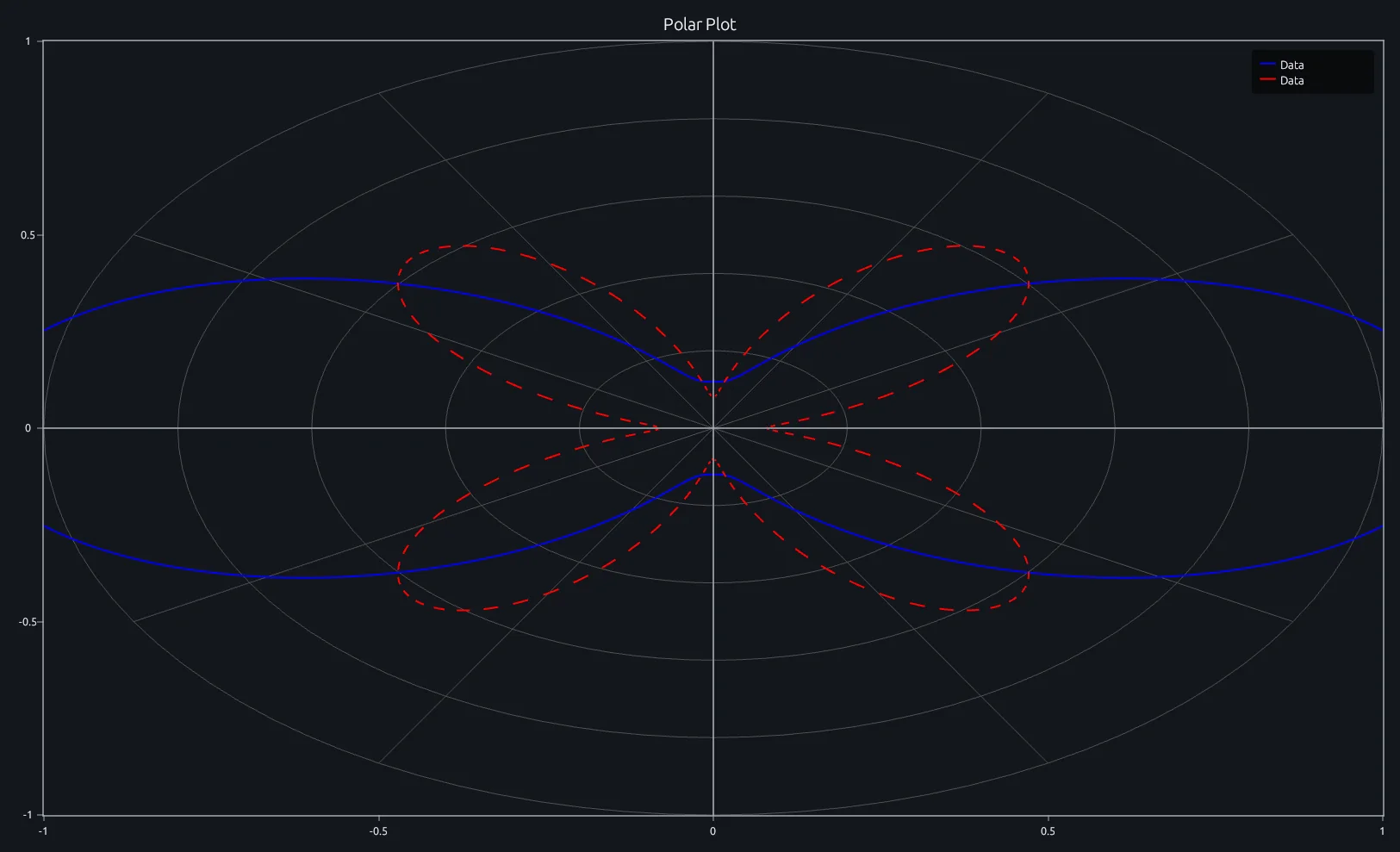
Compare this result with other chart types in the MATLAB Plot Gallery.
Using polarplot with coding agents
Open a RunMat example with live inputs, then ask the agent to explain how polarplot changes the result.
Run a small polarplot example, explain the result, then change one input and compare the output.
FAQ
Does polarplot store polar data internally?⌄
The line object stores cartesian x/y coordinates after conversion. The axes metadata records that the axes are polar, which controls grid rendering and equal aspect behavior.
Are advanced MATLAB polar axes properties supported?⌄
The initial implementation supports the common plotting forms, line styles, and polar grid rendering. Advanced axes properties such as ThetaLim, RLim, ThetaDir, and ThetaZeroLocation are not yet separate builtins/properties.
Related Plotting functions
2D Charts
area · bar · errorbar · heatmap · hist · histogram · loglog · pie · plot · scatter · semilogx · semilogy · stairs · stem
Other
addpoints · ancestor · animatedline · axes · barh · caxis · cla · clf · clim · colorcube · colororder · copyobj · daspect · datacursormode · dataTipTextRow · fcontour · figure · fill · fill3 · findobj · fsurf · gobjects · groot · hgload · hgsave · hidden · histogram2 · hold · line · linkaxes · openfig · opengl · pan · parula · patch · plotmatrix · plotyy · polarhistogram · polarscatter · print · quiver3 · ribbon · saveas · savefig · sphere · stackedplot · subtitle · suptitle · text · textscatter · textscatter3 · triplot · waitbar · wordcloud · xlabel · xlim · xline · xscale · xtickangle · xtickformat · xticklabels · xticks · ylabel · ylim · yline · yscale · ytickangle · ytickformat · yticklabels · yticks · zlim · zoom
About RunMat
RunMat is an open-source runtime that executes MATLAB-syntax code blazing on any GPU. It is licensed under the Apache 2.0 license.
- RunMat automatically optimizes your math for GPU execution on Apple, Nvidia, and AMD hardware. No code changes needed. Simulations that took hours now take minutes.
- Start running code in seconds. RunMat runs in the browser, on the desktop, or from the CLI. No license server, no IT ticket.