
RunMat vs Cadence
RunMat ECAD draws the schematic, lays out the board and shows it in 3D. SPICE analyses, Monte Carlo over part tolerances, board temperature and IR drop run from the same files and script in MATLAB-language code. Cadence remains the choice for signoff-grade SI, PI and thermal analysis with Sigrity X and Celsius.
- SPICE, Monte Carlo, board temperature and IR drop, included
- Windows, macOS, Linux and the browser, with the same editor
- Free for individuals, students and faculty, and organizations up to 250 people and US$10M in revenue
Facts about Cadence checked November 5, 2026. Sources
At a glance
| Topic | RunMat | Cadence |
|---|---|---|
| Schematic and layout | Hierarchical schematics with repeated channels, push-and-shove routing, differential pairs, length tuning, HDI vias, an autorouter and live DRC, on stackups up to 32 layers. | OrCAD X Standard includes schematic capture, constraint management, 3D, and fabrication and assembly documentation [1]. |
| Circuit simulation | Operating point, DC and AC sweeps, noise and transient, with parameter sweeps and Monte Carlo run in parallel across every core. Included. | PSpice in OrCAD X Standard and Professional is limited to 250 nodes or 250 devices, 1 million transient points or 10,000 sweep points [2]. Advanced Analysis and System Level Analysis need Professional Plus [2]. |
| Scripting results | Sweep and Monte Carlo results come back as arrays to plot, fit and check against a limit in MATLAB-language code, and runmat test runs them in CI. | MathWorks Simulink integration is part of OrCAD X Professional Plus [2]. |
| Board thermal and IR drop | Board temperature, DC IR drop with Joule heating, and warpage from the stackup, the copper and the circuit's power map, checked against stated limits. Included. | Celsius Thermal Solver runs PCB electrothermal analysis, with IR drop from Joule heating, as its own product [3]. Signal and power integrity are in the Sigrity X line [4]. |
| Mechanical CAD | MCAD is in the same product: parametric parts, assemblies and drawings, with the board opening in an assembly as a part. Included. | MCAD collaboration with a separate mechanical CAD tool, in OrCAD X Standard [1]. |
| Collaboration and multiplayer | Several people edit one project live and see each other's cursors. Schematic changes reach the copper as reviewed rows, and the files diff and merge in Git. | Design review and markup, and data management, in OrCAD X Standard [1]. |
| AI and MCP | The built-in agent and MCP clients such as Claude Code and Codex edit schematics and boards, run ERC and DRC and launch board studies, with changes arriving as reviewed rows. | Allegro X AI places components, creates power planes and routes critical nets, using cloud compute [5]. |
| Platforms and offline | Desktop apps for Windows, macOS and Linux, and the same editor in the browser. The desktop app edits, checks and simulates offline; a network connection may be required for security and permission checks. | OrCAD X runs on 64-bit Windows 10 and 11, Professional and Enterprise editions, and Windows Server [6]. |
| Price | Free for individuals, academics, open-source contributors and smaller organizations. Professional: $99 per person per month in the US, or the local equivalent, for MCAD, ECAD, simulation and the MATLAB-language runtime. | OrCAD X is sold as a yearly license, with no price on Cadence's buy page; orders go through Cadence's channel partners [1]. Celsius and Sigrity X are separate products [3] [4]. |
- Schematic and layout
- RunMatHierarchical schematics with repeated channels, push-and-shove routing, differential pairs, length tuning, HDI vias, an autorouter and live DRC, on stackups up to 32 layers.
- CadenceOrCAD X Standard includes schematic capture, constraint management, 3D, and fabrication and assembly documentation [1].
- Circuit simulation
- RunMatOperating point, DC and AC sweeps, noise and transient, with parameter sweeps and Monte Carlo run in parallel across every core. Included.
- CadencePSpice in OrCAD X Standard and Professional is limited to 250 nodes or 250 devices, 1 million transient points or 10,000 sweep points [2]. Advanced Analysis and System Level Analysis need Professional Plus [2].
- Scripting results
- RunMatSweep and Monte Carlo results come back as arrays to plot, fit and check against a limit in MATLAB-language code, and
runmat testruns them in CI. - CadenceMathWorks Simulink integration is part of OrCAD X Professional Plus [2].
- Board thermal and IR drop
- RunMatBoard temperature, DC IR drop with Joule heating, and warpage from the stackup, the copper and the circuit's power map, checked against stated limits. Included.
- CadenceCelsius Thermal Solver runs PCB electrothermal analysis, with IR drop from Joule heating, as its own product [3]. Signal and power integrity are in the Sigrity X line [4].
- Mechanical CAD
- RunMatMCAD is in the same product: parametric parts, assemblies and drawings, with the board opening in an assembly as a part. Included.
- CadenceMCAD collaboration with a separate mechanical CAD tool, in OrCAD X Standard [1].
- Collaboration and multiplayer
- RunMatSeveral people edit one project live and see each other's cursors. Schematic changes reach the copper as reviewed rows, and the files diff and merge in Git.
- CadenceDesign review and markup, and data management, in OrCAD X Standard [1].
- AI and MCP
- RunMatThe built-in agent and MCP clients such as Claude Code and Codex edit schematics and boards, run ERC and DRC and launch board studies, with changes arriving as reviewed rows.
- CadenceAllegro X AI places components, creates power planes and routes critical nets, using cloud compute [5].
- Platforms and offline
- RunMatDesktop apps for Windows, macOS and Linux, and the same editor in the browser. The desktop app edits, checks and simulates offline; a network connection may be required for security and permission checks.
- CadenceOrCAD X runs on 64-bit Windows 10 and 11, Professional and Enterprise editions, and Windows Server [6].
- Price
- RunMatFree for individuals, academics, open-source contributors and smaller organizations. Professional: $99 per person per month in the US, or the local equivalent, for MCAD, ECAD, simulation and the MATLAB-language runtime.
- CadenceOrCAD X is sold as a yearly license, with no price on Cadence's buy page; orders go through Cadence's channel partners [1]. Celsius and Sigrity X are separate products [3] [4].
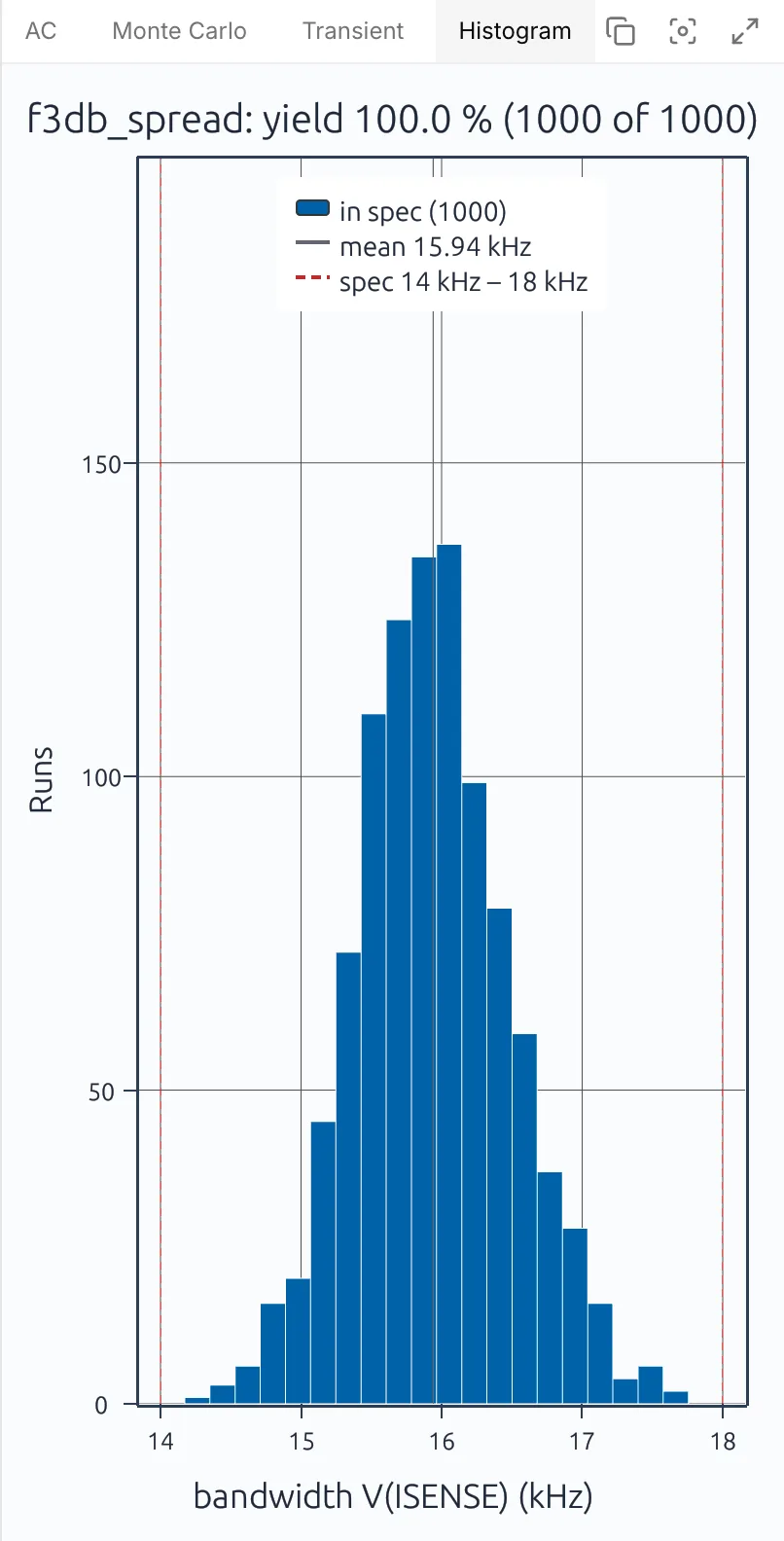
Monte Carlo yield against the spec
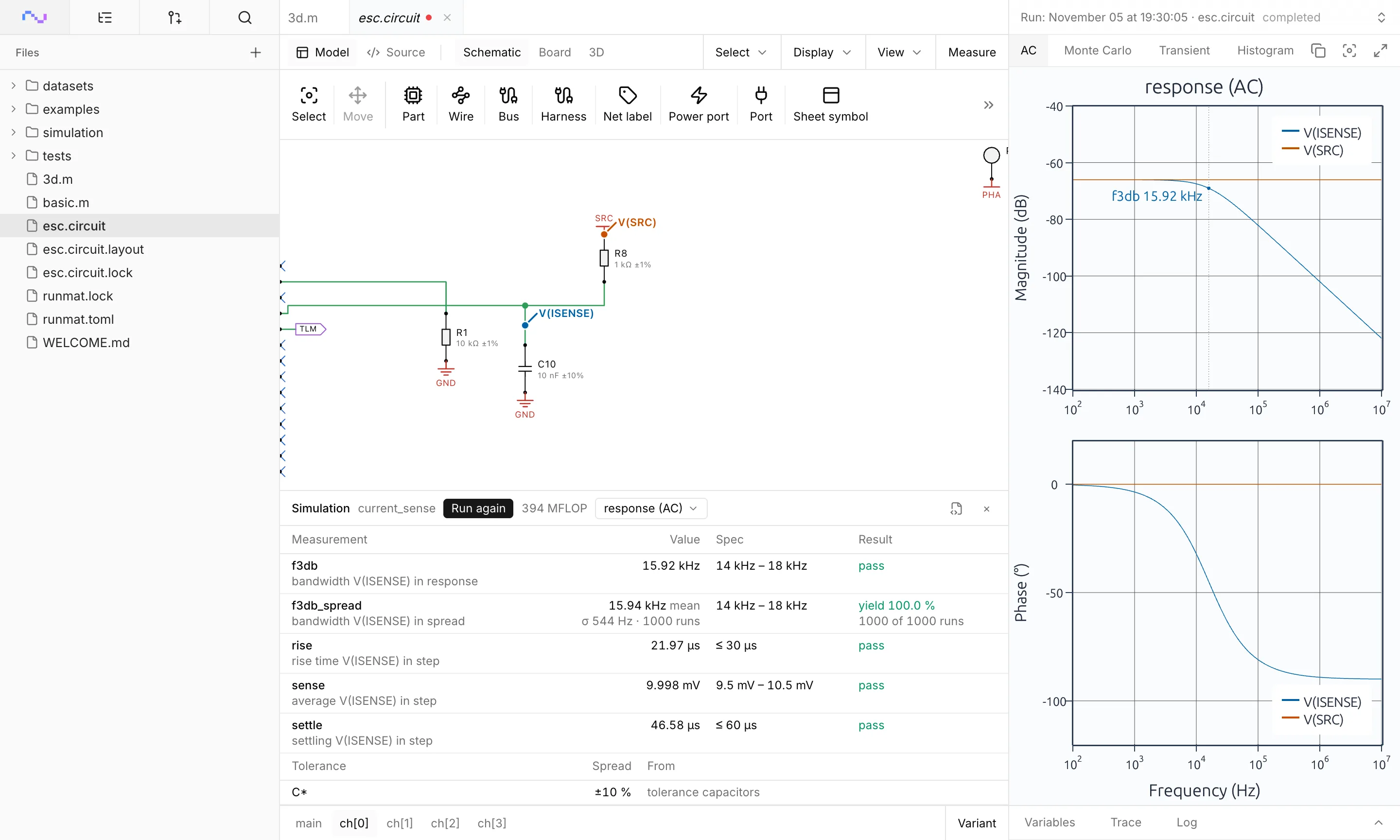
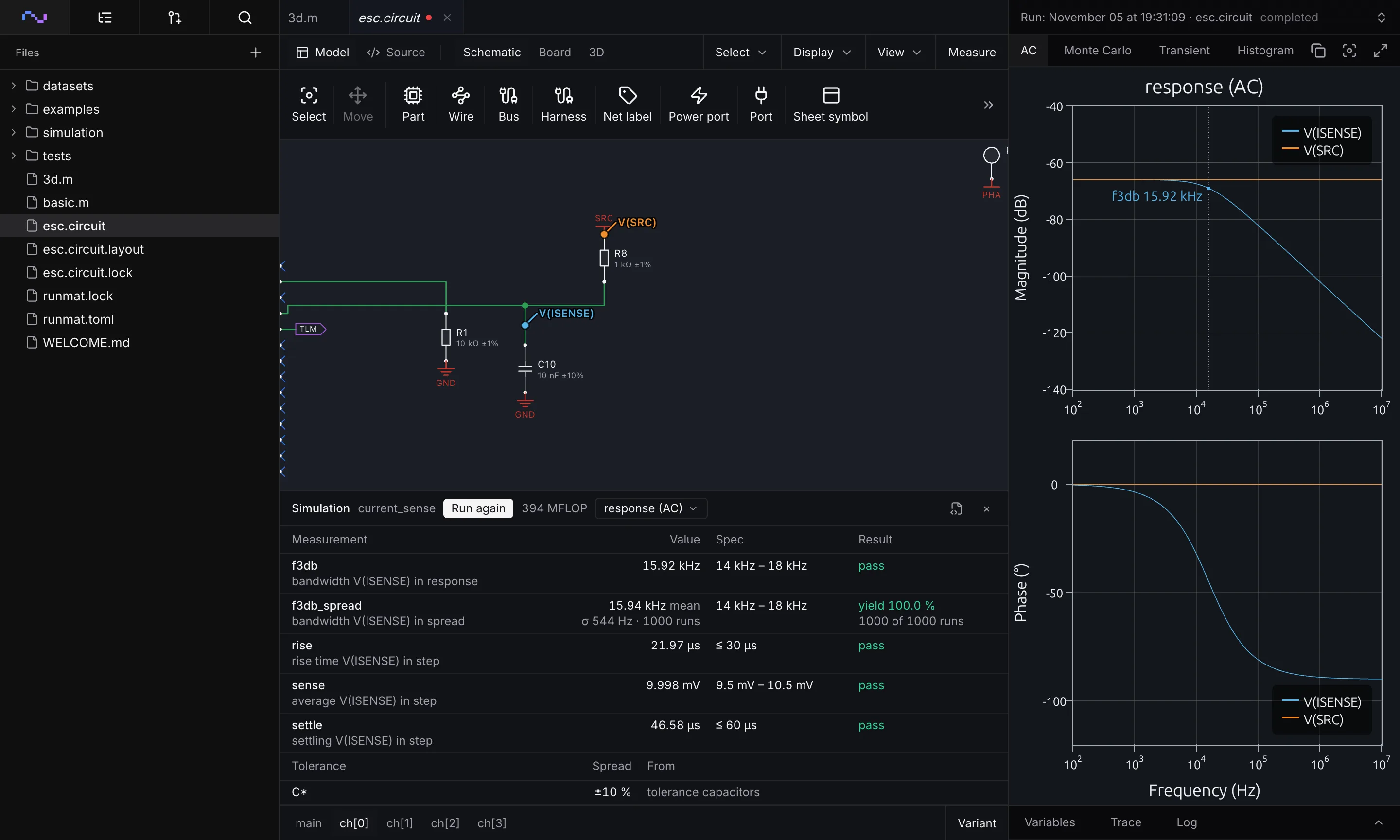
Run an AC analysis, a transient or a Monte Carlo over part tolerances from the schematic, and read the plots beside it. Measurements such as bandwidth and rise time are checked against their spec, with the yield across every run.
The same results come back as arrays in MATLAB-language code, so a script can fit them, plot them or fail a CI build when the yield drops.
What you can do in RunMat ECAD
Everything below works in one project, on the desktop or in the browser.
Draw the schematic
- Hierarchical sheets, buses and harnesses
- A channel drawn once and repeated
- ERC while you draw
- Netlists in KiCad, SPICE, EDIF 2.0 and IPC-D-356A
Simulate the circuit
- Operating point, DC, AC, noise and transient
- Parameter sweeps and Monte Carlo
- SPICE3, PSpice and LTspice model syntax
- Results scripted in MATLAB-language code
Lay out the board
- Stackups up to 32 copper layers
- Blind, buried and micro vias
- Differential pairs and impedance from the stackup
- Autorouter for the connections left open
Analyze the board
- Board temperature with two-resistor packages
- DC IR drop with Joule heating
- Warpage over the reflow profile
- Power at the operating point as the heat load
Release
- Gerber X2, ODB++ and IPC-2581
- NC drill, pick-and-place and the BOM
- Assembly and fabrication drawings
- STEP of the assembled board
Work together
- Live co-editing with cursors
- Schematic changes reviewed as rows
- ERC, DRC and simulations in CI
- AI edits from the agent and MCP clients
When RunMat is the better choice
RunMat is the better choice when circuit simulation, board physics and layout should live in one project that every engineer can open.
Monte Carlo and sweeps over the whole circuit, with yields checked in a script and on every commit.
The power each part dissipates at the operating point fed straight into the board's thermal study.
Board temperature and IR drop checked on every layout change, without a separate analysis product.
Engineers on Macs, Linux machines or a browser tab.
Teams that exchange KiCad files with partners and fabs, and need to save back to KiCad.
When Cadence is the better choice
- High-speed boards that need signoff signal and power integrity with Sigrity X [4].
- Package, board and system thermal signoff with Celsius, linked to Cadence's IC tools [3].
- Constraint-driven layout of large, dense boards in Allegro X, shared with an existing Allegro team.
- Existing PSpice model libraries and Advanced Analysis workflows, such as smoke analysis [2].
- Chip, package and board co-design with the rest of the Cadence flow.
ECAD works with the rest of RunMat
- Thermal simulation
With simulation
Board temperature, IR drop and warpage solve on the board you laid out, from its stackup, its copper and the power each part dissipates at the circuit's operating point.
- Runtime
With MATLAB code
Compute part values in MATLAB code, such as a filter's resistors and capacitors from its cutoff, and read every circuit simulation back as arrays to fit, plot or check in CI.
- MCAD
With MCAD
The board opens in a RunMat MCAD assembly as a part, with its outline, mounting holes and components, from the same project.
Move a design over
- 01
Bring your models
Library parts carry SPICE models, and models in SPICE3, PSpice or LTspice syntax can be added to any part.
- 02
Bring the board
Open KiCad 9 and 10 projects, or import Altium Designer, EAGLE and EasyEDA projects, with their schematics, boards and libraries.
- 03
Check it
Run ERC, DRC and the circuit's simulations, and add them to CI with
runmat testso every commit is checked.
License
RunMat is source-available under the Business Source License 1.1, and each version converts to the Apache License 2.0 three years after the date it is first published.
The source code is available on GitHub, so you can read, build and modify the code that produces every result. Enterprise adds self-hosted deployment, including fully offline, under contract.
Questions
01Can RunMat use my PSpice models?
Yes. Models in SPICE3, PSpice or LTspice syntax can be added to any part, and library parts carry SPICE models already.
02Is there a limit on circuit size?
03Does RunMat do board thermal analysis?
Yes. A board study reads the stackup, the copper on each layer, the vias and the power map from the circuit's operating point, and reports each junction against its limit. DC IR drop and warpage run on the same board.
04Does RunMat run on a Mac?
05How much does RunMat cost?
Nothing for individuals, academics, open-source contributors and smaller organizations. Larger organizations pay $99 per person per month for Professional in the US, which includes ECAD, MCAD and simulation.
06Is RunMat open source?
RunMat is source-available under the Business Source License 1.1, so its source is public today. Each version converts to the Apache License 2.0, an open-source license, three years after the date it is first published. Until then, individuals, students and faculty, open-source contributors and organizations under the size limits use it free.
07Is RunMat made by Cadence?
No. RunMat is made by Dystr, Inc. Cadence, OrCAD, Allegro, PSpice, Sigrity and Celsius are trademarks of Cadence Design Systems, Inc.
Sources
We checked the facts about Cadence on this page against these sources on November 5, 2026.
- [1]Cadence, Buy OrCAD Xwww5.cadence.com
- [2]Cadence, OrCAD X and PSpice FAQcadence.com
- [3]Cadence, Celsius Thermal Solvercadence.com
- [4]Cadence, Celsius Studiocadence.com
- [5]Cadence, Cadence Introduces Allegro X AI (press release, 2023)cadence.com
- [6]Cadence, OrCAD X Software Requirements and Hardware Requirementsresources.academic.cadence.com