
Run MATLAB code and physics simulations from Claude Code and Codex
Connect Claude Code, Codex or another MCP client to RunMat Desktop. Your AI can then run MATLAB code on the GPU, sweep thousands of cases in parallel and solve physics simulations on your own geometry.
Find the first natural frequency of this tuning fork and show the mode shape.
 Running a modal study in RunMat
The first natural frequency is 366 Hz, with the steel fork fixed at the end of its stem. In this mode both tines sway to the same side, moving most at the tips. Want me to solve more modes to find the one where they move in opposition?
What you can ask for
“Find the first natural frequency of this tuning fork and show the mode shape.”
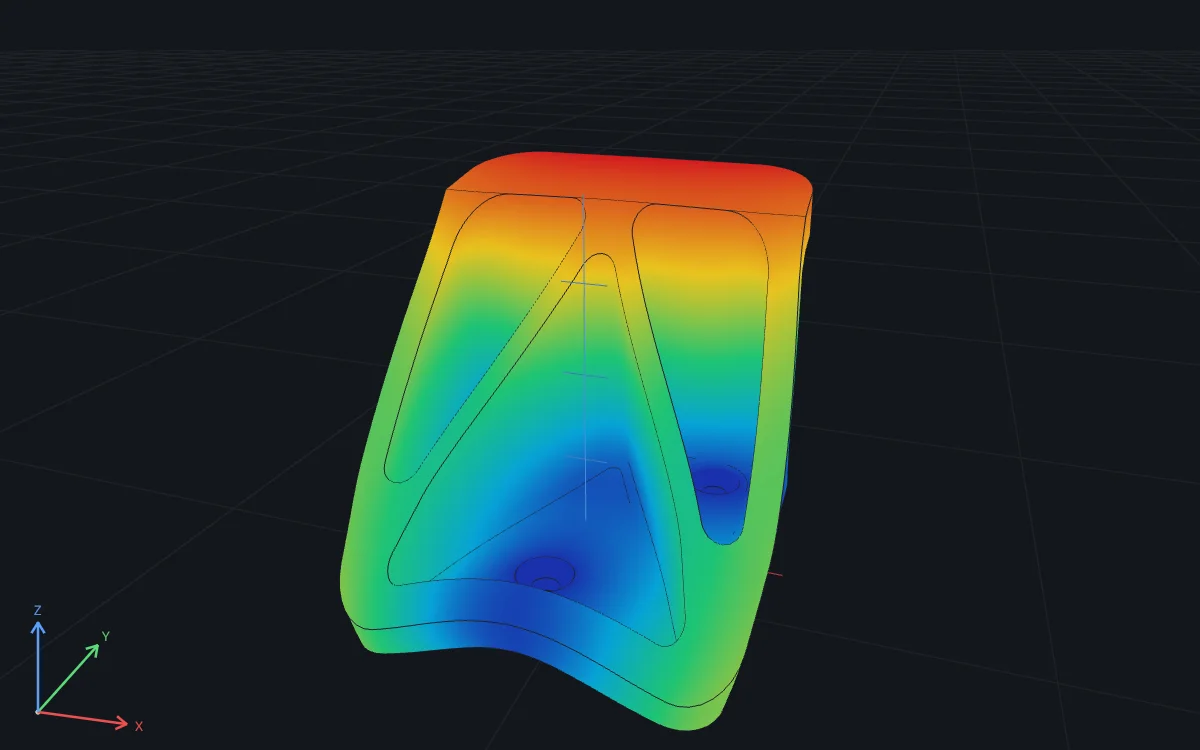
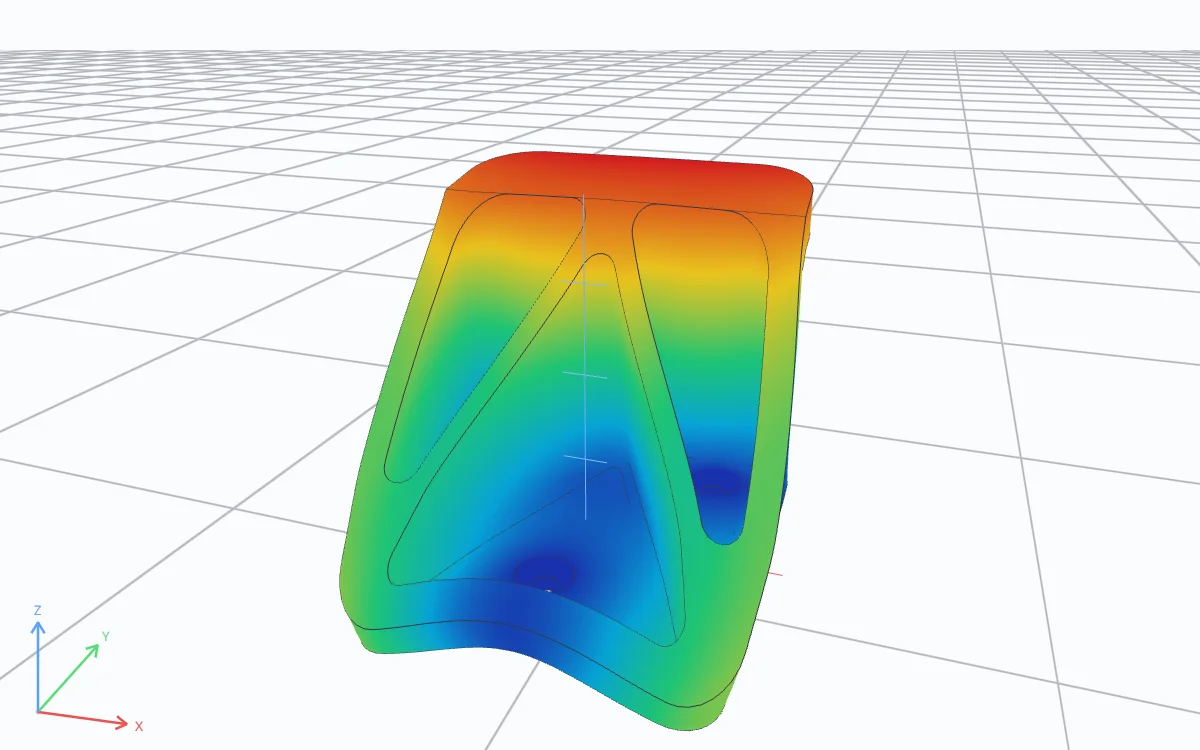
“Here's my steel wall hook. Hang 2 kN from the hook seat with the three mounting holes fixed. What's the maximum deflection, and the mean von Mises stress in the two hook corner fillets?”
“Price this option with 10 million Monte Carlo paths on my GPU and check it against Black-Scholes.”
% 10 million price paths; RunMat runs the array math on the GPUS0 = 100; K = 105; r = 0.03; sigma = 0.2; T = 1;Z = randn(1e7, 1);ST = S0 * exp((r - sigma^2/2)*T + sigma*sqrt(T)*Z);price = exp(-r*T) * mean(max(ST - K, 0));fprintf("Call price: %.2f\n", price);
Call price: 7.13
“Sweep 10,000 combinations of damping and stiffness across all my cores and find the worst case.”
[Z, K] = ndgrid(linspace(0.05, 0.5, 200), ...linspace(10, 500, 50));t = linspace(0, 20, 4001);peak = zeros(size(Z));parfor n = 1:numel(Z)wn = sqrt(K(n)); wd = wn*sqrt(1 - Z(n)^2);peak(n) = max(abs(exp(-Z(n)*wn*t) .* sin(wd*t) / wd));end[pmax, i] = max(peak(:));fprintf("Worst case: %.3f m (zeta %.2f, k %.0f N/m)\n", ...pmax, Z(i), K(i));
Worst case: 0.293 m (zeta 0.05, k 10 N/m)
When to use it
Use it when the answer has to come from running something: your team's MATLAB code, a large calculation, or a simulation of a part.
- 01
Your MATLAB code
Paste a script or open a Project, and the AI runs it as written, with more than 2,100 builtins and the full core language and no MATLAB install. When it fails, the AI reads the error, fixes the code and runs it again.
- 02
Math at GPU speed
Array math runs on the GPU and sweeps run in parallel, so one answer can cover 10 million samples or 10,000 design cases.
- 03
Simulations of your parts
Give it your CAD file (STEP, IGES or BREP) and the AI sets up the study: material, loads, supports and mesh. RunMat solves it and shows stress, temperature or mode shapes on the part.
Supported AI tools
Codex
Run code and simulations in the Project open in RunMat Desktop, with each run shown in the app.
RunMat + CodexClaude Code
Run code and simulations in the Project open in RunMat Desktop, with each run shown in the app.
RunMat + Claude CodeOther MCP clients
Connect any client on your computer that supports MCP over Streamable HTTP to RunMat Desktop.
Connect another clientMATLAB code and physics simulations
The same connection covers numerical work and simulation. Results stay in a RunMat Project, so the next question picks up the same files, variables and figures.
MATLAB code
- Runs MATLAB-language scripts and
.mfiles: more than 2,100 core builtins and the full core language - Returns output, diagnostics and variables, with interactive 2D and 3D figures in RunMat Desktop
- Debugs a script that fails and reruns it to show the fix works
- Works on a multi-file Project or a local repository
Physics simulations
- Sets up a study on your CAD file (STEP, IGES or BREP): materials, loads, supports and mesh
- Solves structural, thermal and modal studies
- Returns stress, temperature and mode shapes as interactive 3D results
- Keeps each study as a text file the team can review and rerun
Runs in RunMat Desktop
Claude Code, Codex and other MCP clients reach RunMat through RunMat Desktop on the same computer while the app is open. Code and studies run there, in the Project you allowed.
Speed
- Native GPU speed through Metal, DirectX 12 and Vulkan, with double precision on GPUs that support it
- Every CPU core, and more memory than a browser tab allows
- Simulations solved on your own hardware
Your computer
- Files, datasets and repositories on your computer
- Python, Java, C and MEX calls
- Each run, plot and study result shown in the app, saved with the Project
Access stays with the Project
Each person signs in with their own RunMat account and chooses an organization. The AI works only in the Project someone selected, and a Project open in RunMat Desktop is shared one at a time, with access that can be revoked in RunMat.
Organizations can control which plugins and MCP servers their AI tools may use, and RunMat Enterprise adds single sign-on, audit controls and private deployment.
How it works
- 01
Connect from RunMat Desktop
Install RunMat Desktop, sign in and choose Connect next to Claude Code or Codex in Settings › Connections. Other MCP clients add RunMat's local server.
- 02
Allow the Project
The first time the agent works in a Project, RunMat asks whether to allow it while the Project is open or always.
- 03
Ask for the analysis
Ask in plain words. RunMat runs the code or the study, returns the output to the agent and shows the plots in RunMat Desktop.
FAQ
01What is MCP, in plain words?
MCP (Model Context Protocol) is the standard way AI apps call outside tools. With RunMat connected, Claude Code or Codex hands MATLAB code or a simulation study to RunMat, which runs it and sends back the results.
02Can it run physics simulations as well as code?
Yes. The AI can set up a study on your CAD file (STEP, IGES or BREP), with materials, loads, supports and a mesh, and RunMat solves structural, thermal and modal studies and returns the results as interactive 3D views.
03Where does the code run?
In RunMat Desktop on the same computer, in the Project you allowed the agent to use. Runs appear in the app.
04What does the AI model see?
The model receives the code, output and file contents it asks for, under the model provider's own data policy. RunMat limits that access to the Project you selected.
05Which tools work with RunMat?
Claude Code and Codex through the RunMat plugin, which RunMat Desktop installs, and any MCP client on the same computer that supports Streamable HTTP with custom headers.
06Is it included in the Free plan?
Yes. Agent executions are included with RunMat Free, with no monthly cap. Throughput limits apply: 120 execution starts per hour and 5 at a time. The AI provider may meter its own usage separately.
07Do I need RunMat Desktop?
Yes. RunMat Desktop serves RunMat's MCP tools on your computer while it's open, and Claude Code, Codex and other MCP clients connect to it. It runs code at native GPU and multi-core speed, works with files on your computer, makes Python, C and MEX calls and solves simulations on your own hardware.
08How close is it to MATLAB?
RunMat implements more than 2,100 core builtins and all core language grammar and semantics of the MATLAB language. The builtin reference lists supported toolbox functions.
Add RunMat to your AI tools
Agent executions are included with RunMat Free.