
RunMat vs SOLIDWORKS
RunMat MCAD builds parts from constrained sketches and features, mates them into assemblies and makes drawings, with SOLIDWORKS shortcuts built in. It runs on Windows, macOS, Linux and in the browser, and stress, thermal and acoustic studies run on the parts you model. SOLIDWORKS remains the choice for teams built around its add-ins and PDM vaults.
- Windows, macOS, Linux and the browser, with the same editor
- Structural, thermal and acoustic studies on the part you modeled, included
- Free for individuals, students and faculty, and organizations up to 250 people and US$10M in revenue
Facts about SOLIDWORKS checked November 5, 2026. Sources


At a glance
| Topic | RunMat | SOLIDWORKS |
|---|---|---|
| Modeling | Parametric parts from constrained sketches and features, with multi-body parts, configurations, sheet metal, weldments and surfaces. | Parametric parts, assemblies and drawings, with sheet metal and weldments, in every edition [1]. |
| Assemblies | Mates on named faces, a bill of materials from part properties, interference and clearance checks, and assemblies the size of an airliner with the parts not in work shown as lightweight geometry. | Assemblies in every edition; piping and electrical routing in Premium [1]. |
| Simulation | Static stress, modes, buckling, thermal, thermal stress and acoustics on the part file itself, with sweeps over part dimensions. Included. | Premium includes linear static analysis and motion [1]. Frequency, buckling, thermal, nonlinear and dynamic studies need SOLIDWORKS Simulation Professional or Premium, sold separately [2] [3]. |
| Drawings and PMI | Associative drawings to ISO or ASME with GD&T, exported as PDF, DXF and DWG, and STEP AP242 with semantic PMI. Included. | Drawings in every edition. STEP 242 and 3D PDF with PMI come from SOLIDWORKS MBD, sold separately [4] [5]. |
| Collaboration and multiplayer | Several people edit one part or assembly at once and see each other's cursors. Changes go to review as a diff of features and dimensions. | A checked-out file has one editor until it is checked back in; other users can view and copy it [6]. SOLIDWORKS Design plans add cloud revision management, sharing and markup [7]. |
| Data management | Projects are folders of plain files that fit Git or a file server, or RunMat cloud projects with release and review. Enterprise connects a PDM or PLM system. | PDM Standard in Professional and Premium [1]. PDM Professional is sold separately [8]. |
| Electrical | ECAD is in the same product: schematic capture, board layout, 3D and circuit simulation. Included. | SOLIDWORKS Electrical is sold separately [9]. Professional includes tools for working with ECAD teams [1]. |
| AI and MCP | The built-in agent and MCP clients such as Claude Code and Codex open, edit, check and render parts and launch studies. Their edits arrive as a diff to accept or reject. | AURA and LEO, with SOLIDWORKS Design connected to the 3DEXPERIENCE platform [10]. A one-time grant of 2,100 tokens, then tokens are bought separately [11]. |
| Platforms and offline | Desktop apps for Windows, macOS and Linux, and the same editor in the browser. The desktop app models, exports and runs studies offline; a network connection may be required for security and permission checks. | Windows 11 and Windows 10, 64-bit. Macs aren't supported, including Windows through Boot Camp [12]. |
| Price | Free for individuals, academics, open-source contributors and smaller organizations. Professional: $99 per person per month in the US, or the local equivalent, for MCAD, ECAD, simulation and the MATLAB-language runtime. | SOLIDWORKS Design, per user per year: Standard USD 2,820, Professional USD 3,456, Premium USD 4,716 [7]. Simulation Professional and Premium, PDM Professional, MBD and Electrical are bought separately [2] [8] [5] [9]. |
- Modeling
- RunMatParametric parts from constrained sketches and features, with multi-body parts, configurations, sheet metal, weldments and surfaces.
- SOLIDWORKSParametric parts, assemblies and drawings, with sheet metal and weldments, in every edition [1].
- Assemblies
- RunMatMates on named faces, a bill of materials from part properties, interference and clearance checks, and assemblies the size of an airliner with the parts not in work shown as lightweight geometry.
- SOLIDWORKSAssemblies in every edition; piping and electrical routing in Premium [1].
- Simulation
- RunMatStatic stress, modes, buckling, thermal, thermal stress and acoustics on the part file itself, with sweeps over part dimensions. Included.
- SOLIDWORKSPremium includes linear static analysis and motion [1]. Frequency, buckling, thermal, nonlinear and dynamic studies need SOLIDWORKS Simulation Professional or Premium, sold separately [2] [3].
- Drawings and PMI
- RunMatAssociative drawings to ISO or ASME with GD&T, exported as PDF, DXF and DWG, and STEP AP242 with semantic PMI. Included.
- SOLIDWORKSDrawings in every edition. STEP 242 and 3D PDF with PMI come from SOLIDWORKS MBD, sold separately [4] [5].
- Collaboration and multiplayer
- RunMatSeveral people edit one part or assembly at once and see each other's cursors. Changes go to review as a diff of features and dimensions.
- SOLIDWORKSA checked-out file has one editor until it is checked back in; other users can view and copy it [6]. SOLIDWORKS Design plans add cloud revision management, sharing and markup [7].
- Data management
- RunMatProjects are folders of plain files that fit Git or a file server, or RunMat cloud projects with release and review. Enterprise connects a PDM or PLM system.
- SOLIDWORKSPDM Standard in Professional and Premium [1]. PDM Professional is sold separately [8].
- Electrical
- RunMatECAD is in the same product: schematic capture, board layout, 3D and circuit simulation. Included.
- SOLIDWORKSSOLIDWORKS Electrical is sold separately [9]. Professional includes tools for working with ECAD teams [1].
- AI and MCP
- RunMatThe built-in agent and MCP clients such as Claude Code and Codex open, edit, check and render parts and launch studies. Their edits arrive as a diff to accept or reject.
- SOLIDWORKSAURA and LEO, with SOLIDWORKS Design connected to the 3DEXPERIENCE platform [10]. A one-time grant of 2,100 tokens, then tokens are bought separately [11].
- Platforms and offline
- RunMatDesktop apps for Windows, macOS and Linux, and the same editor in the browser. The desktop app models, exports and runs studies offline; a network connection may be required for security and permission checks.
- SOLIDWORKSWindows 11 and Windows 10, 64-bit. Macs aren't supported, including Windows through Boot Camp [12].
- Price
- RunMatFree for individuals, academics, open-source contributors and smaller organizations. Professional: $99 per person per month in the US, or the local equivalent, for MCAD, ECAD, simulation and the MATLAB-language runtime.
- SOLIDWORKSSOLIDWORKS Design, per user per year: Standard USD 2,820, Professional USD 3,456, Premium USD 4,716 [7]. Simulation Professional and Premium, PDM Professional, MBD and Electrical are bought separately [2] [8] [5] [9].
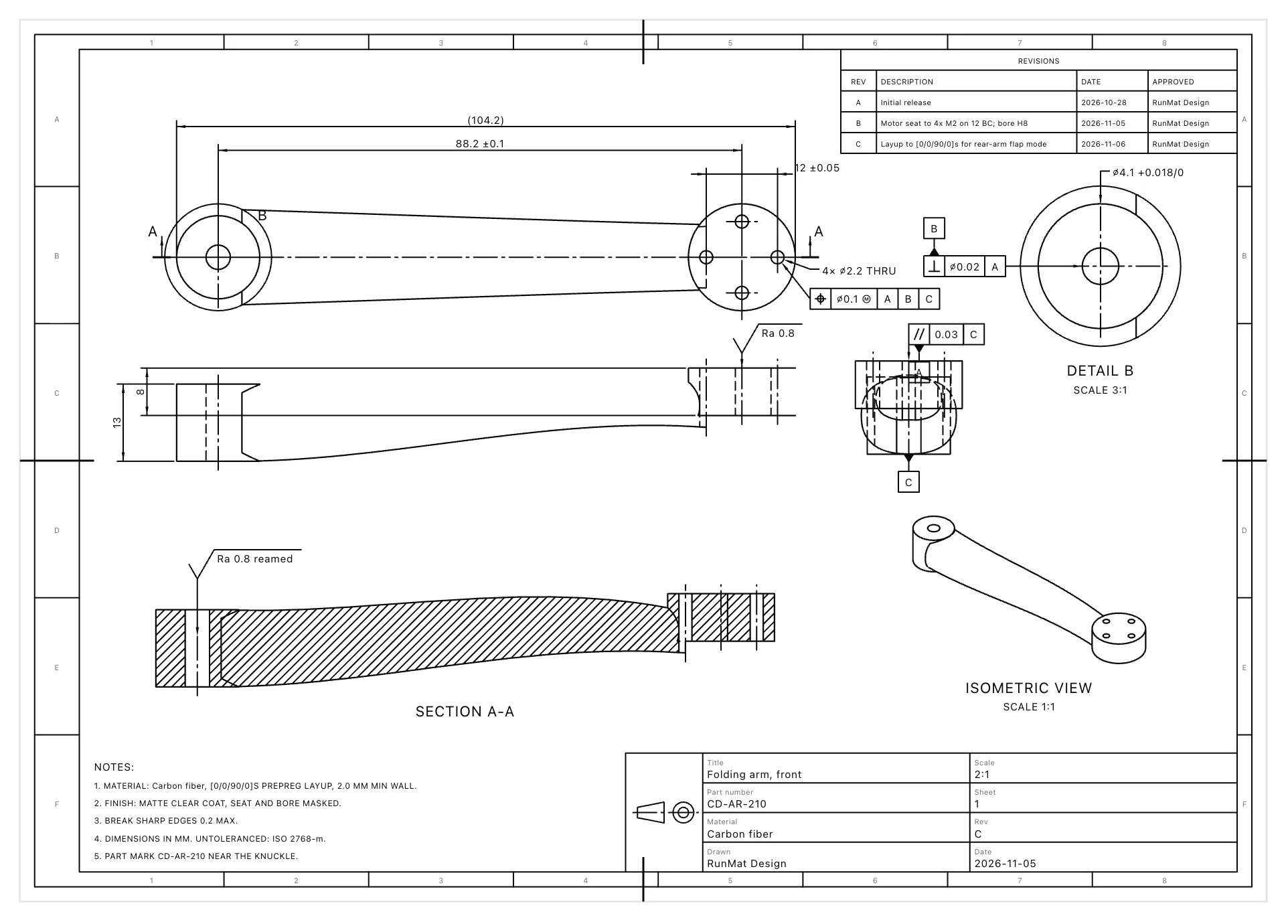
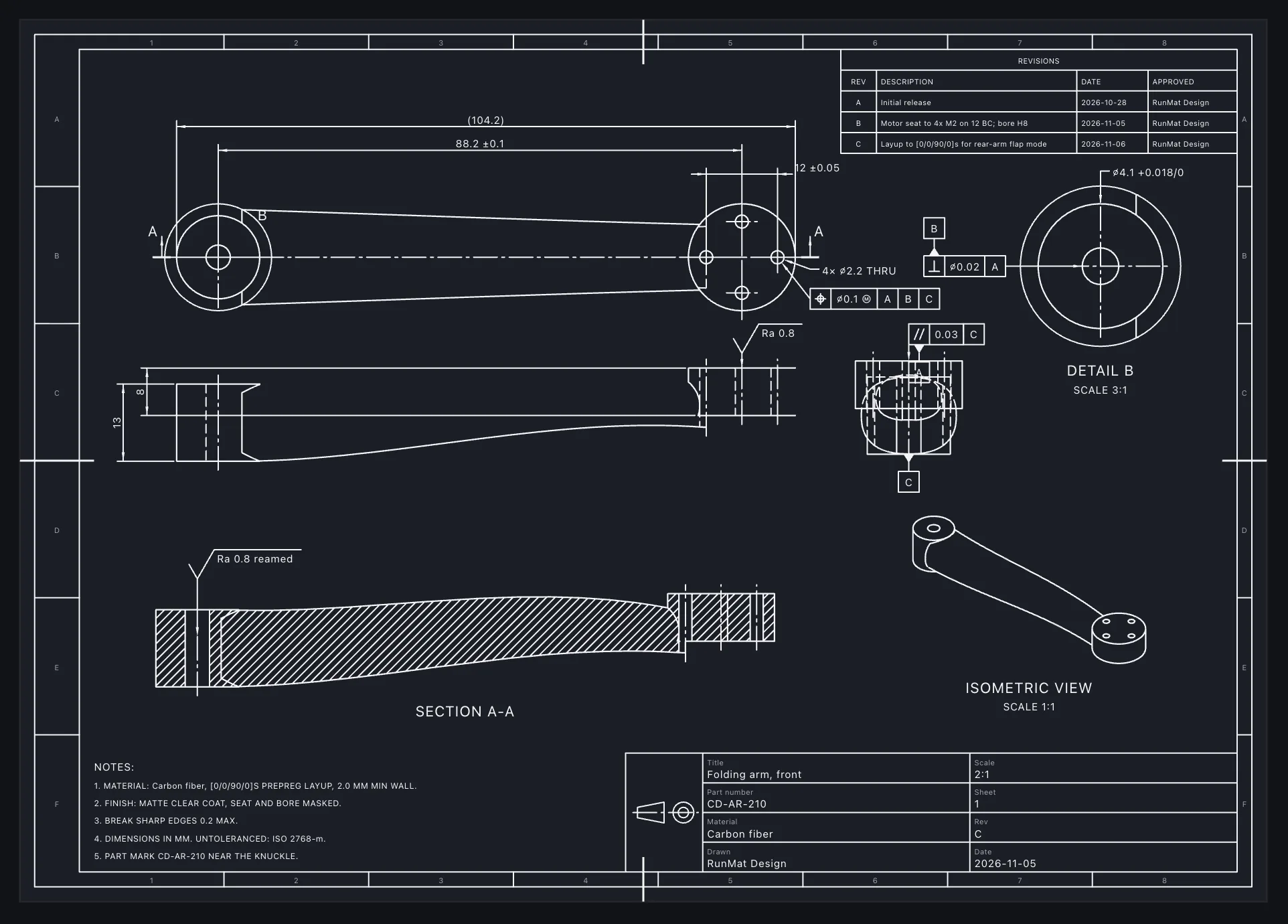
Drawings to ISO or ASME that follow the model
Place standard, projected, section, detail and isometric views, then dimension them with tolerances, GD&T frames, datums and hole callouts to ISO or ASME. Dimensions are tied to the model, so a changed part updates its drawing.
Title blocks fill from part properties, a revision table records each release, and sheets export to PDF, SVG, DXF and DWG at true scale. STEP AP242 carries the same tolerances as semantic PMI, with no add-on.
What you can do in RunMat MCAD
Everything below works in one project, on the desktop or in the browser.
Model parts
- Constrained sketches with degrees of freedom shown
- Extrude, revolve, sweep, loft, holes, fillets, shells and patterns
- Sheet metal with a flat pattern, and weldments
- Configurations for a product family
Build assemblies
- Mates on named faces, edges and points
- Top-down design from a skeleton part
- Bill of materials from part properties
- Interference, clearance and motion checks
Make drawings
- Projected, section and detail views
- GD&T to ISO or ASME
- PDF, SVG, DXF and DWG at true scale
- STEP AP242 with semantic PMI
Simulate the part
- Static stress, modes, buckling and contact
- Steady and transient heat
- Sweeps over part dimensions
- Optimizers such as fmincon over part inputs
Drive it from code
- Part dimensions computed by MATLAB-language functions
- Parts, assemblies and drawings saved as text files that fit Git
- Every part rebuilt and checked in CI
- The same files on the desktop and in the browser
Work together
- Live co-editing with cursors in the 3D view
- Changes reviewed as features and dimensions
- Release with the approver recorded
- AI edits from the agent and MCP clients
When RunMat is the better choice
RunMat is the better choice when modeling, simulation and review need to stay in one project that the whole team can open, on any operating system.
Engineers on Macs, Linux machines or a browser tab, working on the same parts as colleagues on Windows.
Stress, modal and thermal checks on every design change, without a separate simulation license or a STEP export.
Drawings to ISO or ASME with GD&T, and STEP AP242 with semantic PMI, without an MBD add-on.
Two engineers working on one assembly at the same time, with changes reviewed as features and dimensions before release.
Design studies that sweep part dimensions or hand them to an optimizer, run on every core.
AI agents that edit parts and launch studies, from Claude Code, Codex or any MCP client, with every edit staged for review.
When SOLIDWORKS is the better choice
- Workflows built on SOLIDWORKS add-ins and partner products, such as CAM, Toolbox content and supplier part libraries in SOLIDWORKS formats.
- An established SOLIDWORKS PDM vault with years of revisions, workflows and approvals [8].
- Class-A surfacing and freeform shapes, where SOLIDWORKS and its partner tools have a long track record.
- Hiring and training around the CSWA and CSWP certifications.
- Suppliers and customers who exchange native SOLIDWORKS files and expect them back in the same format.
MCAD works with the rest of RunMat
- Simulation
With simulation
A stress, modal or thermal study reads the part file directly, with its loads on the part's named faces. Change a dimension and the study reruns on the new geometry.
- Runtime
With MATLAB code
Compute a part's dimensions in a MATLAB-language function, such as a cam profile from its motion law, and sweep them from a script across your cores.
- ECAD
With ECAD
Boards from RunMat ECAD open in the assembly as parts, with their outline, mounting holes and components, from the same project.
Move a design over
- 01
Export STEP AP242
Export parts and assemblies from SOLIDWORKS as STEP AP242. RunMat opens them as exact geometry, with any face, body and color names in the file.
- 02
Rebuild features
Feature recognition turns imported holes, fillets, chamfers and extrusions back into editable features, and new features go on top.
- 03
Keep your shortcuts
Pick the SOLIDWORKS keymap in Settings, and the sketch, feature, mate and view shortcuts match.
License
RunMat is source-available under the Business Source License 1.1, and each version converts to the Apache License 2.0 three years after the date it is first published.
The source code is available on GitHub, so you can read, build and modify the code that produces every result. Enterprise adds self-hosted deployment, including fully offline, under contract.
Questions
01Can RunMat open SOLIDWORKS files?
RunMat opens STEP, IGES and BREP files as exact geometry, so a part or assembly exported from SOLIDWORKS as STEP AP242 comes in with its face, body and color names. Feature recognition rebuilds holes, fillets, chamfers and extrusions as editable features.
02Does RunMat run on a Mac?
03Is simulation included?
Yes. Static stress, modes, buckling, thermal, thermal stress and acoustic studies run on Free and Professional, on the plan's weekly simulation allowance. A study loads the part file directly, with loads on the part's named faces.
04Can several people work on one assembly?
Yes. Several people can edit a part or an assembly at once and see each other's cursors. Changes to a released revision go through review, with the approver recorded in the history.
05How much does RunMat cost compared with SOLIDWORKS?
06Is RunMat open source?
RunMat is source-available under the Business Source License 1.1, so its source is public today. Each version converts to the Apache License 2.0, an open-source license, three years after the date it is first published. Until then, individuals, students and faculty, open-source contributors and organizations under the size limits use it free.
07Is RunMat made by Dassault Systemes?
No. RunMat is made by Dystr, Inc. SOLIDWORKS is a registered trademark of Dassault Systemes SolidWorks Corporation.
Sources
We checked the facts about SOLIDWORKS on this page against these sources on November 5, 2026.
- [1]Dassault Systemes store, SOLIDWORKS Premium vs Professional3ds.com
- [2]SOLIDWORKS, SOLIDWORKS Simulationsolidworks.com
- [3]SOLIDWORKS Help, SOLIDWORKS Simulation packageshelp.solidworks.com
- [4]SOLIDWORKS, SOLIDWORKS MBDsolidworks.com
- [5]SOLIDWORKS Help, SOLIDWORKS MBD (2025)help.solidworks.com
- [6]SOLIDWORKS PDM Help, Checking Out Fileshelp.solidworks.com
- [7]Dassault Systemes store, SOLIDWORKS Design plans and prices (US, read 2026-11-05)3ds.com
- [8]SOLIDWORKS Help, About SOLIDWORKS PDM Professional (2025)help.solidworks.com
- [9]SOLIDWORKS Help, SOLIDWORKS Electrical (2025)help.solidworks.com
- [10]SOLIDWORKS, AI Virtual Companionssolidworks.com
- [11]SOLIDWORKS Blog, SOLIDWORKS AI 101: Understanding How Tokens Workblogs.solidworks.com
- [12]SOLIDWORKS, System Requirementssolidworks.com