Flight-test vibration against its limit
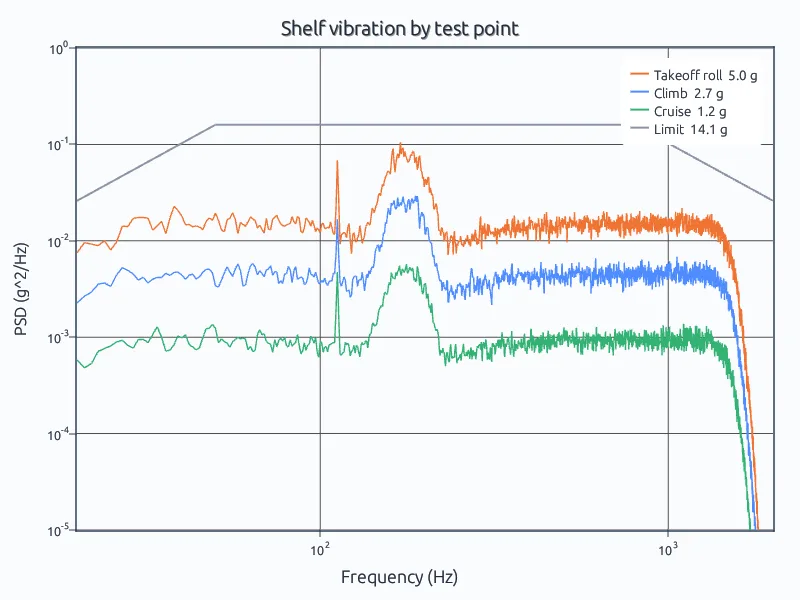
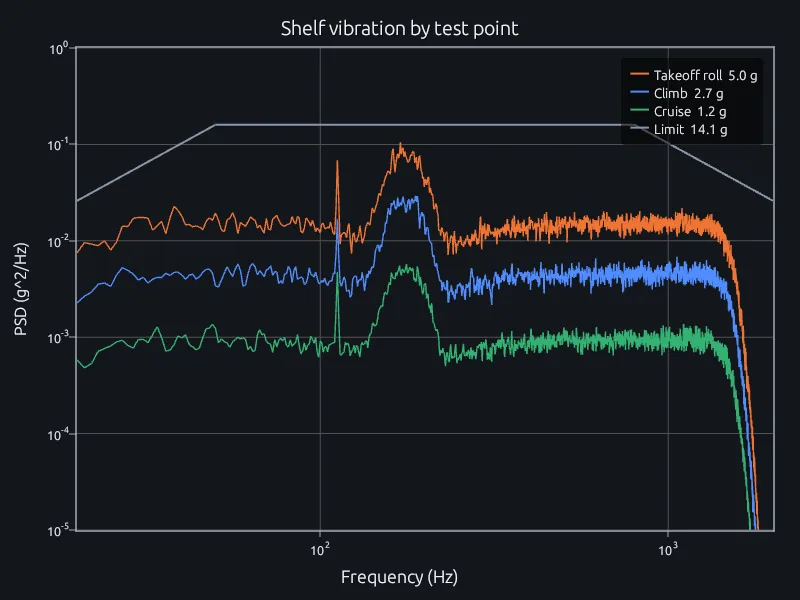
Welch spectra of three test points against the GEVS limit.
Reduce flight and test data, qualify hardware against vibration and shock, and run structural and thermal simulations, in one MATLAB-language tool your team works in together.
MATLAB is the working language of aerospace analysis. Flight-test reduction, guidance and control, loads post-processing and Monte Carlo work are written in it, and engineering schools teach it, so the engineers you have and the ones you hire already know it.
RunMat runs MATLAB-language code as it is, in the same project as your simulation studies. Existing scripts keep working, and new work starts without retraining anyone.
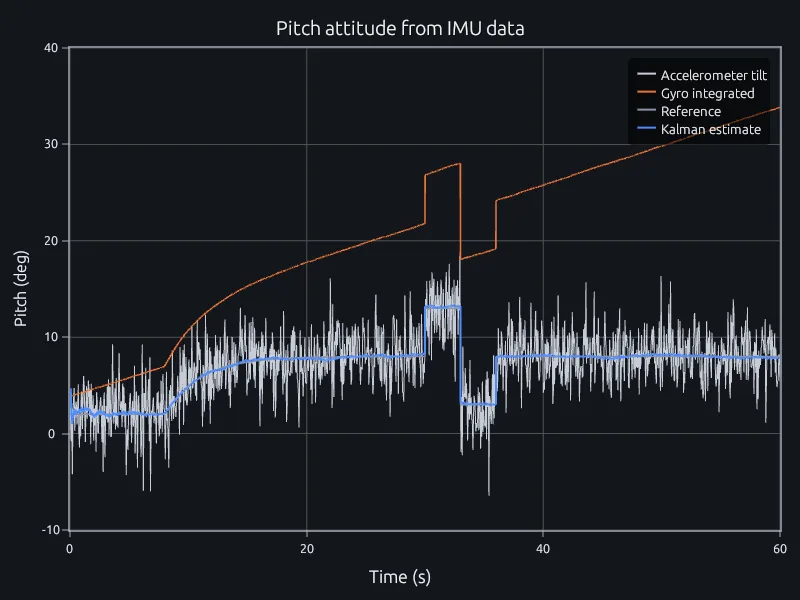
% Kalman filter, state x = [pitch; gyro bias].F = [1 -dt; 0 1]; B = [dt; 0]; H = [1 0];Q = diag([1e-4 1e-6]); R = 2.5^2;x = [accel(1); 0]; P = diag([10 1]);est = zeros(n, 1); integ = zeros(n, 1); integ(1) = accel(1);for k = 2:nx = F * x + B * gyro(k); % predict with the gyroP = F * P * F' + Q;K = P * H' / (H * P * H' + R); % correct with the accelerometerx = x + K * (accel(k) - H * x);P = (eye(2) - K * H) * P;est(k) = x(1);integ(k) = integ(k-1) + gyro(k) * dt; % gyro alone, for comparisonend
$ runmat flight-attitude.mpitch error (RMS), Kalman estimate: 0.16 deggyro alone 15.47 deg, accelerometer alone 2.50 deg
Most simulation tools capture setup as hundreds of choices made through menus and dialogs, saved in a project file that only the tool can open. In RunMat the whole intent of a study, its geometry, materials, loads and the analyses it chains, is a short text file with the units written in.
Text can be read, compared line by line, reused across a program and rerun years later. It is also what AI models write well: a model can set up a study from a description, and RunMat checks units, regions and the analysis chain before anything runs.
This study heats an avionics box, carries the temperature into its structure and solves the vibration modes the heat shifts, all on one mesh.
study heated_modes {geometry = geometry.boxmesh = mesh.boxmodel = model.operatinganalysis heat { thermal steady {} retain heated }analysis preload after analysis.heat {thermomechanical preload { temperature = analysis.heat.state.heated }}analysis modes after analysis.preload {structural prestressed_modal {prestress = analysis.preload.state.geometric_stiffnessmodes = 6}}}
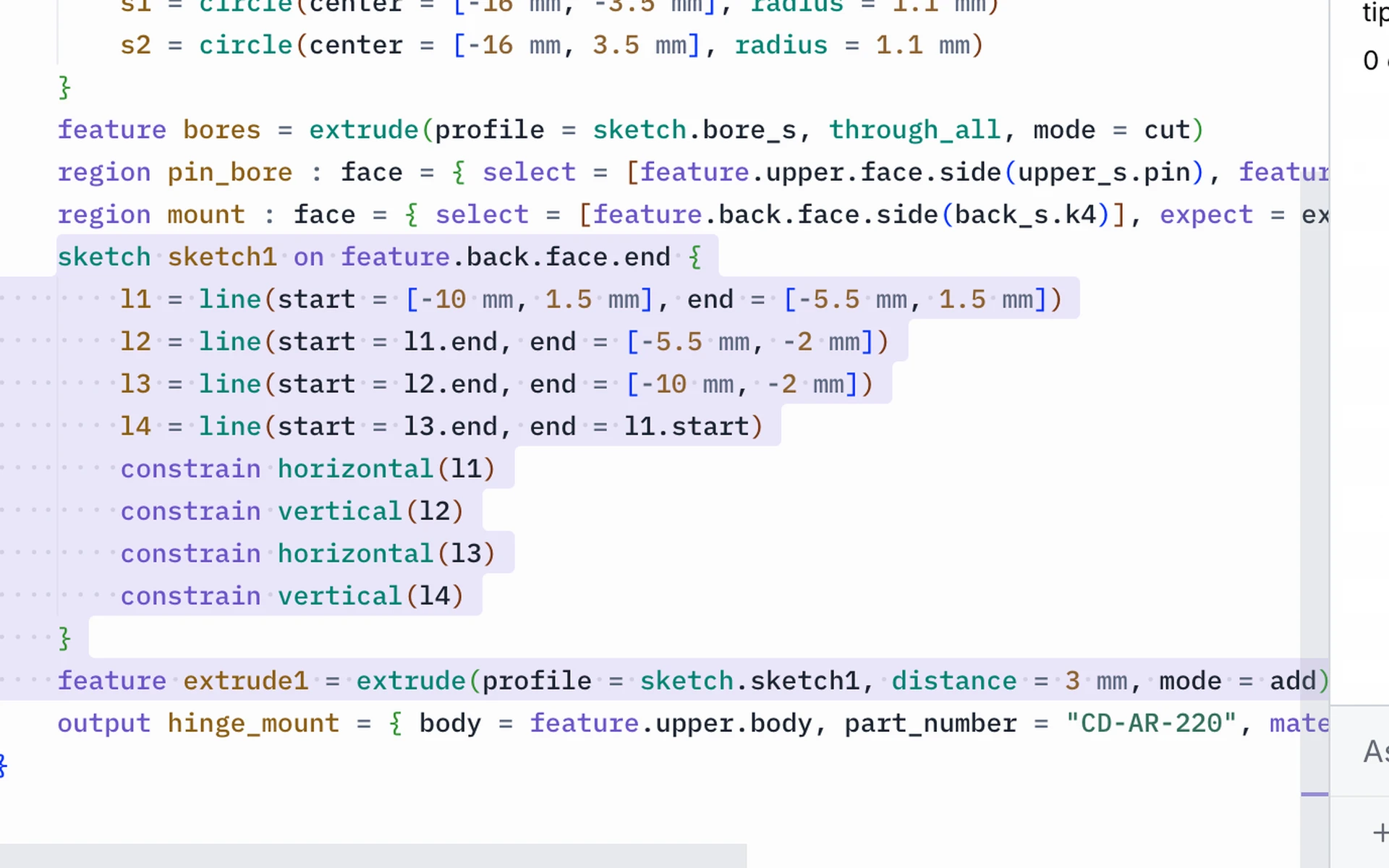
Model parts and assemblies in RunMat MCAD, with each dimension as an input in the part file. Change an input and the part regenerates, and its assemblies and drawings update from it.
Studies on a part rerun on the new geometry with their setup in place, so each design change gets its stress and modal check in one project. Avionics boards are laid out in RunMat ECAD, in the project that holds the airframe.
RunMat is a deterministic engine: the same study or script gives the same result every time. It is designed for AI models to use in a controlled loop, for work like the analyses on this page.
The model writes the study. RunMat checks its units, regions and analysis chain and sends any error back for the model to fix, then solves it. The model reports the result and how it was computed, and every number in that answer came from RunMat, so it can go in a qualification report.
Use Claude Code, Codex, any MCP client or the agent built into RunMat, on the model your company already uses.
Works withClaude CodeCodexAny MCP client
Analysts, test engineers, leads and suppliers open the same project at once. Everyone sees each other's edits and cursors, and can point at the same peak on a plot or the same spot on a 3D result, as it happens.
Reviews happen on the result itself instead of over email and screen shares, and every run is shared with the inputs and software version that produced it, ready for the certification file.
Anything you write, MATLAB-language scripts and simulation studies alike, runs on a laptop, across every core, on the GPU or across a cluster you own, without being rewritten.
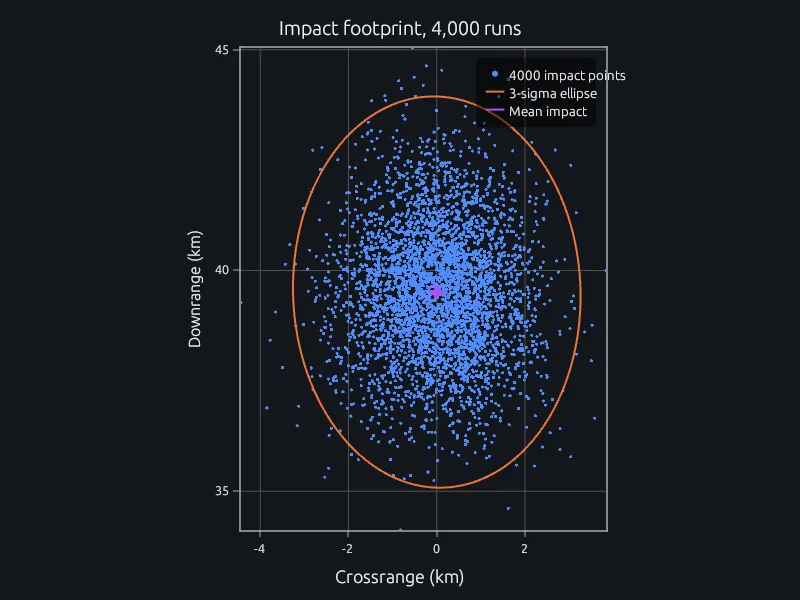
Sweep a design over hundreds of studies or run thousands of Monte Carlo cases in parallel, and collect the results in the same script.
% 200 bracket thicknesses, one study each, across the cluster
t = 2 + 4 * (0:199) / 199;            % mm
f1 = zeros(1, 200);
parfor k = 1:200
    f1(k) = first_mode(fea.run(bracket_study(t(k))));
endThe desktop, server and workers can run fully offline on your machines, which makes ITAR-aligned private deployment possible under enterprise contract. The source of the runtime and solver is public, so your security team can read what runs.
Welch spectra of three test points against the GEVS limit.
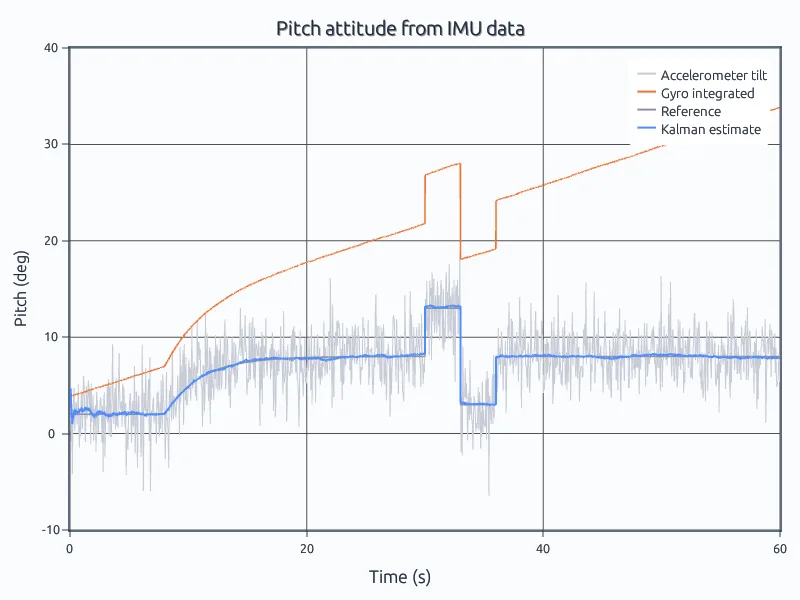
A Kalman filter on a drifting gyro and a noisy accelerometer.
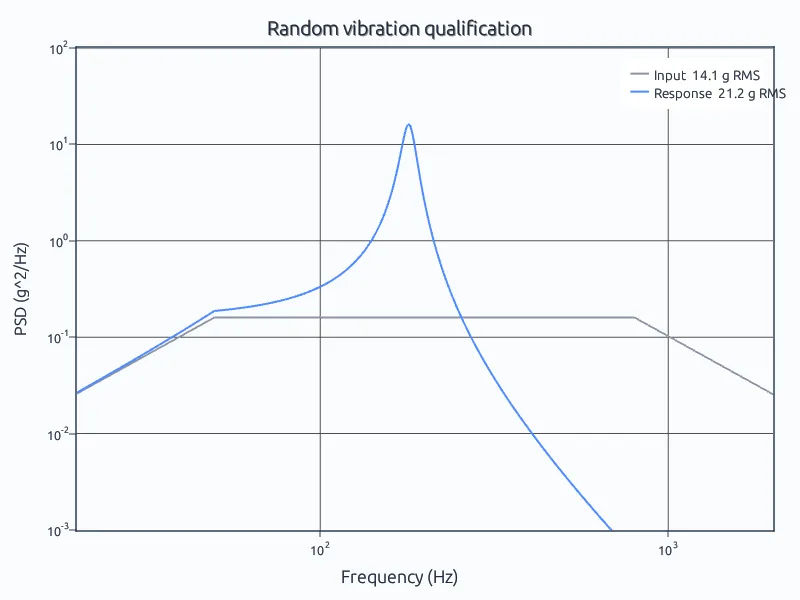
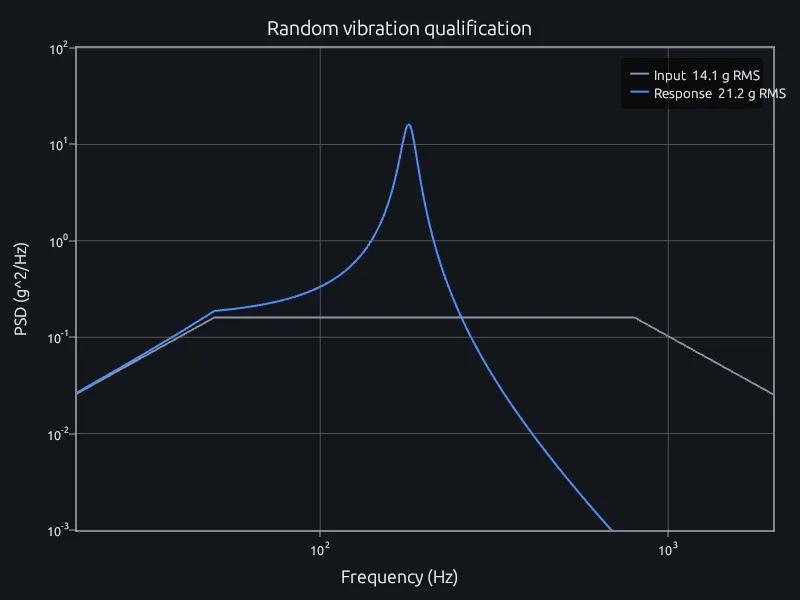
Miles' equation against the integrated response at 180 Hz.
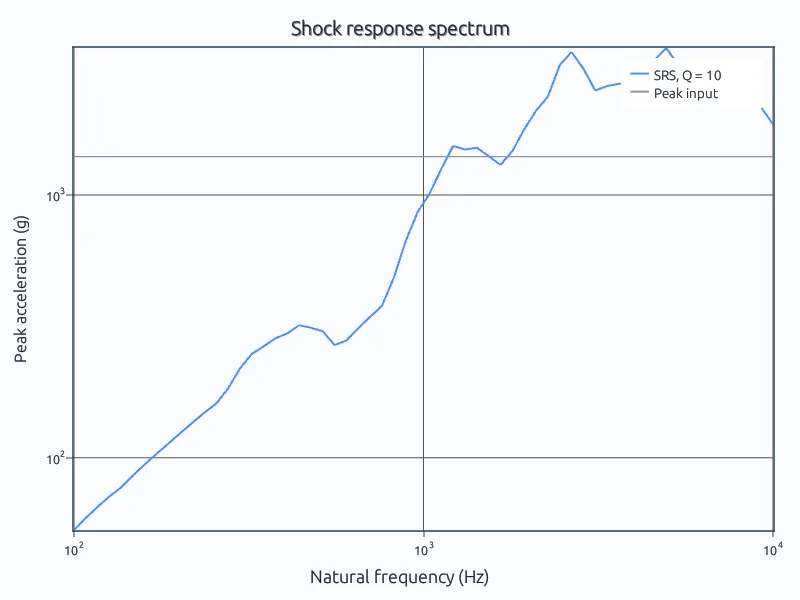
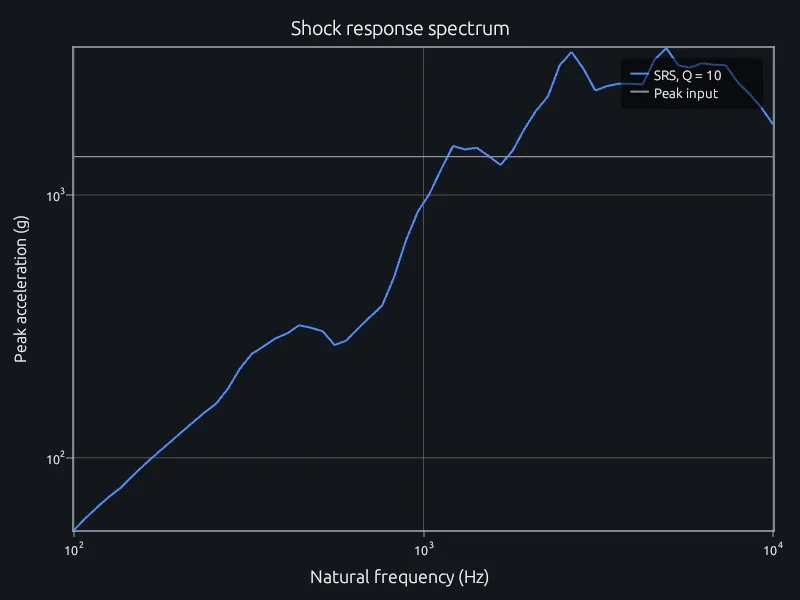
A pyroshock-like transient through 60 Q = 10 oscillators.
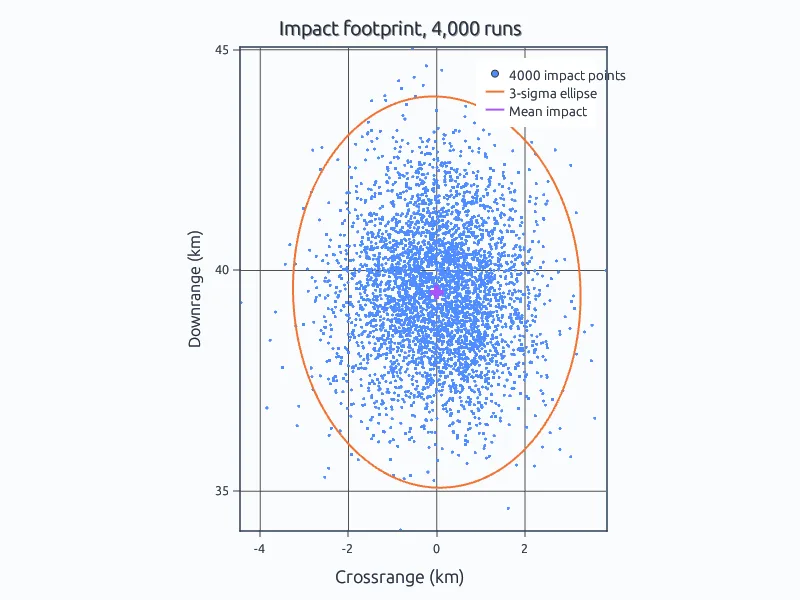
4,000 dispersed trajectories and their 3-sigma ellipse.
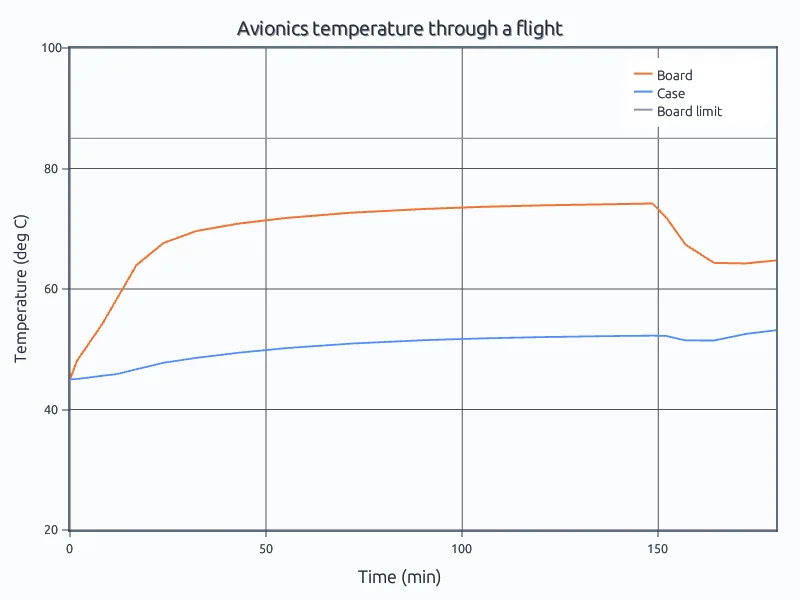
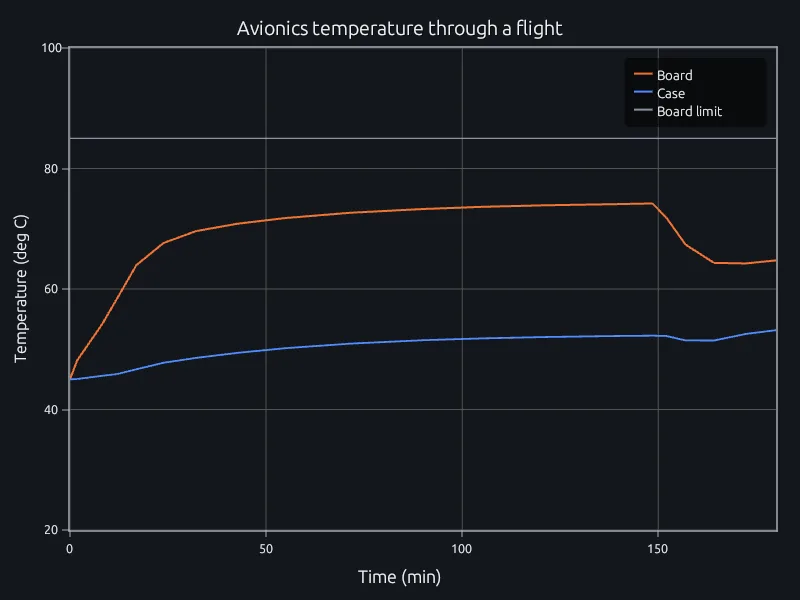
A two-mass thermal model of a board and its case, with ode45.
Open the flight-test example in your browser. No account needed.
Run three of your own scripts and compare their run times.
Talk to us about your team, your programs and where it runs.
Defense and controlled programsStructural simulationSignal processingParallel computing