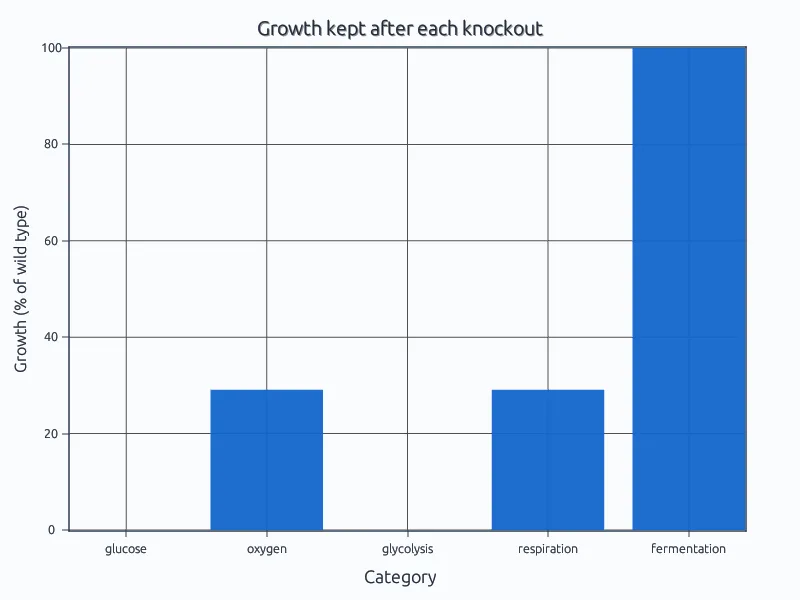
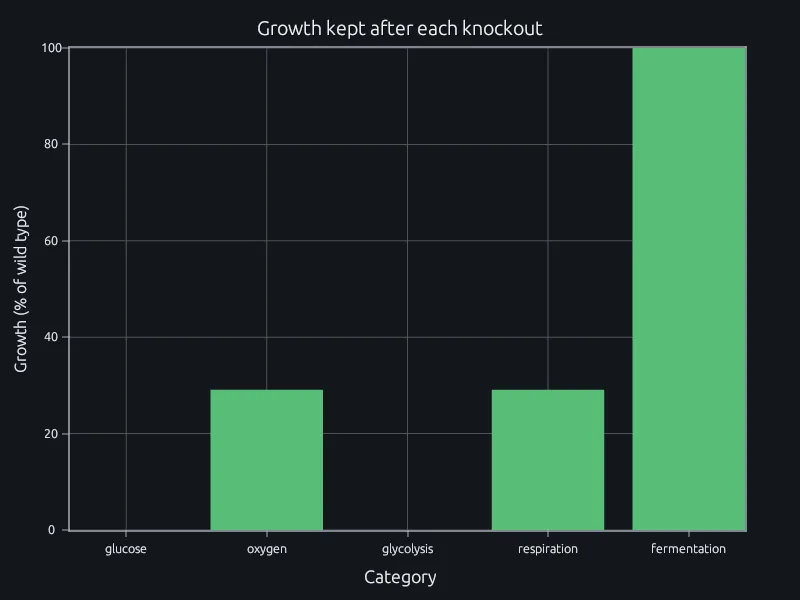
Flux balance and knockouts
Which reactions a cell can lose and still grow.
Write metabolic models, signal analyses, dosing models and device checks in code that reads like the equations in your methods section, on a runtime that is free for teaching, academic research and smaller companies.
The MATLAB language reads like the equations in your methods section, so anyone in your lab can check the code against the paper, line by line.
RunMat runs it, and checks shapes and units before anything runs.
Most accredited biomedical engineering programs require this language, so your incoming students already read it. The RunMat runtime is free for teaching and academic research: a new student runs the lab's code on day one, and a thesis still runs after graduation.
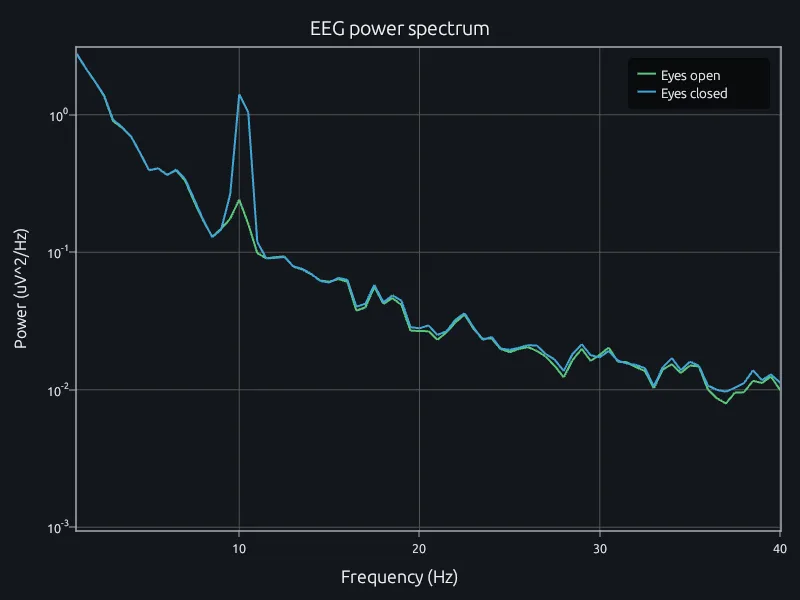
A collaborator at another institution opens the project in a browser. You both point at the same alpha peak, change the window and see the new spectrum together.
A script that works on one subject's recording, or one knockout, soon has to run on a whole cohort or every reaction in a genome-scale model. Spreading that over machines usually means someone writes and maintains a cluster job.
In RunMat you change for to parfor. The same script runs across every core of your laptop, on its GPU or on your institution's cluster.
% HRV for every subject in a study cohort
files = dir('cohort/*.csv');
sdnn = zeros(1, numel(files));
parfor k = 1:numel(files)
    sdnn(k) = hrv_sdnn(readmatrix(fullfile('cohort', files(k).name)));
end
low = files(sdnn < 50);RunMat is a deterministic engine: the same script and data give the same result every time. It is designed for AI models to use in a controlled loop, for work like the analyses on this page.
The AI model writes the code in the same notation as your equations. RunMat checks its types, shapes and units and sends any error back for the model to fix, then runs it. The model reports the result and how it was computed, and every number in that answer came from RunMat, so it can go in your paper.
Use Claude Code, Codex, any MCP client or the agent built into RunMat, on the model your institution already uses.
Works withClaude CodeCodexAny MCP client
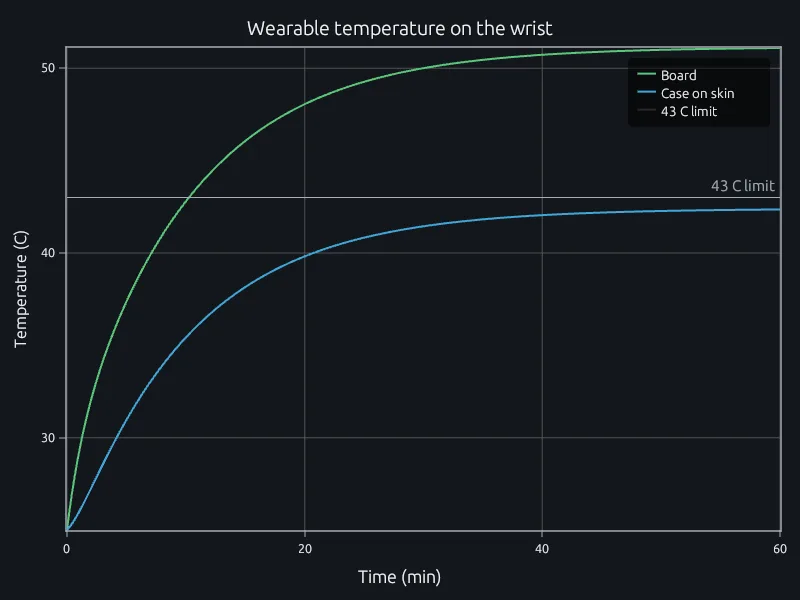
A device on the skin has to stay under the contact-temperature limit at full power.
In RunMat the thermal model is its two heat balances, written as they read on paper. Change the power or the case and run it again, and each run is kept with the inputs that made it, ready for your design review. When the question needs the real part, a heat or stress study of its CAD file runs in the same project.
% A wearable on the wrist: 0.35 W from its electronics, a two-node model of the% board and the skin-contact case, against a 43 C limit for skin contact.P = 0.35; Cb = 4; Cc = 12; % W, J/K board, J/K caseRbc = 25; Rskin = 60; Rair = 90; % K/W board-case, case-skin, case-airTskin = 33; Tair = 25;f = @(t, T) [(P - (T(1) - T(2))/Rbc) / Cb;((T(1) - T(2))/Rbc - (T(2) - Tskin)/Rskin - (T(2) - Tair)/Rair) / Cc];[t, T] = ode45(f, linspace(0, 3600, 600), [Tair; Tair]);Rpar = 1 / (1/Rskin + 1/Rair);steady = (Tskin/Rskin + Tair/Rair + P) * Rpar;fprintf('case %.1f C after an hour, %.1f C at steady state\n', T(end, 2), steady);fprintf('margin to the 43 C skin-contact limit %.1f K\n', 43 - max(T(:, 2)));
$ runmat wearable-temperature.mcase 42.4 C after an hour, 42.4 C at steady statemargin to the 43 C skin-contact limit 0.6 K
RunMat can run on your own servers, fully offline if you need to, so patient recordings and trial data stay inside your institution.
Which reactions a cell can lose and still grow.
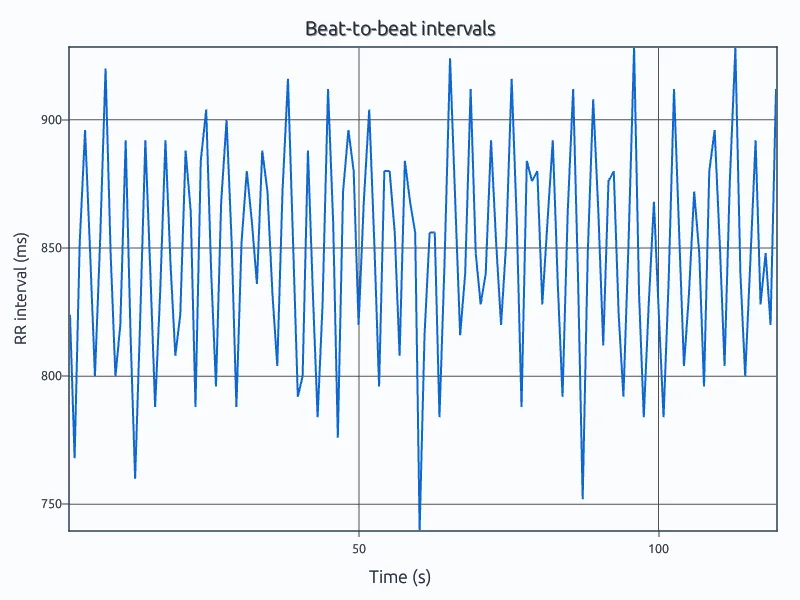
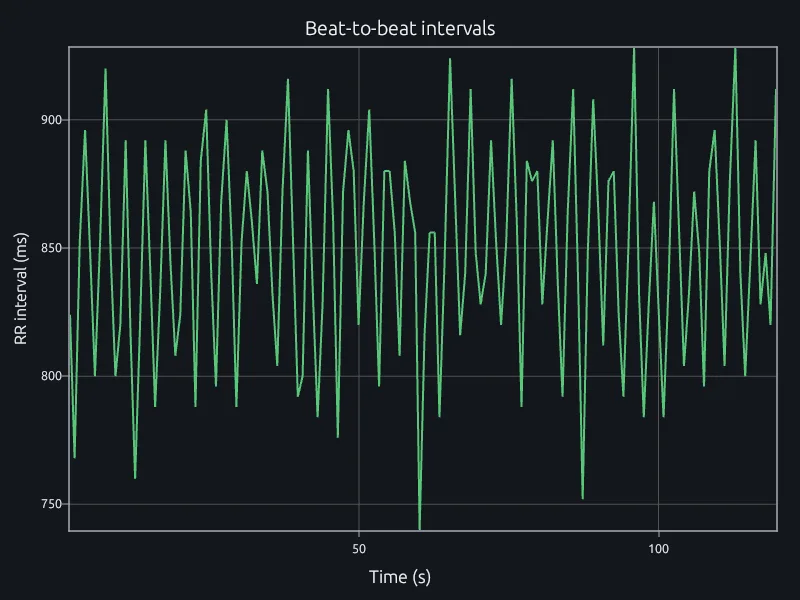
R peaks, beat-to-beat intervals, SDNN and RMSSD.
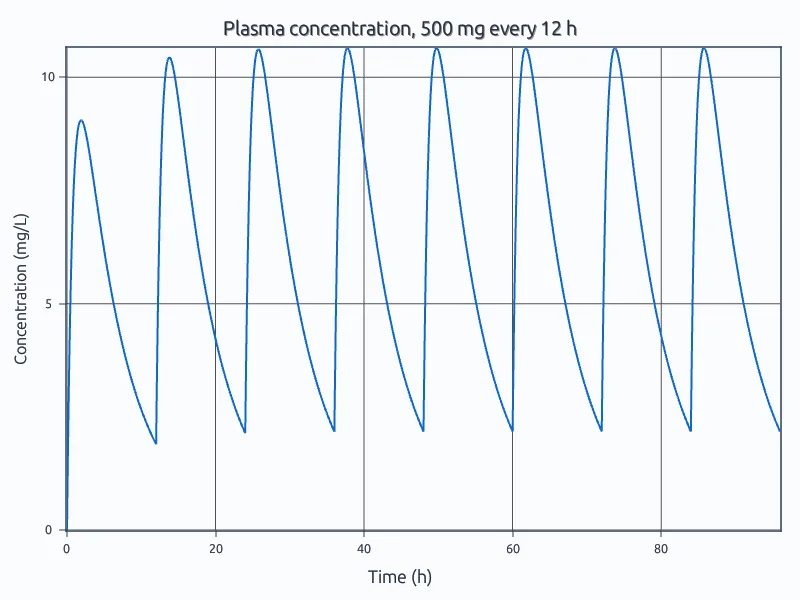
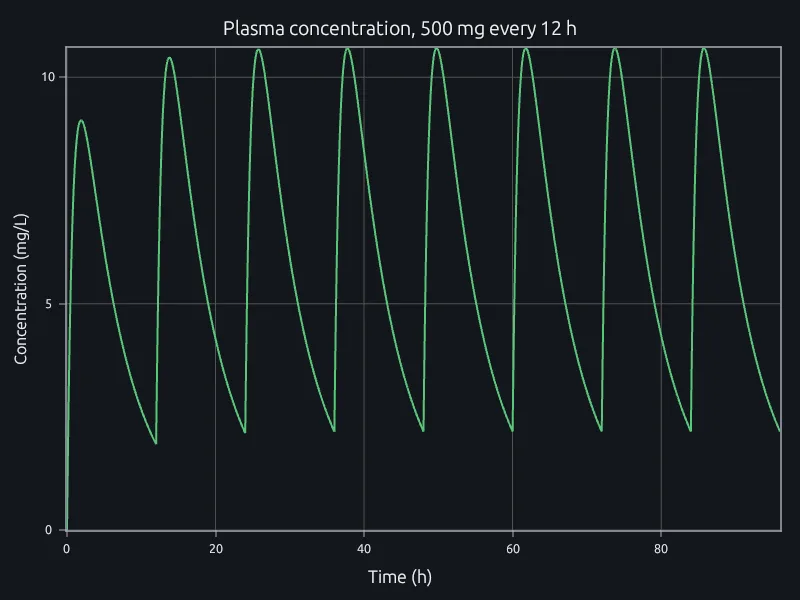
A one-compartment oral model, 500 mg every 12 hours.
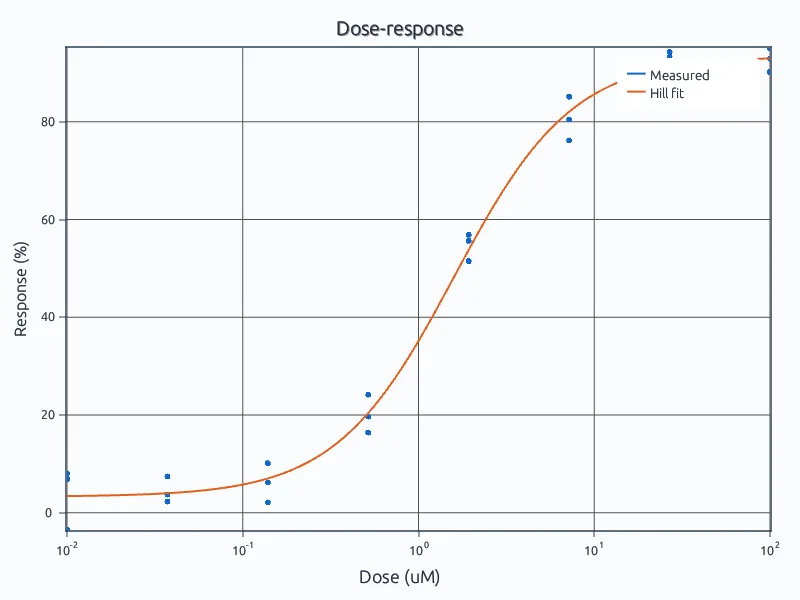
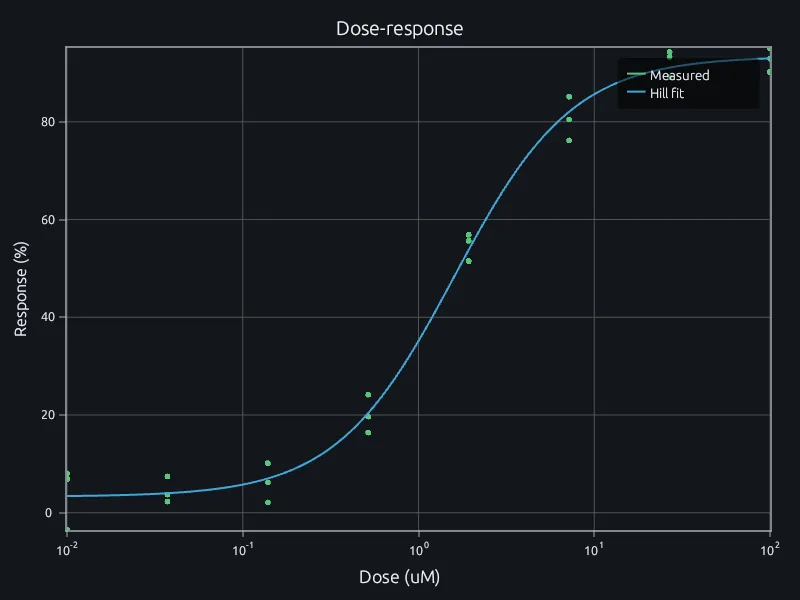
A four-parameter Hill fit to a triplicate assay.
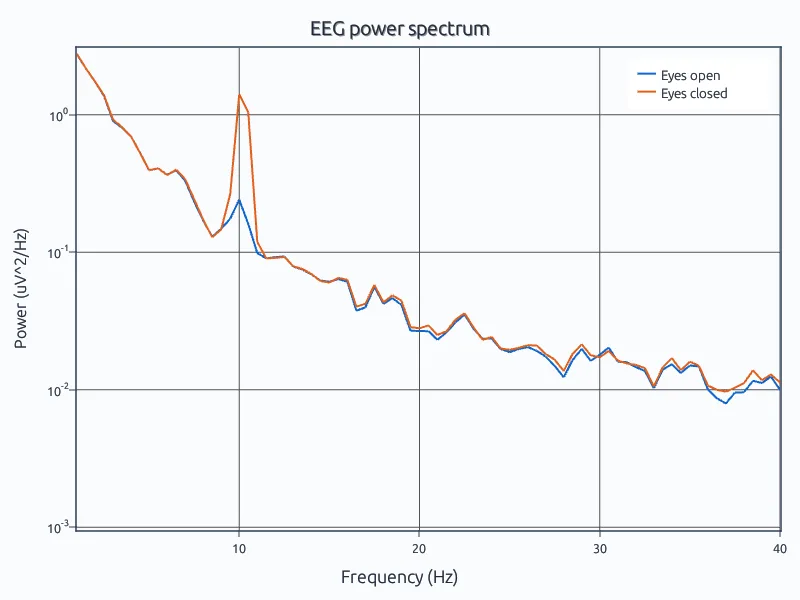
The 10 Hz rhythm with eyes open and closed.
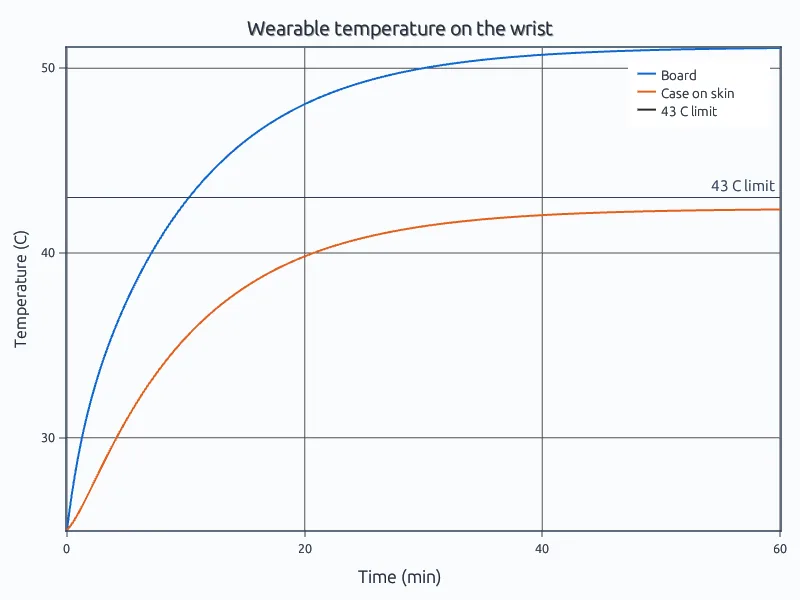
A device on the wrist against the 43 C skin-contact limit.
Open the flux balance example in your browser. No account needed.
Run three of your lab's scripts and compare their results and run times.
Talk to us about your lab, your data and where it runs.
Signal processingDifferential equationsCurve fittingStatistics