
RunMat vs SolidCraft
RunMat MCAD is parametric 3D CAD with simulation and PCB design built in: model a part, check how it handles load and heat, and model complex circuit boards, including their mechanical fits, in one project. SolidCraft is only the CAD, with no stress or thermal simulation and no PCB design.
- Check stress, vibration and heat on the part you just modeled
- Design complex circuit boards, including their mechanical fits
- Send drawings with GD&T and hole callouts to the shop
Facts about SolidCraft checked November 20, 2026. Sources


At a glance
| Topic | RunMat | SolidCraft |
|---|---|---|
| Simulation | Static stress, modes, buckling, thermal, thermal stress and acoustics on the part file itself, with sweeps over part dimensions. Included. | Motion studies and parameter sweeps. No stress, thermal or modal analysis in SolidCraft [1]. |
| Electrical | ECAD is in the same product: schematic capture, board layout, 3D and circuit simulation, with boards placed in the product's assembly. Included. | KiCad and Gerber boards import as solids for fit checks. No schematic or board editor in SolidCraft [2]. |
| Drawings and PMI | Associative drawings to ISO or ASME with GD&T and hole callouts, exported as PDF, DXF and DWG, and STEP AP242 with semantic PMI. | Drawings since 0.45.0 (November 19, 2026), exported as SVG or PNG. GD&T, weld and surface-finish symbols and hole callouts are planned [3] [1]. STEP export without PMI [4]. |
| Collaboration | Several people edit one part or assembly at once and see each other's cursors. Changes go to review as a diff of features and dimensions. | No multi-user editing or shared cloud projects. Cloud sync and version-control commands are open proposals [5]. |
| Files and version control | Parts, assemblies and drawings are plain-text files that diff and merge in Git, or RunMat cloud projects with history. | One design file holds parts, assembly and drawings, saved as a ZIP container [6]. |
| Modeling | Parametric parts from constrained sketches and features, with configurations, sheet metal, weldments with a cut list, surfaces and mold tools. | Parametric parts with sheet metal, frame members and surfaces [1]. |
| Assemblies | Mates on named faces, edges and points, a bill of materials from part properties, interference, clearance and motion checks, and exploded views. | Joints, and Mate, Flush and Distance constraints since 0.41.0 [7]. |
| AI and MCP | The built-in agent and MCP clients such as Claude Code and Codex edit parts and launch studies. Their edits arrive as a diff to accept or reject. | An assistant panel and an MCP server [8]. |
| Platforms and offline | Desktop apps for Windows, macOS and Linux, and the same editor in the browser. The desktop app models, exports and runs studies offline. | Desktop apps for Windows, macOS, Linux and FreeBSD, and a browser app [3] [9]. |
| Price | Free for individuals, academics, open-source contributors and smaller organizations. Professional: $99 per person per month in the US, or the local equivalent, for MCAD, ECAD, simulation and the MATLAB-language runtime. | Free. The code is licensed MIT or Apache 2.0 [10] [9]. |
- Simulation
- RunMatStatic stress, modes, buckling, thermal, thermal stress and acoustics on the part file itself, with sweeps over part dimensions. Included.
- SolidCraftMotion studies and parameter sweeps. No stress, thermal or modal analysis in SolidCraft [1].
- Electrical
- RunMatECAD is in the same product: schematic capture, board layout, 3D and circuit simulation, with boards placed in the product's assembly. Included.
- SolidCraftKiCad and Gerber boards import as solids for fit checks. No schematic or board editor in SolidCraft [2].
- Drawings and PMI
- RunMatAssociative drawings to ISO or ASME with GD&T and hole callouts, exported as PDF, DXF and DWG, and STEP AP242 with semantic PMI.
- SolidCraftDrawings since 0.45.0 (November 19, 2026), exported as SVG or PNG. GD&T, weld and surface-finish symbols and hole callouts are planned [3] [1]. STEP export without PMI [4].
- Collaboration
- RunMatSeveral people edit one part or assembly at once and see each other's cursors. Changes go to review as a diff of features and dimensions.
- SolidCraftNo multi-user editing or shared cloud projects. Cloud sync and version-control commands are open proposals [5].
- Files and version control
- RunMatParts, assemblies and drawings are plain-text files that diff and merge in Git, or RunMat cloud projects with history.
- SolidCraftOne design file holds parts, assembly and drawings, saved as a ZIP container [6].
- Modeling
- RunMatParametric parts from constrained sketches and features, with configurations, sheet metal, weldments with a cut list, surfaces and mold tools.
- SolidCraftParametric parts with sheet metal, frame members and surfaces [1].
- Assemblies
- RunMatMates on named faces, edges and points, a bill of materials from part properties, interference, clearance and motion checks, and exploded views.
- SolidCraftJoints, and Mate, Flush and Distance constraints since 0.41.0 [7].
- AI and MCP
- RunMatThe built-in agent and MCP clients such as Claude Code and Codex edit parts and launch studies. Their edits arrive as a diff to accept or reject.
- SolidCraftAn assistant panel and an MCP server [8].
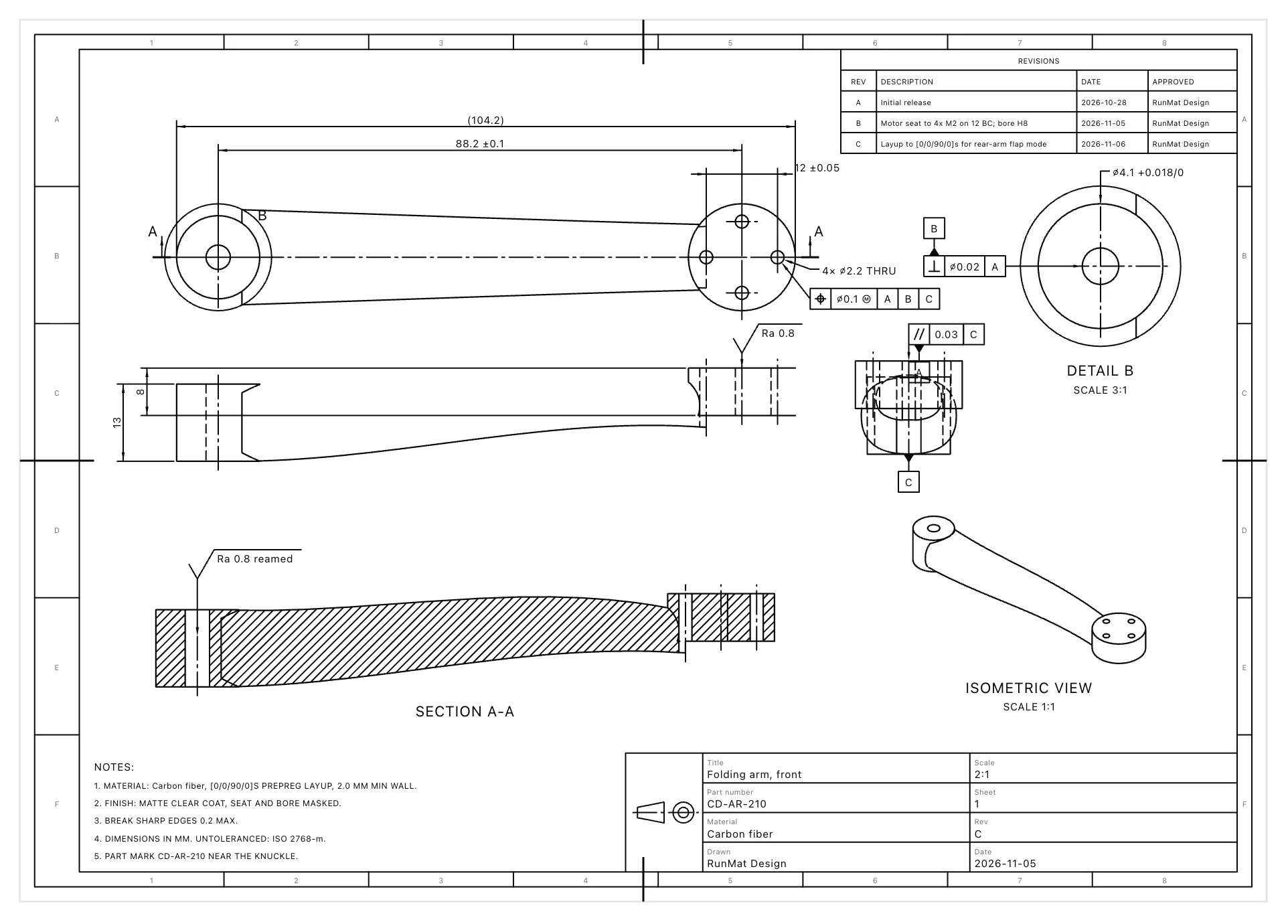
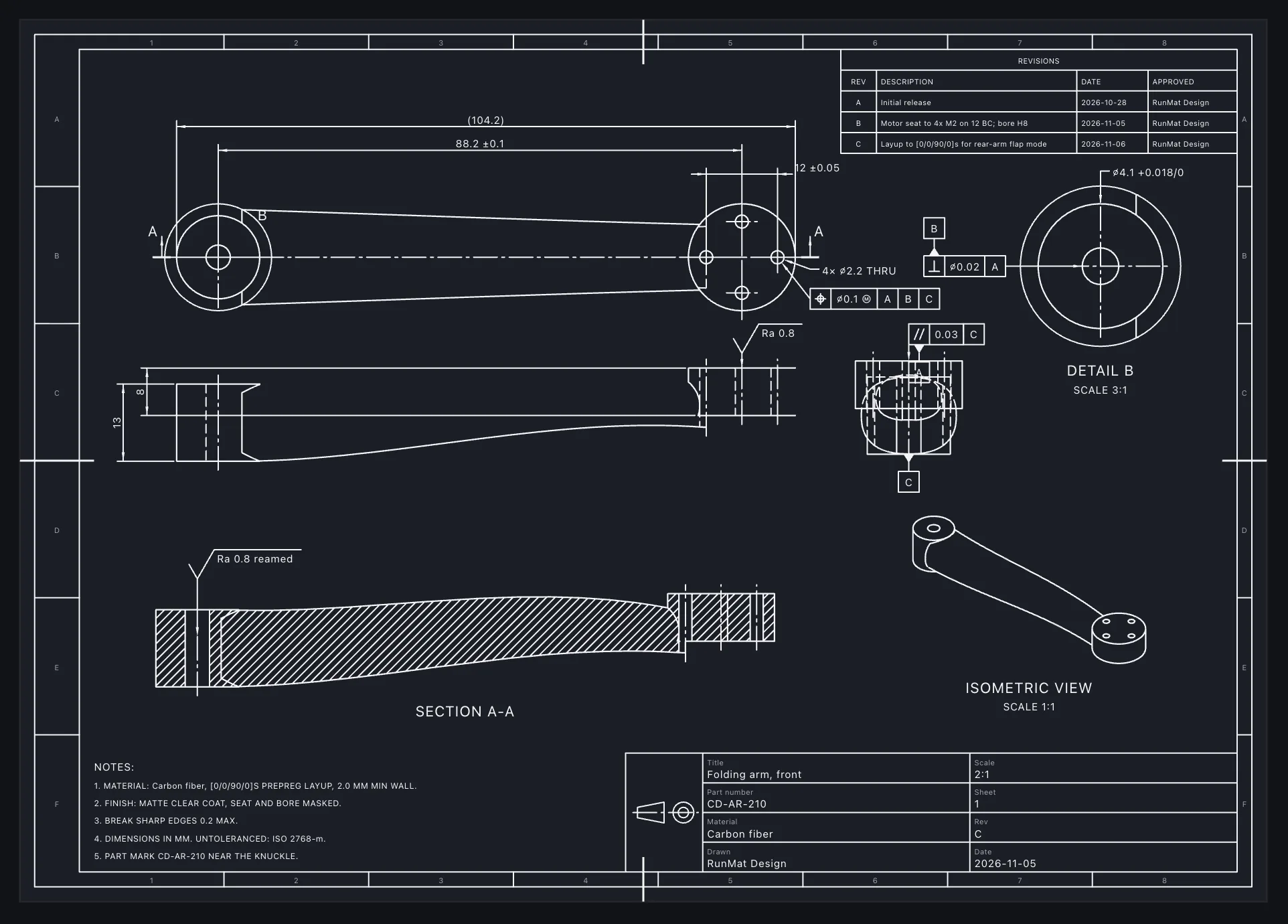
Drawings with GD&T that follow the model
Place standard, projected, section, detail and isometric views, then dimension them with tolerances, GD&T frames, datums and hole callouts to ISO or ASME. Dimensions are tied to the model, so a changed part updates its drawing.
Title blocks fill from part properties, a revision table records each release, and sheets export to PDF, SVG, DXF and DWG at true scale. STEP AP242 carries the same tolerances as semantic PMI.
What you can do in RunMat MCAD
Everything below works in one project, on the desktop or in the browser.
Model parts
- Constrained sketches with degrees of freedom shown
- Extrude, revolve, sweep, loft, holes, fillets, shells and patterns
- Sheet metal with a flat pattern, and weldments with a cut list
- Mold tools: parting lines, core and cavity
Build assemblies
- Mates on named faces, edges and points
- Top-down design from a skeleton part
- Bill of materials from part properties
- Interference, clearance and motion checks
Make drawings
- Projected, section and detail views
- GD&T and hole callouts to ISO or ASME
- PDF, SVG, DXF and DWG at true scale
- STEP AP242 with semantic PMI
Simulate the part
- Static stress, modes, buckling and contact
- Steady and transient heat
- Sweeps over part dimensions
- Optimizers such as fmincon over part inputs
Design the boards
- Schematics and board layout in the same project
- Boards placed in the product's assembly, with fits checked
- Circuit simulation from the schematic
- Fabrication outputs from the board
Work together
- Live co-editing with cursors in the 3D view
- Changes reviewed as features and dimensions
- Plain-text files that fit Git
- AI edits from the agent and MCP clients
When RunMat is the better choice
RunMat is the better choice when a part needs simulation, drawings a shop can build from, or a circuit board, and the team works on it together.
Stress, modal and thermal checks on every design change, with loads on the part's named faces.
Products with circuit boards, where the schematic, the board and the mechanical assembly live in one project.
Drawings for a machine shop or a supplier, with GD&T, hole callouts and STEP AP242 with semantic PMI.
Molded parts and welded frames, with core and cavity tools and a weldment cut list.
Two engineers working on one assembly at the same time, with changes reviewed as features and dimensions.
Organizations that need self-hosted servers with SSO, SAML and SCIM, under an Enterprise contract.
When SolidCraft is the better choice
MCAD works with the rest of RunMat
- Simulation
With simulation
A stress, modal or thermal study reads the part file directly, with its loads on the part's named faces. Change a dimension and the study reruns on the new geometry.
- Runtime
With MATLAB code
Compute a part's dimensions in a MATLAB-language function, such as a cam profile from its motion law, and sweep them from a script across your cores.
- ECAD
With ECAD
Boards from RunMat ECAD open in the assembly as parts, with their outline, mounting holes and components, from the same project.
Move a design over
- 01
Export STEP AP242
Export parts and assemblies from SolidCraft as STEP AP242, which carries body names, colors and the assembly structure [4]. RunMat opens them as exact geometry.
- 02
Rebuild features
Feature recognition turns imported holes, fillets, chamfers and extrusions back into editable features, and new features go on top.
- 03
Name the faces that matter
Name the faces your mates, drawings and studies attach to, so they stay attached when a dimension changes.
License
RunMat is source-available under the Business Source License 1.1, and each version converts to the Apache License 2.0 three years after the date it is first published.
The source code is available on GitHub, so you can read, build and modify the code that produces every result. Enterprise adds self-hosted deployment, including fully offline, under contract.
Questions
01Can RunMat open SolidCraft designs?
02Is simulation included?
Yes. Static stress, modes, buckling, thermal, thermal stress and acoustic studies run on Free and Professional, on the plan's weekly simulation allowance. A study loads the part file directly, with loads on the part's named faces.
03Can I design circuit boards in RunMat?
Yes. RunMat ECAD draws schematics, lays out and routes boards and simulates circuits, in the same project as the parts. A board opens in the product's assembly as a part.
04How much does RunMat cost compared with SolidCraft?
05Is RunMat open source?
RunMat is source-available under the Business Source License 1.1, so its source is public today. Each version converts to the Apache License 2.0, an open-source license, three years after the date it is first published. Until then, individuals, students and faculty, open-source contributors and organizations under the size limits use it free.
06Is RunMat made by the SolidCraft maintainers?
No. RunMat is made by Dystr, Inc., and is not affiliated with SolidCraft.
Sources
We checked the facts about SolidCraft on this page against these sources on November 20, 2026.
- [1]SolidCraft, features (read 2026-11-20)github.com
- [2]SolidCraft, KiCad PCB import (read 2026-11-20)github.com
- [3]SolidCraft 0.45.0 release notes (2026-11-19, read 2026-11-20)github.com
- [4]SolidCraft, capabilities (read 2026-11-20)github.com
- [5]SolidCraft milestones (read 2026-11-20)github.com
- [6]SolidCraft, design container (read 2026-11-20)github.com
- [7]SolidCraft 0.41.0 release notes (read 2026-11-20)github.com
- [8]SolidCraft, MCP server (read 2026-11-20)github.com
- [9]solidcraft.io (read 2026-11-20)solidcraft.io
- [10]SolidCraft, NOTICE (licenses, read 2026-11-20)github.com